€5,142.50









Recommended


Extended registration module. Address fields during customer registration images
What it does for your store
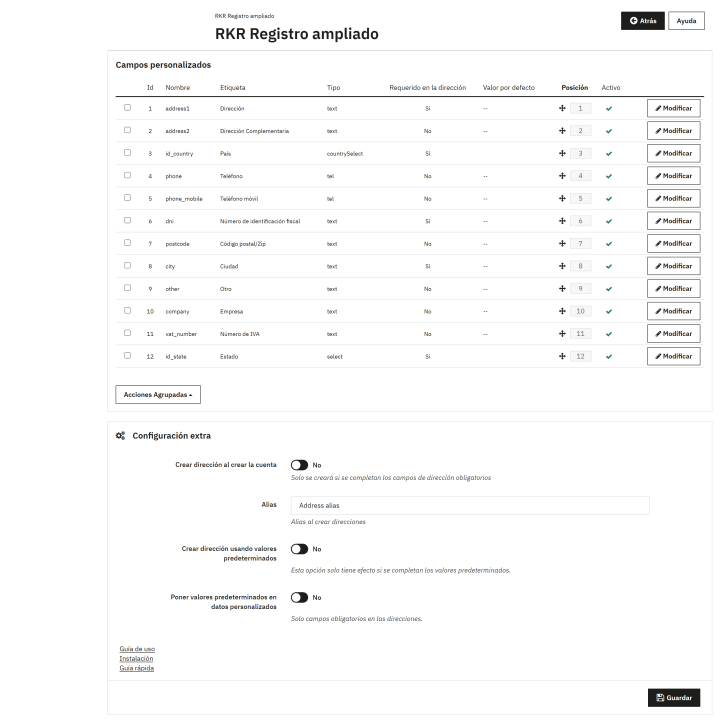
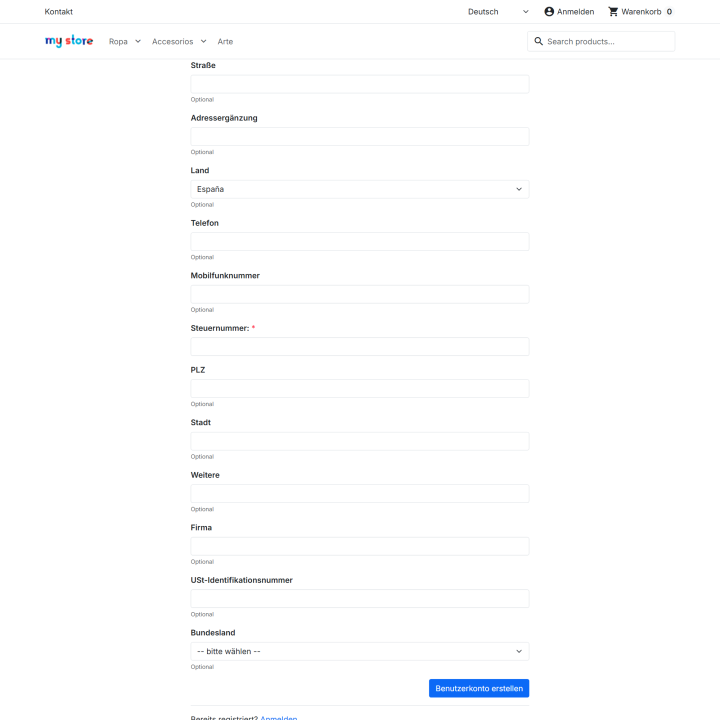
Request address details directly on the registration form : one step instead of two. Twelve fields—address, phone number, tax ID, company, VAT number, province, etc.—that you activate one by one and arrange as you wish. What the customer enters is saved in their profile, and if you enable it, their first address is automatically created. Multi-store functionality with both GDPR compliance features.
We'll do it for you! We'll install and configure the module in your store completely free of charge , guaranteeing a quick and hassle-free start.
Get permanent access to the latest version of your module. Your investment is protected and it will always be compatible with new versions of PrestaShop.
Our modules have passed the official PrestaShop validation, ensuring their security, performance and compatibility with the platform's standards.
You have a full year of dedicated support . Any questions or problems that arise regarding the module will be resolved by our expert team.
In standard PrestaShop, creating an account and creating an address are two separate forms. The customer fills out the first one, thinks they're finished, and then encounters another. That's where records get lost.
That's why we created this module: it integrates the address fields into the registration form. The customer enters their information once, it's saved in their profile even if they don't create an address, and if you want, their first address can be generated automatically.
You have their data from the very beginning and your client doesn't have to write the same thing twice.
Record
The customer fills out the first form, thinks they're finished, and then encounters another one. That's where the records get lost. RKR Extended Registration inserts the address data directly into the registration form.
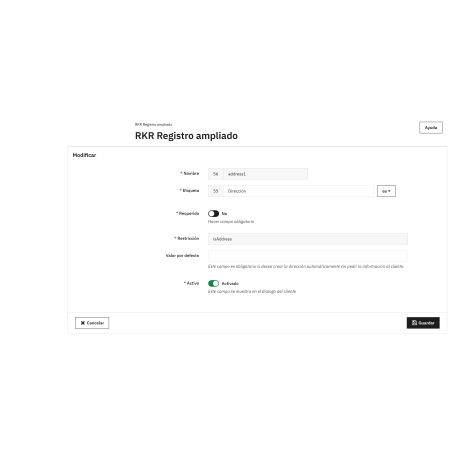
The twelve fields are installed disabled . You activate the ones you want from the Active column, drag the order in which they appear, and reload your store's form: there they are. Without touching a single theme template.
Everything the customer writes is saved in their record, under Customers → View , with their label and the country and province displayed in text—not as numbers. And it remains there even if you later disable that field: nothing a customer ever wrote is lost.
If you enable this option, upon completion of registration, the module creates the customer's initial address using the information they just entered, and assigns it the alias you choose. If any data required by PrestaShop for their country is missing, the registration will still complete successfully without an address: no account will ever be left incomplete.
Do you sell in Spain? The tax document field can actually check the NIF and NIE letters : 12345678Z passes, while 12345678A is rejected. If you sell outside of Spain, PrestaShop's standard check is used, and it won't reject unfamiliar formats.
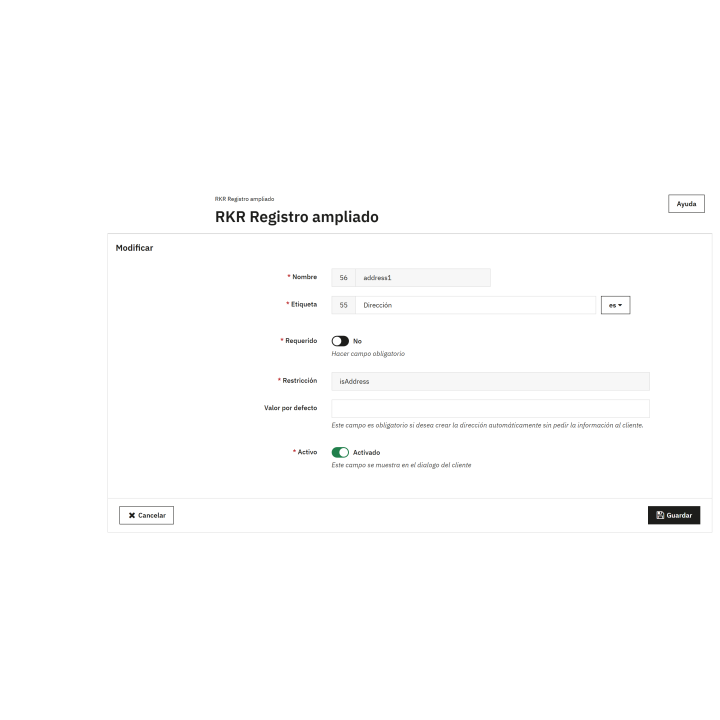
The field names are taken directly from the PrestaShop catalog, so a German customer will see "Straße" and an Italian customer " Indirizzo" without you having to translate anything. If you prefer a different word, you can change it yourself, language by language.
The field catalog is the same for each store, but you can change which fields are requested, which are mandatory, in what order they appear, and what default values they're saved with . You can switch stores using the back-office selector to see their configuration. A new store is created with a copy, so you don't have to start from scratch.
When a customer exercises their right of access, the module's data is included in the export with its label; when they request its deletion, it is deleted. It connects to the two hooks of the official PrestaShop GDPR Compliance module.
These fields are requested while the customer doesn't have an address. As soon as they create their first address, these fields disappear, and their addresses are managed through the standard PrestaShop process. No one fills in the same information twice.
Compatible with PrestaShop versions 1.7.6 through 8.x and 9.2
Developed and maintained by REKIRE

| Version | 1.2.6 |
|---|---|
| Compatibility | PrestaShop 1.7.6 – 9.2 |
| PHP | 7.2 – 8.3 |
| Multistore | Yes: each store chooses which fields it requests, their order, which ones are mandatory, and their default value. |
| Languages included | Spanish and English; the field labels are translated from PrestaShop in all its languages |
| Modify the core | Yes: two overrides, Validate (checking the NIF and NIE) and CustomerAddressForm |
| Own tables | 5; upon uninstallation, they are deleted along with the data saved by the clients. |
| Documentation | User guide, quick start guide and installation guide in PDF format, in Spanish, English, French, Italian, Portuguese and German |
v1.2.6
v1.2.5
v1.2.4
v1.2.3
v1.2.2
At Rekire we want to make things easy for you. That's why our PrestaShop modules come with a flexible usage license:
Professional ethics. This software is our livelihood. We ask for your professional ethics and that you make new purchases if the volume of projects requires it: it's the only way for us to make it worthwhile to continue developing such great modules and maintain our constant improvements.
In order to provide you with the best service, module support is governed by these conditions:











Nobody has asked anything about this product yet.