
€96.79



What it does for your store
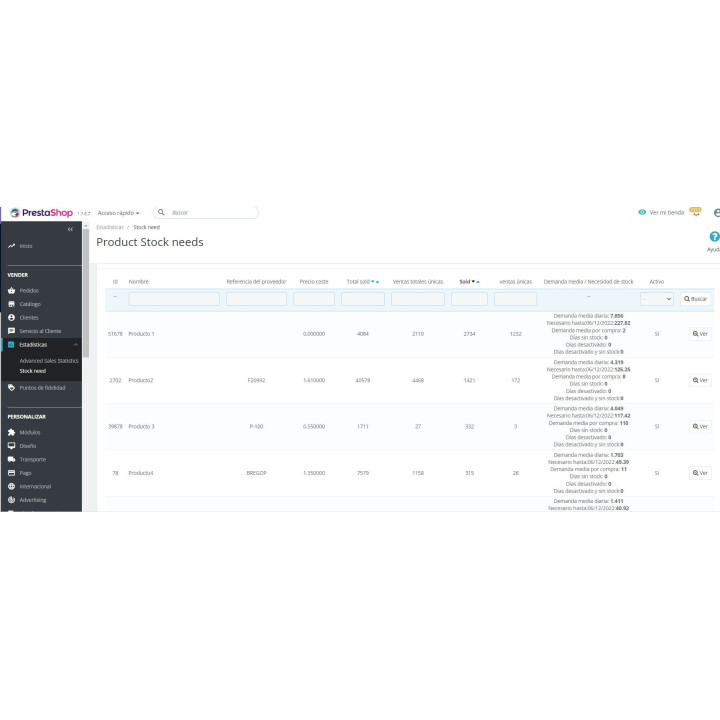
Item replenishment assistant. Automatically detects the stock you will need for a given period and sales information.
The calculation is based on the product creation date and since the module was installed, taking into account how many days the item has been activated and in stock.
We'll do it for you! We'll install and configure the module in your store completely free of charge , guaranteeing a quick and hassle-free start.
Get permanent access to the latest version of your module. Your investment is protected and it will always be compatible with new versions of PrestaShop.
Our modules have passed the official PrestaShop validation, ensuring their security, performance and compatibility with the platform's standards.
You have a full year of dedicated support . Any questions or problems that arise regarding the module will be resolved by our expert team.
PrestaShop tells you how much you've sold, but not how much you need to restock. And if you look at historical sales, seasonal products and discontinued items provide figures that are useless for your next order.
Furthermore, a product that was out of stock sold less than it would have, and that lowers its average. That's why we created this module: it calculates the demand for the period you choose and subtracts the days the product was unavailable.
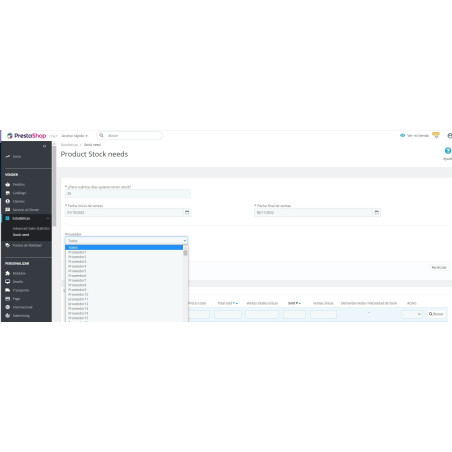
You decide how many days of stock you want to cover and the module tells you how many units to order of each product.
Even if you have a powerful ERP, it is very common for them not to have a good stock forecasting system to be able to meet the estimated demand.
The module allows you to filter by supplier and, most importantly, set a specific time period . This is ideal for seasonal products and for discarding obsolete items , such as those from summer, winter, Christmas, Black Friday, Halloween, or Carnival.
If you sell video game consoles and look at the total units sold throughout the entire sales history, from the console's inception, you'd probably need to restock more PS2 II units than PS5 units. This module will allow you to use a more recent sales period to obtain accurate data.
Once the module is installed, information will be collected on whether products were out of stock or deactivated .
What's the point of this? Let's say you have 100 units that you sell all on the first day and can't restock for 100 days. The average daily sales over those 100 days would be 1 unit, but that's because there were actually 99 days when the product wasn't available for purchase, so the true average sales are at least 100 units. Obviously, you have to take into account new product launches and special promotions that could skew the statistics.

| Version | 1.2.1 |
|---|---|
| Compatibility | PrestaShop 1.7.3 – 9.1 |
| Languages included | Spanish and English |
| Modify the core | No: no overrides |
| Own tables | 2: recording the number of days each product is out of stock or deactivated |
| Documentation | PDF manual in Spanish and English |
v1.2.2
v1.2.1
At Rekire we want to make things easy for you. That's why our PrestaShop modules come with a flexible usage license:
Professional ethics. This software is our livelihood. We ask for your professional ethics and that you make new purchases if the volume of projects requires it: it's the only way for us to make it worthwhile to continue developing such great modules and maintain our constant improvements.
In order to provide you with the best service, module support is governed by these conditions:











Nobody has asked anything about this product yet.