







Configurador de productos a medida con precio al instante en PrestaShop
Precio:
181,38 €
Este producto se puede comprar con suscripción. Abajo ves qué incluye cada opción y cuánto cuesta.
Primer año:
181,38 €
IVA incl.
Desde el segundo año:
45,35 €/año
IVA incl.
- Un año de soporte técnico y actualizaciones de por vida; desde el segundo año, el soporte se amplía por 45,35 €/año e incluye atender tus ideas de mejora generales del módulo.
- Se renueva sola; la cancelas cuando quieras, sin permanencia.
Pago único:
181,38 €
IVA incl.
- Un año de soporte técnico y actualizaciones de por vida; después, el soporte termina (con la suscripción se amplía por 45,35 €/año).
- Un solo pago, sin cobros automáticos.
149,90 €
+ IVA = 181,38 €
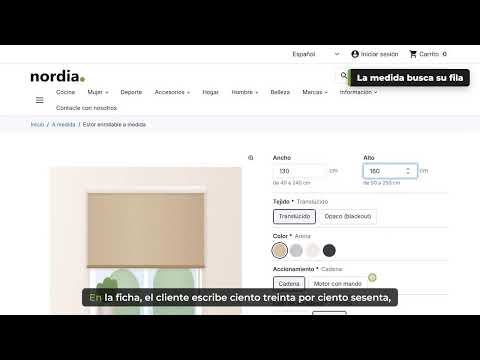
Vende a medida: el cliente teclea ancho, alto o largo, elige opciones y ve el precio al momento. Modo sencillo para opciones y acabados, modo experto para medidas, reglas de precio, tabla ancho × alto y reglas de visibilidad. Un asistente con IA (con tu propia clave) te escribe la configuración. Cuenta la merma de corte, controla el stock de planchas y barras con sus retales y te da el escandallo con tu margen. El precio se recalcula en el servidor, sin overrides, y el pedido lleva las medidas, con hoja de taller. Importa la configuración de Mega Product (Alabaz) y de Additional Product Attributes (Anvanto) sin tocarlos. Módulo Rekire, probado en tiendas reales.
Compatible con PrestaShop 1.7.8 a 9.x.
Productos a medida
Tu cliente sabe qué medidas necesita. Tú no quieres presupuestar cada pieza por correo.
Cristal, metacrilato, telas, madera, vinilo: cada pedido es distinto y cada precio hay que calcularlo a mano. RKR Configurador a Medida deja que el cliente teclee las medidas, elija las opciones y vea el precio al momento, y te llega el pedido con todo lo que hace falta para fabricarlo. Y si cortas de planchas o barras, sabe cuánto material gastas, cuánto te sobra y cuánto ganas.
2 modos
sencillo para opciones y acabados, experto para medidas y reglas de precio
4 tipos de venta
por superficie (ancho × alto), por volumen, por longitud o por unidad con solo opciones
17 tipos de regla
de precio, peso y días de fabricación, con condiciones, tramos y grupos de clientes
1.7.8 → 9.x
sin overrides, con los temas classic y Hummingbird; probado en 1.7.8.11, 8.2.8 y 9.2.0
/ Dos modos: el sencillo para opciones, el experto para medidas
Modo sencillo
Para productos que solo necesitan que el cliente elija o escriba algo: un acabado, un grabado, un envoltorio de regalo. Una sola pantalla con los campos (lista desplegable, botones, casillas, imágenes, colores, texto, número y fecha) y lo que suma cada opción, en importe fijo o en porcentaje. Los textos pueden cobrar por rellenarse y por carácter, y los números multiplicar el importe por la cifra escrita.
Modo experto
Medidas, reglas de precio, tabla ancho × alto y reglas de visibilidad. Un producto sin configurar te pregunta primero el modo, y cambias de uno a otro desde la barra del editor.
/ Un asistente con IA que te escribe la configuración
En el editor, el botón Asistente: le cuentas con tus palabras cómo vendes el producto y te propone la configuración, en modo sencillo o experto y en todos los idiomas de tu tienda. La revisas en pantalla y no se guarda nada hasta que pulsas Guardar. Funciona con tu propia clave de Anthropic (Claude), OpenAI o Google Gemini, que se guarda cifrada. En cada consulta viajan el nombre y el precio del producto y su configuración; no viaja nada de tus clientes ni de tus pedidos.
/ El cliente configura y ve el precio al momento
Medidas en la unidad que quiera
Milímetros, centímetros, decímetros, metros, pulgadas o pies. Tú pones mínimo, máximo, valor por defecto, valores fijos en desplegable o múltiplos, y una condición entre medidas del tipo W <= 2*H para que no pidan piezas imposibles.
Opciones como las necesites
Atributos de PrestaShop, opciones propias o campos para escribir (texto, número, color). Se muestran como botones, desplegable, lista, imágenes, colores o casillas, con opción obligatoria, varias a la vez con mínimo y máximo, ayuda y descripción con imagen.
Presentación a tu gusto
La configuración puede salir en lista, pestañas, acordeón o pasos, según lo larga que sea.
/ Tu forma de calcular el precio, sin programar
Reglas de precio
Por unidad de medida, por ancho, alto o largo, valor × fórmula con mínimo y redondeo, importe fijo por pieza o por línea, porcentajes y extras, mínimos por pieza, línea o medida, peso y días de fabricación. Se aplican según las opciones elegidas (todas, cualquiera o «la que pide más»), la cantidad, las medidas, el importe de la línea o una condición escrita.
Tabla de precios
Rejilla ancho × alto (se aplica la fila más pequeña que contiene la pieza) o tramos por medida total, con precio total, por unidad o por medida × cantidad, y por opciones.
Fórmulas propias, sin riesgo
Con las variables de ancho, alto, largo, medida total y cantidad y funciones como min, max, ceil o between. El evaluador es propio: no se ejecuta código.
/ Reglas de visibilidad escritas como frases
«Si eligen Corte sierra → ocultar Forma y Taladros.» Así se escribe en el editor. Puedes ocultar, mostrar solo si, seleccionar automáticamente o no dejar comprar, con condiciones sobre las medidas y un mensaje para el cliente. Se aplican al momento en el navegador y se vuelven a comprobar en el servidor.
/ El precio lo decide el servidor, no el navegador
El precio, las opciones elegidas, las reglas y los límites se recalculan siempre en el servidor, al configurar y también cuando cambia la cantidad en el carrito. Lo que se escriba o se toque en el navegador no cambia lo que se cobra.
/ Del carrito al taller
Carrito, pedido, factura y correos
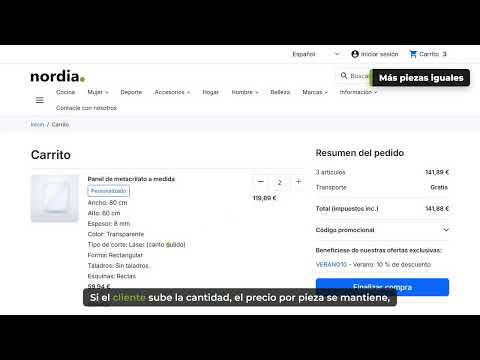
Cada configuración es una línea propia, con su precio y su peso por pieza. La línea del carrito enseña las medidas y las opciones, y el pedido, la factura y los correos las conservan.
Panel en el pedido y hoja de taller
En el pedido del back-office ves la configuración de cada línea, y puedes imprimir una hoja de taller con lo que hay que fabricar.
Sin overrides
Usa las personalizaciones del núcleo de PrestaShop. Funciona de la 1.7.8 a la 9.x, con los temas classic y Hummingbird.
/ Cobra lo que cuesta de verdad: merma, material y retales
Merma por producto y por opción
Ancho de corte, sangrado alrededor de la pieza y porcentaje de desperdicio. Lo que diga una opción manda sobre lo del producto: una sierra se come más material que un láser, y cada material o forma de cortar lleva la suya. Decides si cobras al cliente el material con su merma o solo la medida de la pieza.
Materiales y stock de planchas y barras
Das de alta tus planchas, barras o rollos con sus piezas enteras y sus retales. Cada pedido aparta su material del retal más pequeño en el que cabe la pieza y, si no cabe en ninguno, de una pieza entera. Lo que sobra vuelve al stock como retales: de una plancha de 100 × 100 cm, una pieza de 50 × 50 deja un retal de 100 × 50 y otro de 50 × 50, y las siguientes piezas salen de ahí antes de abrir otra plancha.
Si se cancela, el material vuelve
Si el pedido se cancela o se reembolsa, vuelve al stock el material que solo estaba apartado (lo ya cortado se queda cortado). Los cortes pendientes se pueden recolocar todos juntos: el módulo prueba varios órdenes sobre una copia del stock y se queda con el que deja menos piezas esperando, abre menos piezas enteras y desperdicia menos.
La plancha dibujada, lista para cortar
La pantalla de cada material dibuja cada plancha o barra en uso con todo lo que lleva: piezas por cortar, piezas ya cortadas, retales libres y desperdicio. El pedido y la hoja de taller dicen de qué retal o pieza entera sale cada pieza, dónde está guardado, si va girada y qué vuelve al stock.
Sin pisarse entre pedidos
Dos pedidos a la vez no se llevan el mismo retal: cada material lo corta un pedido cada vez. Un material puede estar vinculado a un producto de PrestaShop (la plancha entera que también vendes) y su stock es el número de piezas enteras, en los dos sentidos. También puedes hacer que el material rechace en la ficha la pieza que no sale de lo que tienes.
Escandallo: cuánto ganas en cada pieza
Material con su merma, corte, opciones y costes fijos de cada pieza, con tu margen, en el simulador y en el pedido. El cliente no lo ve nunca.
/ Un editor que enseña de dónde sale cada euro
Simulador
En el editor del producto, la pestaña Probar te deja poner medidas y opciones y te enseña de dónde sale cada euro del precio. Compruebas una regla antes de que la vea ningún cliente.
Copiar, plantillas y JSON
Copia la configuración a otros productos por id o referencia, define plantillas por categoría, y exporta o importa la configuración en JSON.
/ ¿Vienes de otro módulo? Pásate sin empezar de cero
Importa la configuración de Mega Product de Alabaz y, desde la versión 1.3.0, los campos de Additional Product Attributes / Custom Product Fields de Anvanto. En los dos casos solo se leen sus tablas, no se toca nada del módulo de origen y la tienda no cambia hasta que tú lo decides.
/ Desde Mega Product de Alabaz
Si tienes instalados los dos módulos, la configuración se importa sola al instalar este. Se lee de las tablas de Mega Product de Alabaz y no se toca nada de él: sigue vendiendo como hasta ahora.
Revisa antes de pasar
Una pantalla de importación te enseña los productos, lo importado y los avisos de lo que no se pudo traducir. Compruebas cada producto en el simulador y comparas el precio. Puedes importar de nuevo: los productos que ya editaste aquí se respetan, salvo que marques lo contrario.
Pasas producto a producto, y puedes volver
Pasar deja inactivo el producto en Mega Product (solo esa fila, y guarda su estado anterior) y este módulo toma el relevo. Devolver a Mega Product lo deshace, y al desinstalar este módulo todo vuelve a Mega Product.
Lo que no se importa. Se avisa en el informe de importación, y lo tendrás que rehacer aquí o dejarlo en Mega Product: grupos de productos o categorías como opciones, capas de imagen, componentes, subida de ficheros, Megadesigner/3D, tablas de precios por cantidad, venta por cajas, stock por medida y algunos tipos de regla (pricebox, stock, minqty, maxqty, changedefm, limits, boxes, reference). Los descuentos de PrestaShop se aplican sobre el precio configurado entero; Mega Product los trataba a su manera, así que compara precios antes de pasar. Mega Product de Alabaz es un módulo de un tercero, sin relación con Rekire.
/ Desde Additional Product Attributes (Anvanto)
Si las tablas de ese módulo están en tu tienda, el panel muestra una pestaña para importarlas. Sus campos pasan a ser los campos de cada producto aquí, en modo sencillo.
Vista previa, sin guardar nada
Te dice qué productos se traerían y con qué avisos. Después importas los de la lista o uno por su id, para los campos dados a toda la tienda.
Tu tienda no cambia hasta que lo activas
Mientras el módulo de origen siga activado, lo importado queda desactivado. Revisas cada producto en el simulador, desactivas ese módulo y pulsas Activar todo lo traído.
Lo que se trae
Listas, botones, casillas, textos, números y fechas; el importe o porcentaje de cada valor; el precio por carácter con sus caracteres gratis; el número que multiplica el importe; el valor por defecto y los textos de ayuda. Los campos que solo se muestran con un valor de otro pasan a reglas de visibilidad. También a quién se da cada campo: producto, categoría, marca, grupo de campos o toda la tienda, con sus exclusiones.
Lo que no se trae. Se avisa en las notas de cada producto: campos de fichero, fórmulas de precio, el impuesto propio de un campo y el porcentaje de un campo de texto. Las imágenes de los valores siguen en la carpeta de ese módulo: cópialas antes de desinstalarlo. Additional Product Attributes es un módulo de un tercero, sin relación con Rekire.
/ Lo que conviene saber
Lo encuentras en Catálogo → Productos a medida y en el botón Configurar de la ficha del producto. El peso configurado llega a los transportistas. Viene traducido al español, inglés, francés, italiano, alemán y portugués. Licencia AFL-3.0.
Compatible con PrestaShop 1.7.8 a 9.x
Desarrollado y mantenido por REKIRE
-
Referenciarkrmegaproduct
v1.3.0
- Import from "Additional Product Attributes / Custom Product Fields" (Anvanto): a new tab of the panel, shown when the tables of that module are in the shop. Its fields become the fields of each product here, in simple mode: lists, buttons, checkboxes, texts, numbers and dates, with the amount or percentage of each value, the price per character with its free characters, the number that multiplies its amount, the default value, the help texts and the fields that are shown only with a value of another. Fields given to a product, a category, a brand, a group of fields or the whole shop are followed, with their exclusions. Only its tables are read. While that module is enabled, what is brought over stays switched off, with a preview and one button to switch everything on. What cannot be brought over (files, price formulas, taxes of a field) is said in the notes of each product.
- Sheets being cut: the screen of a material draws each sheet or bar in use with everything it holds - the pieces of the orders (waiting or already cut), the offcuts that are still free and the scrap - to cut it in one go.
- Placing the pending cuts again now tries several orders (by area, by longest side, by width, by height, by shortest side) on a copy of the stock and keeps the one that leaves fewest pieces waiting for material, opens fewest whole pieces and wastes the least. Before, it was always from the largest piece to the smallest.
- Two orders placed at the same moment can no longer be given the same offcut: each material is cut by one order at a time.
- Fixed: with the debug mode of PrestaShop on, the screen of a material that had cuts showed an error instead of the material.
v1.2.1
- PrestaShop 9: an employee who can only view the "Made-to-measure products" tab could not open the editor of a product (the address of the editor carried a parameter that PrestaShop 9 reads as a change). They can now see it and try prices; saving still needs permission to edit.
v1.2.0
- Waste: what is lost when a piece is cut. Width of the cut (a saw eats more than a laser), margin around the piece and a percentage of scrap, for the product and for each option, so that a material or a way of cutting brings its own. The customer can be charged the material with its waste or only the measure of the piece.
- Materials and stock (new tab of the panel): the sheets and bars the pieces are cut from, with their whole pieces and their offcuts. Each order takes its material: from the smallest offcut that holds the piece, or from a whole piece when no offcut does. What is left is split as a saw would cut it and goes back to the stock as new offcuts, unless it is too small to keep. From a sheet of 100 x 100 cm, a piece of 50 x 50 leaves one offcut of 100 x 50 and one of 50 x 50, and the next pieces come out of them before another sheet is opened.
- The material that was only set aside goes back if the order is cancelled or refunded (what is already cut stays cut), and the cuts are marked as made when the order is sent or from the workshop sheet. The cuts that are not made yet can be placed again all together, from the largest to the smallest, to waste less.
- A material can be linked to a product of PrestaShop: its stock is the number of whole pieces, in both directions. A material can refuse the pieces the stock cannot hold.
- The order and the workshop sheet say where each piece is cut from (which offcut or whole piece, where it is kept, turned or not), what goes back to the stock, and draw it.
- Cost breakdown: material with its waste, cutting, options and fixed costs of each piece, with the margin, in the simulator of the editor and in the order. Never shown to the customer.
- New "Material and cost" tab in the editor; formulas get TG (measure with its waste), WG, HG and LG (measures with the margin).
- The assistant knows the waste, the costs and the materials of the shop.
- The tables and hooks of a version are also applied when PrestaShop skips its update script, which it does when another module has an update function with the same name.
v1.1.0
- Simple mode: for products sold by the piece that only need choices and fields (a finish, an engraving, a gift wrap). One screen with the fields - drop-down, buttons, radio list, checkboxes, images, colours, text, long text, number and date - and what each option adds: an amount or a percentage of the price. A product that was never configured asks first whether it is simple or expert, and goes from one mode to the other from the bar of the editor.
- AI assistant: the merchant explains how the product is sold and the assistant writes the configuration, in simple or expert mode, in all the languages of the shop. The proposal is reviewed on screen and nothing is saved until Save is pressed. It works with the merchant's own key of Anthropic (Claude), OpenAI or Google Gemini, set in the new "AI assistant" tab; the key is stored encrypted.
- Options can add a percentage of the piece, not only an amount.
- Fields to type can add an amount when they are filled in, an amount per character (with characters free of charge) and, the number ones, the amount multiplied by the number typed. New kind of field: date. Text fields show a counter of characters.
- The product page can show next to each option what it adds, in the currency and with the taxes of the customer ("Show next to each option what it adds to the price").
- The price detail no longer lists a base price of 0 on products sold by the piece.
- Product page: nothing is shown in red before the customer starts. The Add to cart button is no longer dead while something is missing: pressing it says what, marks the field and goes to it. A measure out of its limits is marked where it is typed. Above the price, the piece in one line (measures and options chosen). Checkboxes and radio lists are easier to hit, quantity buttons have a name, and the keyboard focus only shows when the keyboard is used.
- New "Settings" tab: the colour of the chosen options in the configurator, to match the shop, and the AI assistant.
- Editor: drawn icons with a name instead of arrows and crosses, counters on the tabs, Ctrl + S saves, a text that is empty in one language shows the one of another as its example, and in simple mode fields can be duplicated, Enter adds the next option, the price can be tried without leaving the screen and the options fold on a narrow screen.
- On update, the compiled templates and the combined assets of the shop are emptied, so that shops that never recompile templates or that combine their scripts serve the new product page.
v1.0.1
- Order confirmation email in PrestaShop 9: the configuration of each line showed its HTML tags, because that version escapes the text of the customizations. It is now laid out line by line, as in 1.7.8 and 8, and the plain text part of the emails carries it as plain text in every version.
- The name printed before the configuration on invoices, delivery slips and emails ("Configuration") is now in the language of each document; it was only translated into the language of the shop. Existing fields are corrected when updating, and again the first time a product is seen after a language is added.
v1.0.0
First version.
- Products sold by area, volume, length or unit, with measures, groups of options (attributes of PrestaShop, own options or fields to type), price rules, price table and display rules written as sentences.
- Price, selection, rules and limits recalculated on the server; safe formula evaluator.
- Cart through the customizations of the core (price and weight per piece), without overrides; measures and options on the line of the cart, in the order, the invoice, the emails, the order of the back office and a printable workshop sheet.
- A configured product cannot reach the cart without its configuration: the add buttons of the lists, the quick view or sticky bars of other modules are refused by the core.
- Automatic import of Mega Product (Alabaz) when both are installed, with a report of what could not be translated; switch each product and back, or all at once.
- Editor with simulator, copy to other products, JSON export/import, category templates.
- Translated into Spanish, French, Italian, German and Portuguese.
- Tested on PrestaShop 1.7.8.11, 8.2.8 and 9.2.0 (classic and Hummingbird).
Seis vídeos cortos, de instalar a vender: cómo se configura cada parte del módulo con productos de ejemplo.
4 otros productos de la misma categoría


Venta por metros cuadrados (m²) en PrestaShop, con cajas y piezas completas
Blog
108,78 €
89,90 €
+ IVA = 108,78 €

También podría interesarte

80,95 €
66,90 €
+ IVA = 80,95 €


80,95 €
66,90 €
+ IVA = 80,95 €

80,95 €
66,90 €
+ IVA = 80,95 €

84,69 €
69,99 €
+ IVA = 84,69 €

120,99 €
99,99 €
+ IVA = 120,99 €

80,95 €
66,90 €
+ IVA = 80,95 €

80,95 €
66,90 €
+ IVA = 80,95 €

302,50 €
250,00 €
+ IVA = 302,50 €

181,50 €
150,00 €
+ IVA = 181,50 €
Preguntas y respuestas
Todavía nadie ha preguntado nada sobre este producto.
Reseñas de clientes
–
0 reseñas
Todavía no hay reseñas. ¿Lo has comprado? Cuéntales a otros clientes qué te parece.
Las reseñas marcadas como «Compra verificada» son de clientes que compraron el módulo en rekire.com o que tienen el Pase anual, que incluye todos nuestros módulos: las enlazamos con su pedido antes de publicarlas. Publicamos las valoraciones positivas y las negativas; solo retenemos las que incumplen nuestras normas (insultos, datos personales o publicidad). Ver todas las reseñas de la tienda