Essential PrestaShop modules (and the ones you don't need)
Almost every PrestaShop store needs modules for the same things: search, security and error monitoring, SEO, legal texts, checkout and cache. We go through each need, how many modules are too many and how to uninstall the ones you do not use without breaking anything.

Updated: 01/11/2026
29
Share:
Almost any PrestaShop store needs modules for six things: a good search engine, security and error alerts, SEO, legal compliance, a convenient checkout and cache. Everything else depends on the business. And just as important as installing what is missing is removing what is not used, because every module is code that gets loaded, updated and can fail.
A new store comes with dozens of native modules enabled, and a store that has been running for years accumulates as many again, installed for something specific. This article sorts modules by the need they cover, not by brand. How to judge whether a particular module is reliable is another topic, which we cover in another article on the blog.
Search
Search is the way in for people who already know what they want, and those visitors buy more than average. PrestaShop's native search is fine for small catalogues, but falls short with typos, searches by reference or large catalogues. What to ask of a search engine:
- Results as you type, with image and price.
- Typo tolerance: finding the product even if the customer misspells it.
- Filters within the results.
- Statistics on searches with no results: they are products your customers want and cannot find.
There are two models: cloud search engines with a monthly fee, which charge for as long as you use them, and self-hosted search engines on your own server, which you pay for once.
Security and alerts
Most serious problems in a store are discovered late: an administrator employee nobody created, a changed payment setting, a new file in a module folder, an error that has prevented payments for two days. Two types of module cover this:
- Security monitoring: alerts you to changes in employees, modules, payment configuration and access, and scans for malicious files.
- Error monitoring: alerts you to PHP errors, 500 responses and, above all, payments that do not end in an order.
What sets the good ones apart is that they alert you where you will see it (not on a dashboard nobody opens) and that they do not flood you with repeated messages.
SEO
PrestaShop comes with the basics: friendly URLs, meta titles and descriptions per product and category, and a sitemap module. What is usually missing:
- Manageable 301 redirects for discontinued products or changed URLs.
- Control over which filtered pages get indexed.
- Complete product structured data.
- Help filling in metas at scale in large catalogues.
Be careful about installing several SEO modules at once: two modules writing the same tags create duplicates that do more harm than having none.
Legal
- Cookie banner that really blocks non-essential cookies until the visitor accepts, and that stores the consent.
- Legal texts linked in the footer and at checkout, and a checkbox to accept the terms.
- Information on prices including tax and shipping costs visible before paying.
- Depending on the sector, specific notices on the product page.
Checkout
PrestaShop's native checkout works, but every extra field and step loses customers. Before installing a full checkout module, review what you can already adjust: unnecessary address fields, guest checkout, the order of carriers and payment methods. Payment modules should be the official ones from each gateway or from a developer who maintains them, and be updated when the gateway changes.
Cache and performance
PrestaShop's native cache and OPcache on the server are the foundation. On top of that, a cache module can serve full pages to visitors without a session and take load off the database with Redis. Just one cache module: two competing for the same job are a sure source of stale pages and hard-to-trace errors.
What you usually do not need: native statistics modules nobody looks at, home page blocks the theme does not display, payment or shipping modules that are not used, modules installed for a campaign that has ended and any module that repeats what another one does.
What you cannot see but still need
Some needs do not show up in the store and are missed the day something fails:
- Backups: better done by the server than by a module, but if your hosting does not do them, a module that stores them outside the store is better than nothing.
- Email: clear order templates, and mail sent via SMTP with your domain properly configured.
- Redirects: every product you discontinue leaves a URL that someone has linked to.
- Analytics with consent: measuring sales and conversions while respecting what the visitor accepted in the banner.
Before installing a new one
Three questions save a lot of problems. Does PrestaShop or a module you already have do this? Who maintains it and how often are versions released? Is it compatible with your PrestaShop version and with the next one you are going to update to? If the answer to the last one is «nobody knows», that module could be the one that stops you updating a year from now. Install it on a copy first, check the checkout and see whether it adds overrides or scripts on every page.
How many modules are too many?
There is no magic number. A store with a hundred well-maintained modules can run better than one with thirty abandoned ones. What counts is:
- That each module has a purpose you can explain. If nobody knows what it is for, it should go.
- That it gets updated. A module without new versions for years is a risk, and it blocks PrestaShop updates.
- That it does not install overrides if it can be avoided: they are the main cause of conflicts between modules and with updates.
- That it does not load its JavaScript and CSS on every page when it only needs them on one.
How to uninstall what you do not use
- Make a backup of files and database.
- Disable first, do not uninstall. Wait a few days and check that nothing has broken: home page, product page, checkout, emails.
- Uninstall from the Module Manager. Bear in mind that many modules delete their data when uninstalled.
- Delete the module's folder from the disk. An uninstalled module whose folder is still on the server is still reachable code.
- Check the
override/folder and clear the cache, in case the module left something behind.
How to solve it in PrestaShop
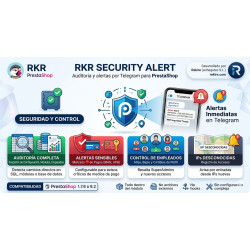
In Rekire's PrestaShop modules catalogue there is one for each of the needs above. Visual Search No SaaS is a full-screen search engine you pay for once: its own index, optional Meilisearch, filters, typo tolerance and statistics on what your customers search for and cannot find. RKR Security Alert monitors configuration (especially payment details), modules, employees and access, scans files for skimmers, backdoors and web shells, and alerts you via Telegram. RKR Sentinel alerts you via Telegram to PHP errors, 500 responses, JavaScript failures at checkout and payments that do not end in an order. Installing a few modules, maintained and up to date, is cheaper than fixing the conflicts of many.
Frequently asked questions
Which PrestaShop modules can be disabled safely?
Those that display nothing in your theme, the statistics you do not check and the payment methods and carriers you do not use. Disable them one at a time and check the store after each change.
Does having many modules slow PrestaShop down?
It can, especially if they load scripts on every page or run heavy queries. It is not so much the number as what each one does.
Do PrestaShop 1.7 modules work on 9?
Some do and many do not, especially those that use overrides or removed functions. Check the compatibility stated by the author and test them on a copy before updating.
Where are modules installed in PrestaShop?
In the back office, under Modules, Module Manager, by uploading the module's ZIP. Do it on a test copy first if the module affects the checkout or payments.
-

-
 Payments, subscriptions and checkout One-page or multi-step checkout in PrestaShop: which fields to drop and when to use 1-click
-
 Payments, subscriptions and checkout Reconciling orders and bank: how to spot payments your store thinks it has and doesn't
-
 Performance and hosting Which PHP version your PrestaShop needs and how to upgrade it without breaking anything


-
 Regulations for online stores Sales and discounts under the Omnibus Directive: how to advertise a reduced price without risking a fine
-
 Regulations for online stores The right of withdrawal in 2026: the new mandatory button and everything your store must comply with
-
 Strategy and conversion The real margin on each order: the calculation almost no store does (and should)
-
-
 Strategy and conversion How to organise an online store’s catalogue
-
 ERP, invoicing and integrations REST APIs for ecommerce integrations: authentication, limits and errors
-
 Purchasing, stock and logistics Purchasing management: where an online store gains or loses its margin
-
 Marketing and loyalty Black Friday and seasonal campaigns: preparing the store technically