




- New

Offers module after placing an order images
Offers module after placing an order
Price:
€121.00
€100.00 Sin impuesto
€121.00 Con impuesto
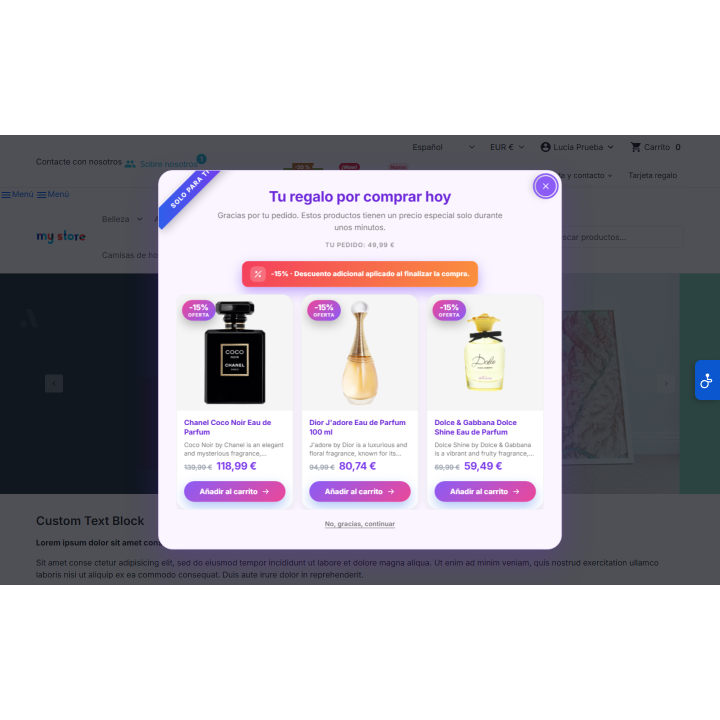
Open a window with your recommended products right after the customer pays: with 24 ways and 23 themes, native discounts (percentage, amount, free shipping or voucher for the next purchase), add to cart by AJAX and statistics with attributed revenue.
Compatible with PrestaShop 1.7.8 to 9.2, with PHP 7.2 or higher.
Average ticket
The customer has already paid. That's the best time to offer them something more.
When the order is complete, the store closes and the opportunity is lost. RKR Post-Purchase Offers opens a window right after you buy, displaying the products you choose and, if you wish, a discount to make your decision easy.
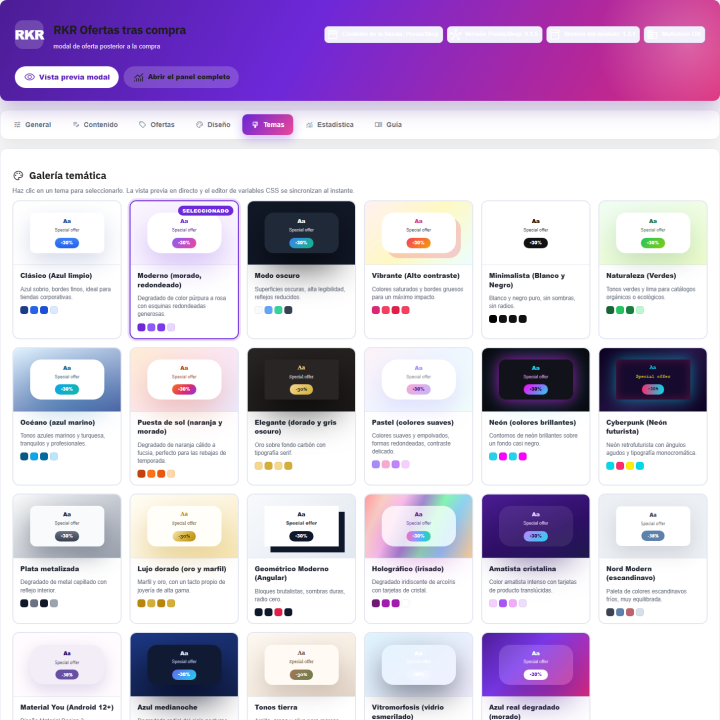
24 forms and 23 themes
so that the window matches your store and doesn't look like an unrelated advertisement
4 types of discount
percentage, fixed amount, free shipping or a voucher for the next purchase
PrestaShop 1.7.8 → 9.2
a single version of the module for all your stores
/ It is shown when the customer has already purchased
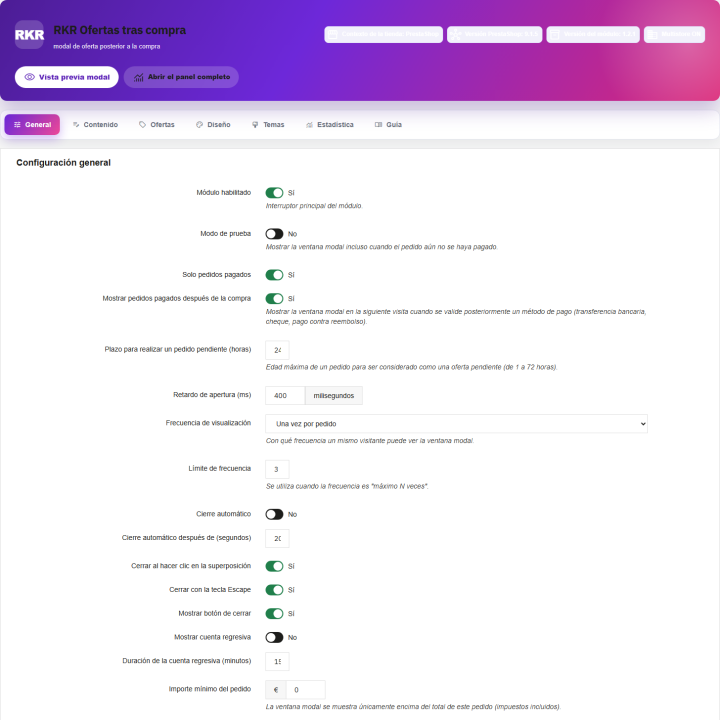
The pop-up window appears on the order confirmation page, after the order has been paid for. It doesn't interrupt the checkout process or compete with the purchase: the customer is already satisfied and just one click away from adding something else. You can choose how long it takes to appear, whether it closes automatically, whether it has a countdown timer, and how often it reappears.
Payments that are confirmed later: If your registered customer pays by bank transfer, check, or cash on delivery , the window appears when the order reaches a paid status. For this to happen, the customer must be logged in. Guests whose payment is confirmed later are not shown the pending offer.
A real discount, not a sign
Percentage or fixed amount
The discount is created as a native PrestaShop cart rule, limited to the products on offer.
Free shipping
To encourage the customer to add that missing product.
Valid for next purchase
With an optional expiration date and mail delivery to the customer. It's a way to encourage repeat business.
Each campaign, in its own way
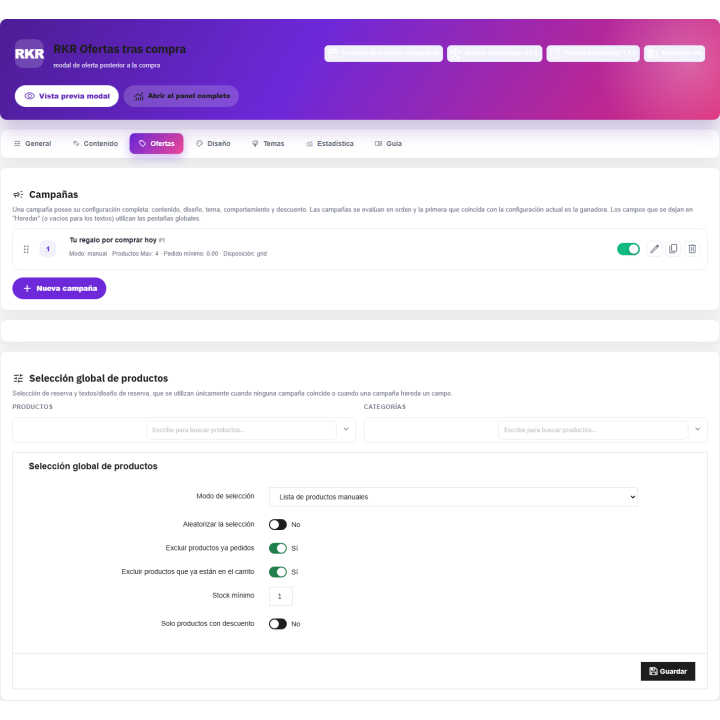
You create multiple campaigns, each with its own text, design, behavior, and discount. You can rearrange them by dragging and dropping, duplicate them, and activate or deactivate them as needed. If a field is left empty, it inherits the general value, and there's a button to access the global settings.
You choose the products manually or by category, and limit the window by minimum order amount, customer groups and devices (computer, tablet or mobile).
Make it look like your store
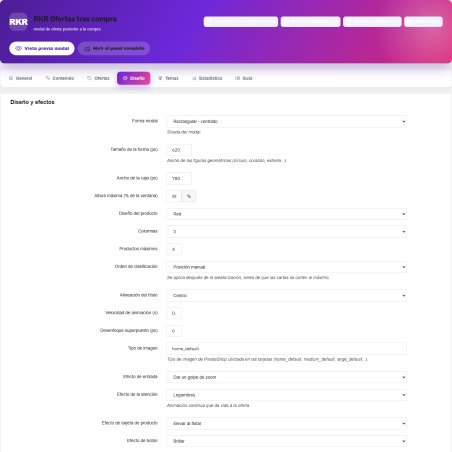
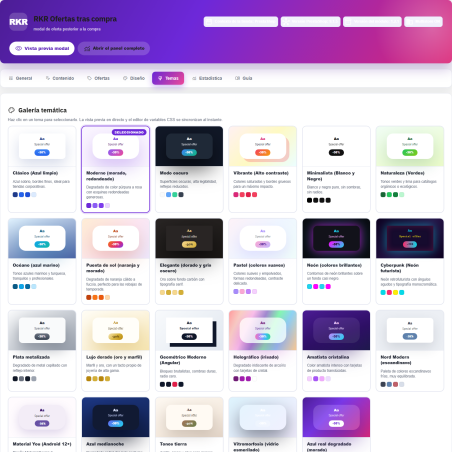
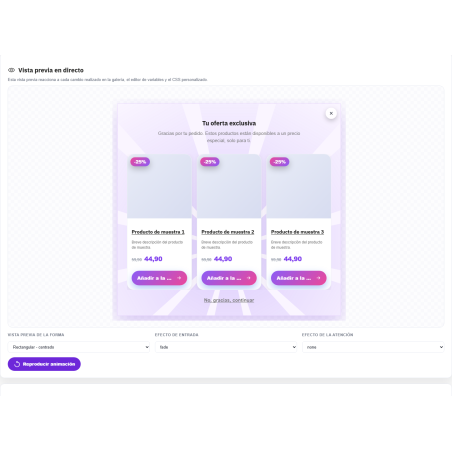
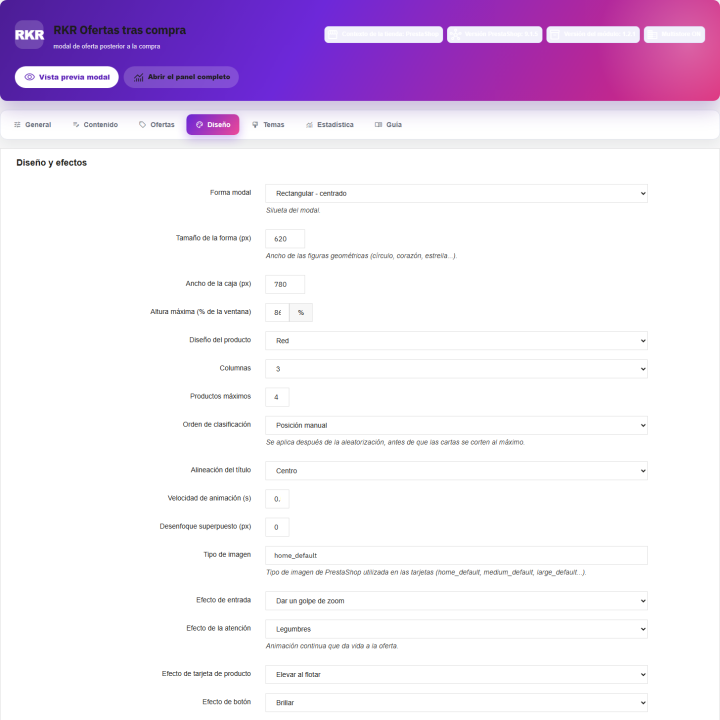
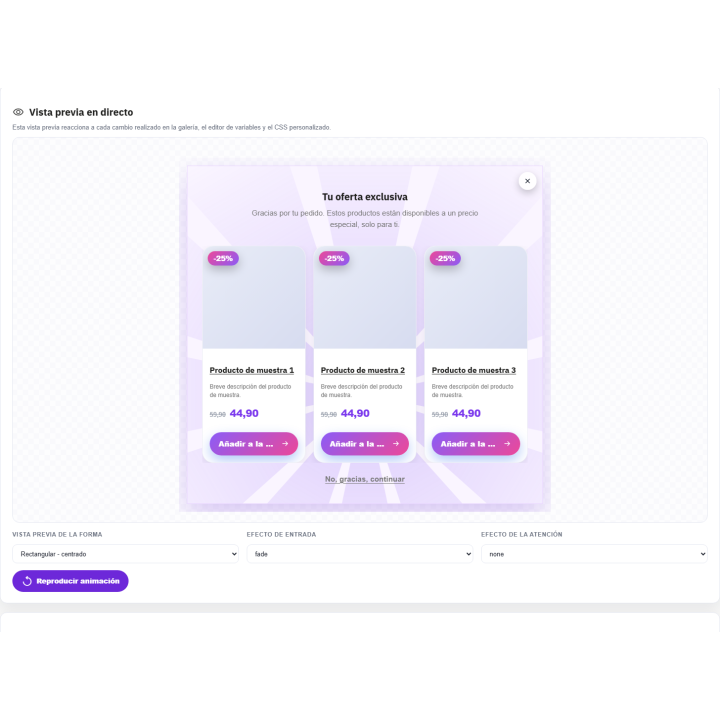
24 window shapes and 23 themes with live preview, plus a built-in CSS editor and entry, attention, and button animations. The animations respect the visitor's "reduce motion" preference. Before showing it to anyone, the test mode and preview button let you see the result.
/ Measure how much it sells
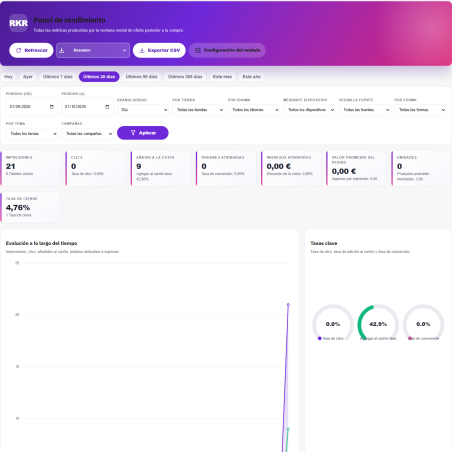
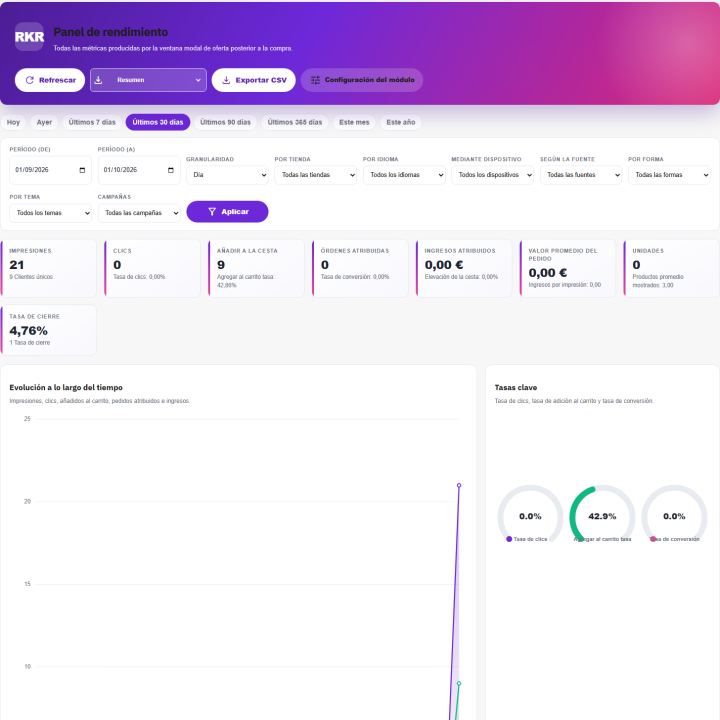
A statistics tab displays impressions, clicks, items added to cart, and revenue attributed to the window, all within the attribution window you define. It includes a funnel, breakdowns by device and product, a heat map by day and hour, and CSV export. This helps you identify which campaigns are worth tracking and which aren't.
Add to cart without leaving the page
Products are added to the cart via AJAX from the window itself, without reloading the order confirmation.
Your store, your languages
The texts are written by language and campaign, and the module works in a multi-store environment: each store has its own configuration and campaigns. It comes with the catalog in Spanish and English, and the voucher email is also available in both.
Designed not to slow down the store
No external CDN or front-end dependencies. The module files are only loaded on the order confirmation page, so the rest of your store won't notice anything.
Seven tabs, all in one place
General, Content, Offers, Design, Themes, Statistics, and Guide. The built-in guide documents each feature, and an optional cron job takes care of purging old data based on your chosen retention period.
Compatible with PrestaShop 1.7.8 to 9.2, with PHP 7.2 or higher
Developed and maintained by REKIRE
v1.2.1
Fixed
- Guest customers: the order confirmation page logs the guest out right after printing the modal, so every tracking call and the AJAX "Add to cart" were rejected with Invalid token . The tokens now survive that logout (they are also checked against the customer of the order named in the request).
- Translatable default texts (title, description, buttons, ribbon...) were stored once for the whole shop: saving them in one language overwrote every other. They are now stored per language (upgrade script copies the existing value to every language).
- Default texts and the sample campaign are written in the language of each shop language (catalog shipped with the module), not always in English.
- Spanish catalogue: the Admin catalog did not contain most of the back office strings, which showed in English; the three catalogs are regenerated from the code (777 strings). Placeholders of the voucher names (
%value%,%campaign%) were translated and never replaced. - Campaign discounts (percentage, amount, free shipping and vouchers) were never applied: the product restriction of the cart rule was written to the wrong table (
Unknown column 'id_item'), the error was swallowed and the modal answered "no discount". It now usescart_rule_product_ruleandcart_rule_product_rule_value. - Immediate voucher:
Cart::isCartRuleUsed()does not exist; the cart rules are read withgetCartRules(). - Country statistics:
Address::getCountryById()andCustomer:: $id_default_billingdo not exist; the country is read from the address table. - Voucher e-mail: the expiration date was formatted with the language id as the "full" flag.
- Order total in the modal header had no label.
- Statistics dashboard raised a JavaScript error on a store without data (line chart with no points).
Changed
- The
actionFrontControllerAfterInithook is nowactionFrontControllerInitAfter(the old name printed a deprecation notice in PrestaShop 9 debug mode; the upgrade moves the registration). - The back office tab is declared in
$this ->tabs(it used to be created by hand during the install). - Addons validator: no
Context::getContext(),$_GETor$_COOKIE, nofile_get_contents(), no HTML in PHP files, no rawnofilter(JSON goes throughdata-jsonattributes, free HTML throughcleanHtml), escaped Smarty output, license headers,LICENSE.txt, root.htaccess, PrestaShop coding standard.
4 other products in the same category
- New


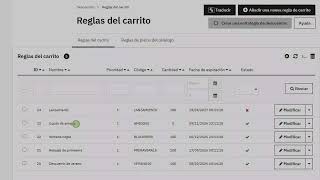
Module to prevent the use of expired coupons
 Blog
Blog
€36.30
€30.00 Sin impuesto
€36.30 Con impuesto
Product Videos

También podría interesarte


€60.44
€49.95 Sin impuesto
€60.44 Con impuesto

€12.09
€9.99 Sin impuesto
€12.09 Con impuesto
- On sale!


€96.79
€79.99 Sin impuesto
€96.79 Con impuesto


€96.79
€79.99 Sin impuesto
€96.79 Con impuesto


€84.69
€69.99 Sin impuesto
€84.69 Con impuesto

€120.99
€99.99 Sin impuesto
€120.99 Con impuesto


€96.79
€79.99 Sin impuesto
€96.79 Con impuesto


€96.79
€79.99 Sin impuesto
€96.79 Con impuesto


€302.50
€250.00 Sin impuesto
€302.50 Con impuesto


€181.50
€150.00 Sin impuesto
€181.50 Con impuesto
Questions and answers
Nobody has asked anything about this product yet.
