Sin impuesto Con impuesto

RKR Stock reservation in the cart: Countdown for PrestaShop

Price: €72.60
First year: €72.60 tax incl.
From the second year: €18.15/year tax incl.
  • One year of technical support and lifetime updates; from the second year, support is extended for €18.15/year and includes taking on your general improvement ideas for the module.
  • Renews automatically; cancel whenever you want, with no minimum term.
One-time payment: €72.60 tax incl.
  • One year of technical support and lifetime updates; after that, support ends (with the subscription it is extended for €18.15/year).
  • A single payment, with no automatic charges.
€60.00 Sin impuesto €72.60 Con impuesto

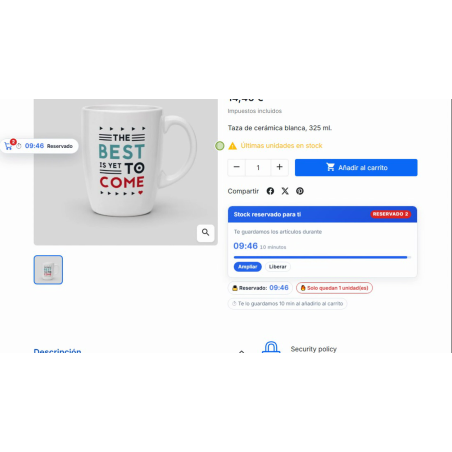
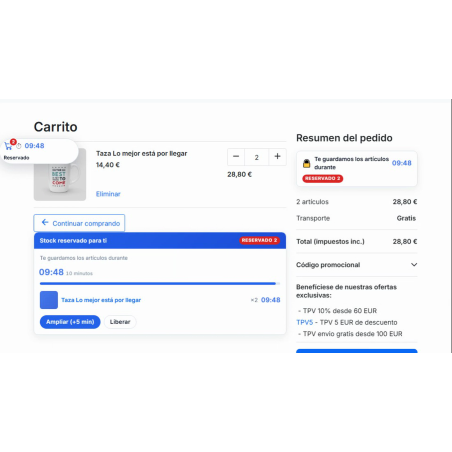
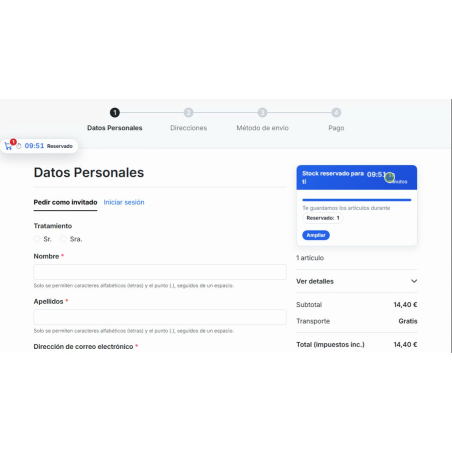
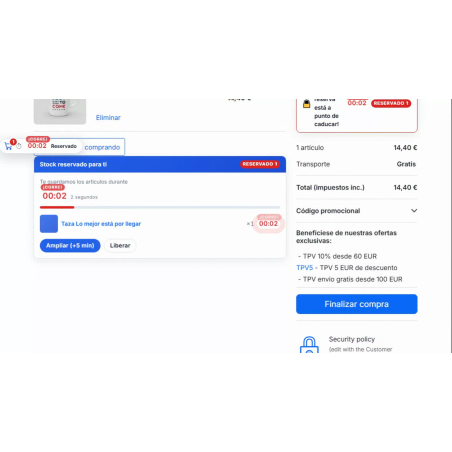
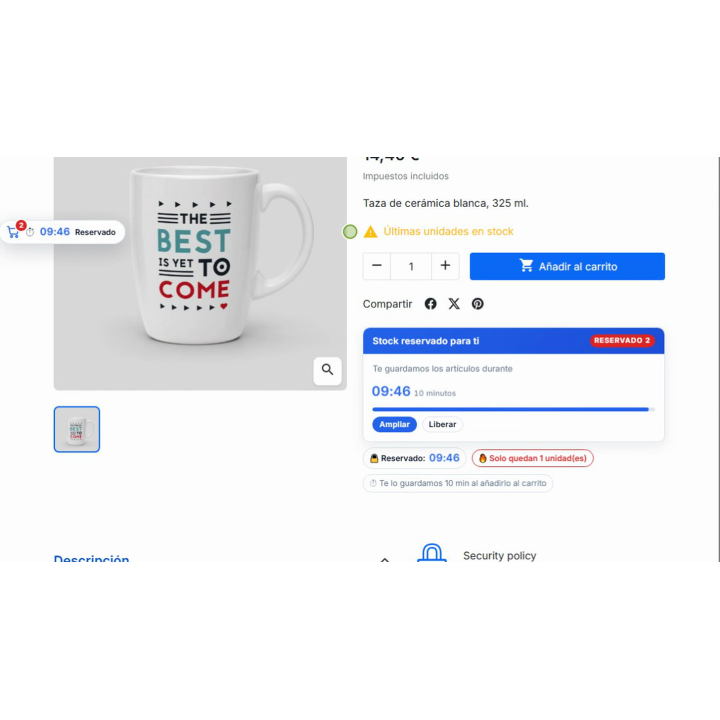
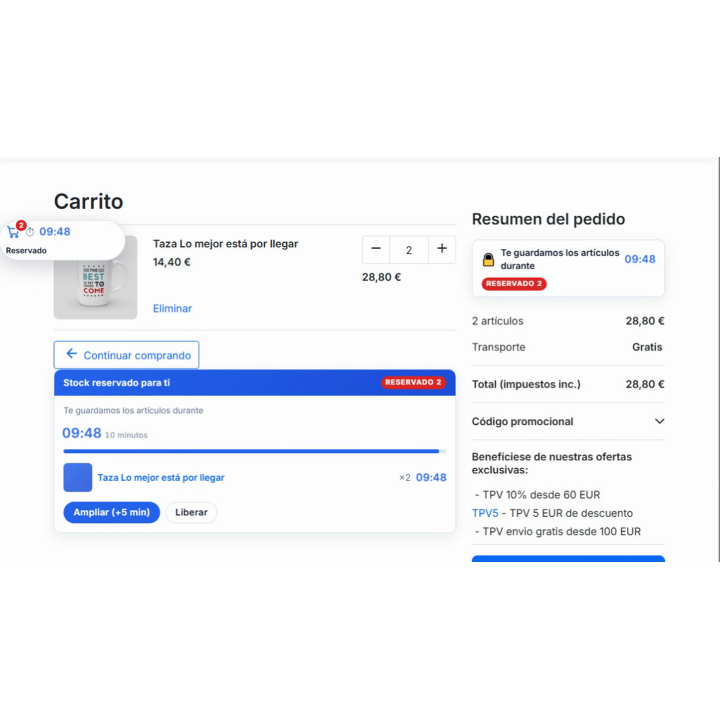
It reserves units as soon as the customer adds them to the cart and displays a countdown timer on the product page, in the cart, the mini-cart, and at checkout. If the countdown expires, the units are automatically released; meanwhile, no one else can claim the last unit. Ideal for launches, limited editions, flash sales, and drops.

Compatible with PrestaShop 1.7.8 and 9.x. Does not modify your physical stock.

Share

Launches and flash sales

Three customers, one last unit. Two leave angry.

In PrestaShop, stock only decreases when the order is validated: until then, everyone sees the available unit and everyone believes it is theirs. RKR Stock reservation in the cart Set aside the units as soon as they enter the cart and show the customer a countdown.

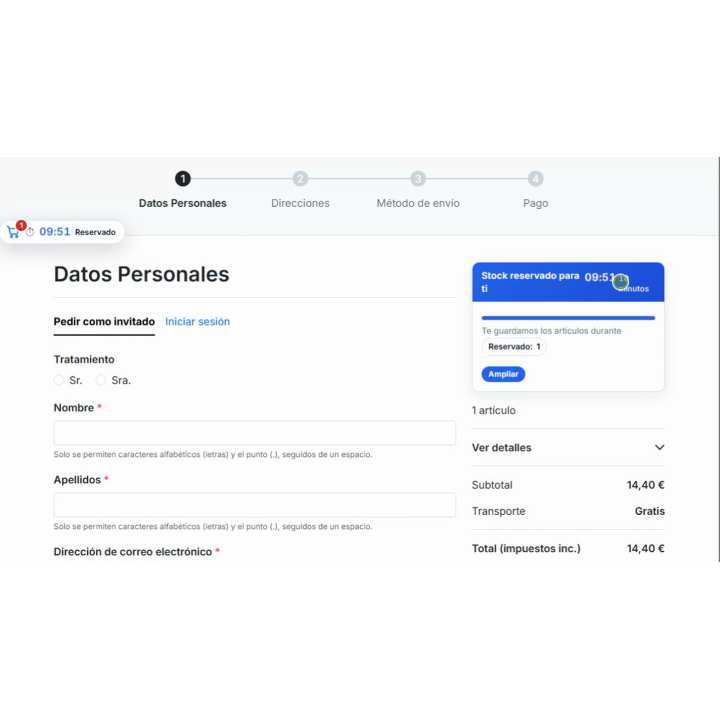
10 minutes
Default reservation, with visible countdown; you choose the duration, from 1 minute to 24 hours
23 designs
for the countdown, with live preview and editable CSS
1.7.8 → 9.x
a single version of the module for all your PrestaShop stores

/ The last unit is sold only once.

Each reservation is created within a row-locked database transaction (SELECT ... FOR UPDATE), so two customers who click "Add to cart" at the same time don't end up with the same last item. And the protection doesn't end at the cart:

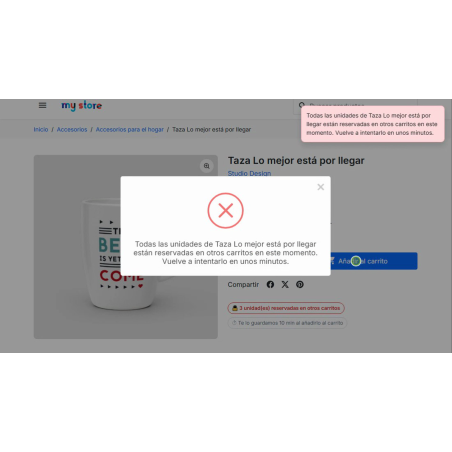
The addition is limited to what is available.
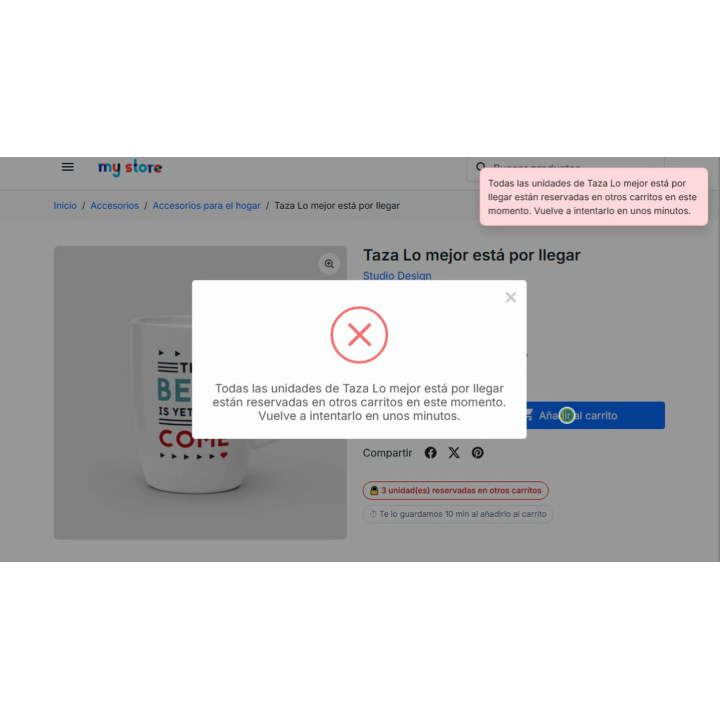
If the available units are reserved in other carts, the cart keeps the ones that are available and the customer reads why: how many are left and that the rest can be released in a few minutes.
The payment has a final check
Both the order page and the payment module validation return the customer to their cart if they still have an item reserved by another customer, showing the product and how many units are available. Alternatively, the line item can be removed automatically.
The units are released automatically upon expiration.
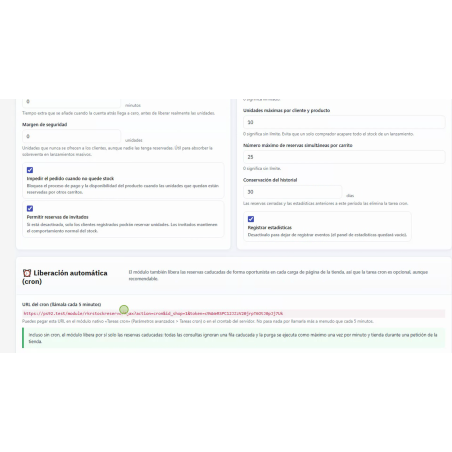
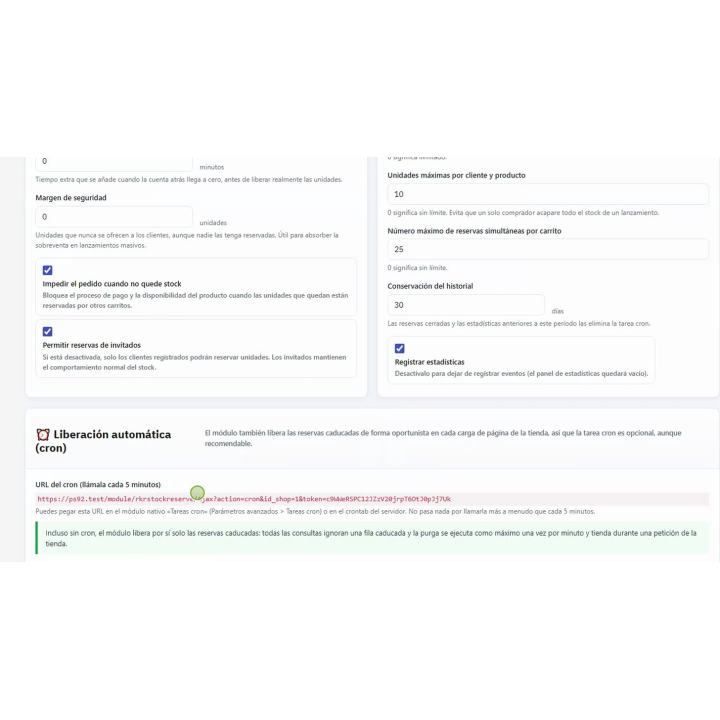
An expired reservation stops counting immediately, without waiting for any task. The cleanup is done using the store's own traffic (at most once per minute), and if you wish, you can add the cron URL to run it every 5 minutes.

It doesn't touch your physical stock. Reservations are stored in the module's own tables: they don't write to the PrestaShop stock, and if you deactivate it, the store will function as before. Products sold as backordered (out of stock) are not subject to limitations: their reservation only advances the countdown.

/ A countdown where the customer decides

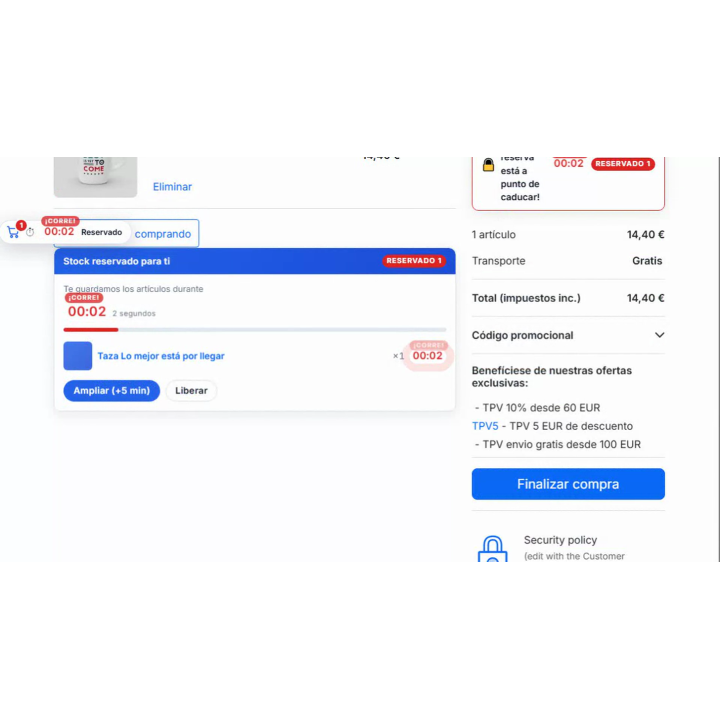
The timer appears on the product page, in the shopping cart (notification bar, summary panel, and clock on each line), in the header mini-cart, and at checkout. Each location is activated and deactivated separately, and the customer can extend the reservation or release units themselves.

Extensions with limits
By default, there are two 5-minute extensions per booking. You can change the number, the duration, or disable them altogether, so no one blocks your stock indefinitely.
Urgency that is noticeable
When 2 minutes remain, the countdown changes to "urgent," and to "critical" in the final 30 seconds (you can adjust both thresholds). Optionally, an alert sounds and the browser displays a notification when the time expires.
Email notification before expiry
Customers with an account receive an email when their booking has a few minutes remaining (2 by default), with a direct link to the shopping cart. This feature is disabled by default, and the templates are available in Spanish, English, French, Italian, German, and Portuguese.
Guests included
Anyone who buys without an account also makes a reservation and is counted in the inventory. If you only want registered customers to make reservations, disable this feature.
Scarcity with real data
In the listing, "Only N units left" and "N units reserved in other carts" come from the actual stock minus reservations, not from an invented number.

/ Rules for each pitch

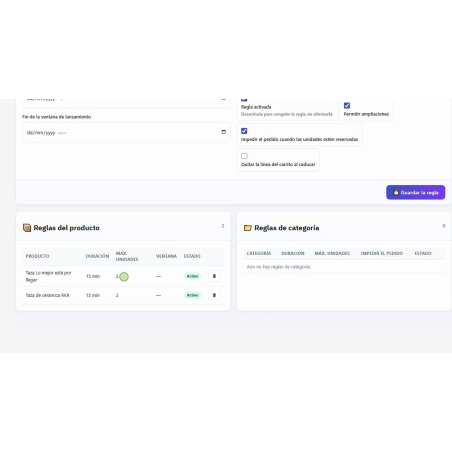
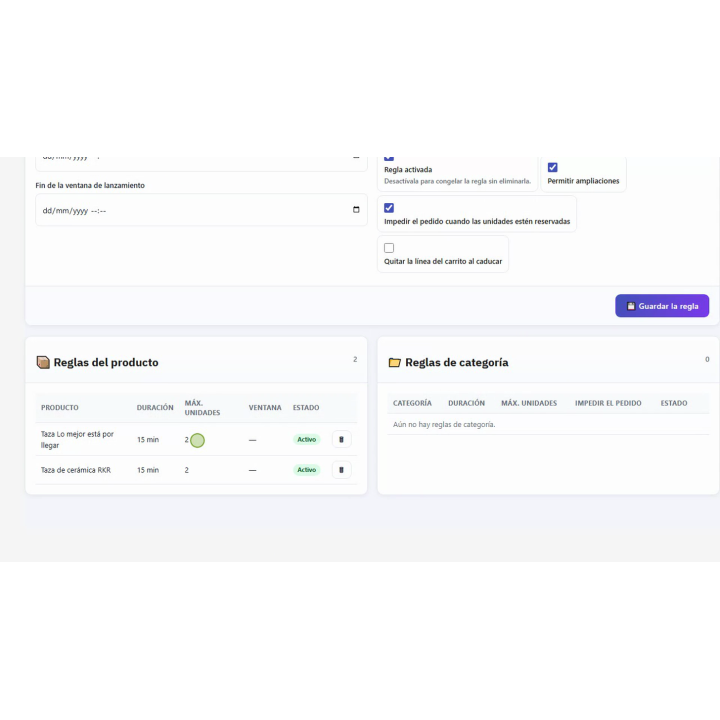
General settings apply to the entire store, and you can add rules for specific products and categories. The product rule takes precedence; if there isn't one, the rule for the deepest category takes precedence; if there's no category rule, the general settings take precedence. A value of 0 in a rule means "inherit."

Date window
A rule can have a start and end date: perfect for a 48-hour drop or a flash sale. Outside of the specified window, the rule is ignored and the general settings apply.
Maximum per customer and per rule
Limits the number of units that one person can reserve per product (10 by default): protection against bots and resellers during launches.
Margin of safety
Units that are never offered: with a margin of 2, a product with 10 units shows 8 available. Cheap insurance if another system, such as an ERP, also records your stock.
By combination
Reservations are counted by product and by combination, so each size or color has its own reserved stock.

/ Measure what happens to your stock

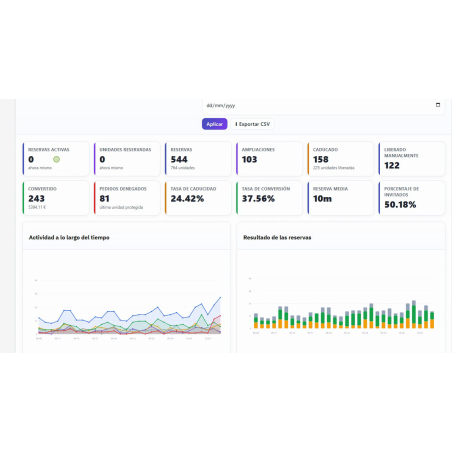
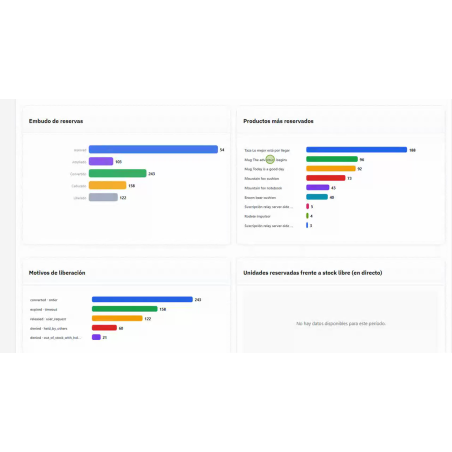
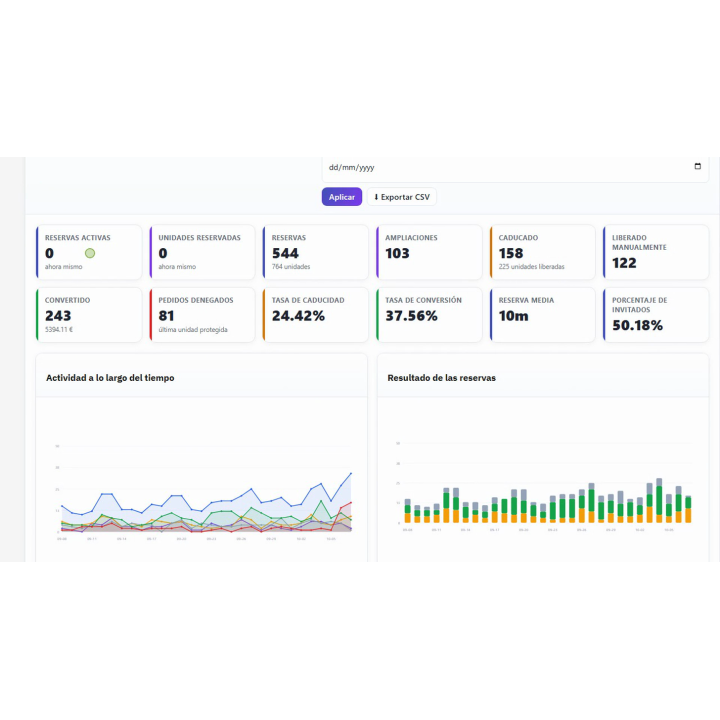
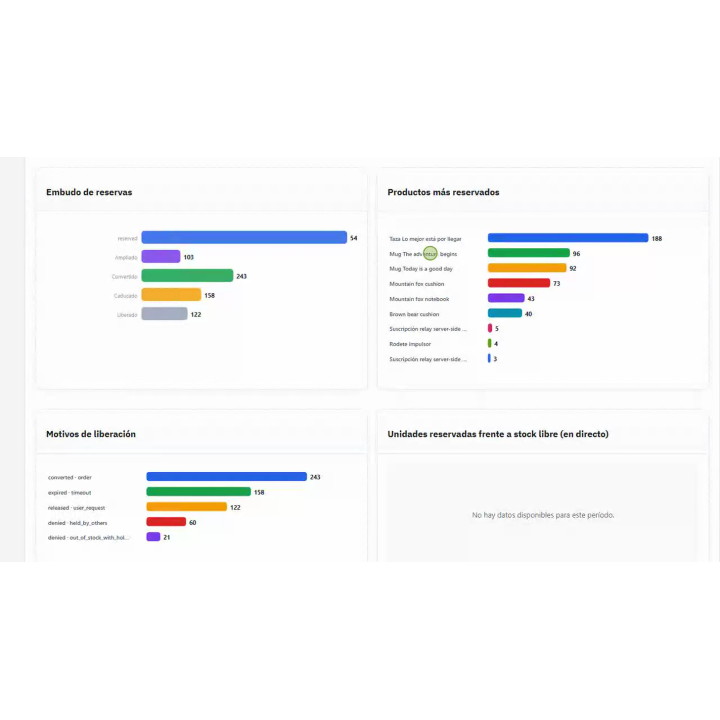
The Statistics tab shows you the booking funnel (booked, extended, converted to an order, expired, and released), a heat map by day of the week and time, the most booked products, the reasons for each release or rejection, and the breakdown between guests and registered customers. You choose the period (today, 7, 30, 90, or 365 days, or custom dates) and export the record as a CSV file. The charts work without external services.

Each time the module prevents the sale of a unit that another customer had reserved, it records it as "denied": it's your counter of Last units saved. Additionally, in the product details of the back office you can see the active reservations for that product (cart, customer, units, time remaining and upgrades) and the rule that applies to it.

/ Make it look like your store

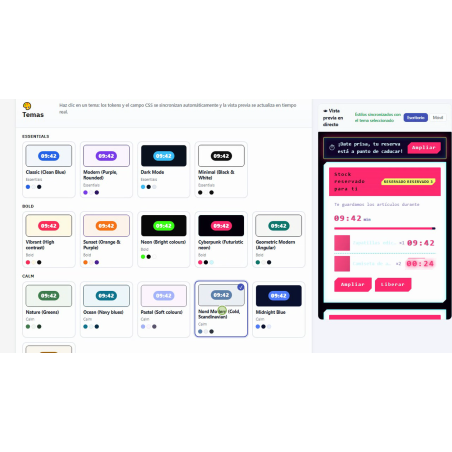
Choose from 23 designs, from classic to frosted glass, neon, or dark, and customize colors, borders, typography, sizes, and shadows. When you select a design, the preview updates instantly, without reloading the page, and includes its own countdown timer. You can assign different animation effects to the normal, urgent, and critical states (while respecting the system's reduced motion settings), and fine-tune them with your own CSS from the back office.

The texts the customer sees are edited by language and come standard in Spanish, English, French, Italian, German, and Portuguese. The module is multi-store: each store has its own settings. In the back office, it appears under «Rekire MODULES» → «Stock Reservation», with Settings, Rules, Design, Statistics and a step-by-step guide.

/ What you should know

The module requires stock management to be enabled in PrestaShop; without it, there is no stock to reserve, and it remains inactive instead of blocking anything. It uses the standard product, cart, and checkout hooks: if your theme doesn't print any of them, the guide tells you where to check. If you already have version 1.1.x, you upload the new ZIP: the module moves the menu to «Rekire MODULES”, regenerates the stylesheet and respects the text you have changed.

Compatible with PrestaShop 1.7.8 and 9.x

Developed and maintained by REQUIRE

v1.2.0

[destacado]

First complete version under the Rekire brand. Version 1.1.5 was functional but unfinished; this version makes it ready for sale.

New features

  • The " Rekire MODULES" menu ( RkrBackOfficeMenuTrait ) displays the module within the shared Rekire modules group, with its Settings, Rules, Design, Statistics, and Guide sections, and each entry in the employee's preferred language (es, en, fr, it, de, pt). Previously, it was located under "Sell" with its English name.
  • The reservation is honored when adding items to the cart. If the available units are reserved in other carts, the cart will only contain the available units, and the customer will see why ("Currently, there are only N units available..."). Previously, the product was added anyway, and the notification would appear, at the earliest, at checkout.
  • Final check at checkout : In addition to the order page, the payment module validation returns to the cart if a unit reserved by another customer is still in it, with details of which product and how many are available.
  • Customer texts in six languages (es, en, fr, it, de, pt) as standard, and four new editable ones: units reserved in other carts, reservation time on the card, limited addition and rejected addition.
  • Notice upon adding : "Added to cart: units reserved during 09:58".
  • Email "your reservation is about to expire" in mails/ / (six languages) and also sent without a cron job, using the store's own traffic.
  • When the "Remove line from cart" option expires, it is now actually removed from the cart (previously only the reservation was released).

Arrangements

  • The customer's shopping cart could be lost when adding a product: the module's AJAX point stored its request counter in the cookie, and a synchronization that coincided with the "add to cart" action would overwrite the cookie without the cart. Now, that point never writes to the cookie.
  • A 10-minute reservation used to last 2 hours and 10 minutes on servers with PHP and MySQL in different time zones (PHP in Madrid, MySQL in UTC): it was saved using PHP's time and compared with MySQL's NOW() function. Now everything uses the same clock.
  • The Statistics panel was always empty , the rules by category were not applied , and the search and rules list returned nothing: these queries asked PrestaShop for the cursor instead of the rows ( executeS( $sql , false) ).
  • A rule without dates was failing to book : the empty window was saved as 0000-00-00 00:00:00 and the engine interpreted it as "the sale has ended". Now it is saved as NULL, and the update corrects the rules that were already saved.
  • "Extend" released the reservation instead of extending it, although the customer saw "Reservation extended".
  • Two customers could get the last unit if both reservations were the first for that product: SELECT … FOR UPDATE doesn't block rows that don't yet exist. Now each product and combination is reserved with a named lock.

  • "Apply only if stock is less than" did the opposite: it reserved with plenty of stock and not with little.
  • The countdown didn't appear on the checkout page for Classic and Hummingbird, which don't run displayFooter on that page: now it goes on displayCheckoutSummaryTop .
  • The actionFrontControllerAfterInit hook is deprecated in PrestaShop 9 and in debug mode its warning broke the cart's AJAX responses: actionFrontControllerInitAfter is used, which has existed since version 1.7.8.
  • In areas where cart errors are not displayed, the customer whose add-on was rejected saw nothing: now the module alerts them.
  • The card said "1 unit reserved by other customers" when the unit belonged to the visitor .
  • The store's texts appeared in English in all languages .
  • The text tab displayed the text in the employee's language in all languages, so when saving, they all overlapped with the same text .
  • The email templates contained template tags that PrestaShop does not process in emails: they would have arrived with the code visible, and they were also in a folder where Mail::send() does not find them.
  • Saving the settings did not change the date in the stylesheet, and the browser continued to serve the previous version of the design .
  • The stylesheet used to be recompiled and compared on each visit; now it's written on save and the store just checks that it exists.
  • Products that are sold out of stock (backordered) are no longer limited: your reservation only moves the countdown.
  • Without stock management activated, the module remains inactive instead of blocking.
  • Remove hooks that do not exist in PrestaShop ( actionCart , actionCartUpdateQuantity , actionProductAttributesModify ) or that were an alias ( displayProductButtons ), and the loading of module scripts on all back office pages.
  • The error message when extending a reservation used to display an internal code ( max_extensions_reached ); now it's text for the customer.
  • Revised Spanish translation: "stock" had been translated as "actions".

For Addons

  • No nofilter in the templates, no HTML in the PHP, no Context:: , file_get_contents() or Tab::getIdFromClassName() .
  • .htaccess and index.php in all folders, config.xml the same as PHP, logo.png of 57x57 and AFL 3.0 license in all files.
  • tests/ and the generated stylesheets do not travel in the package.

Update from 1.1.x

upgrade/ upgrade-1.2.0.php moves the menu, removes old hooks, regenerates the stylesheet, and restores to its original language the texts that still had the factory English value (those changed by the merchant are respected).

4 other products in the same category

FAQ and Questions and Answers Module
€36.30
€30.00 Sin impuesto €36.30 Con impuesto
Product Videos
RKR Questions in 90 seconds (English)
play_circle_outline

Questions and answers

Nobody has asked anything about this product yet.

Loading...
Cookie consent
Back to top