





- New




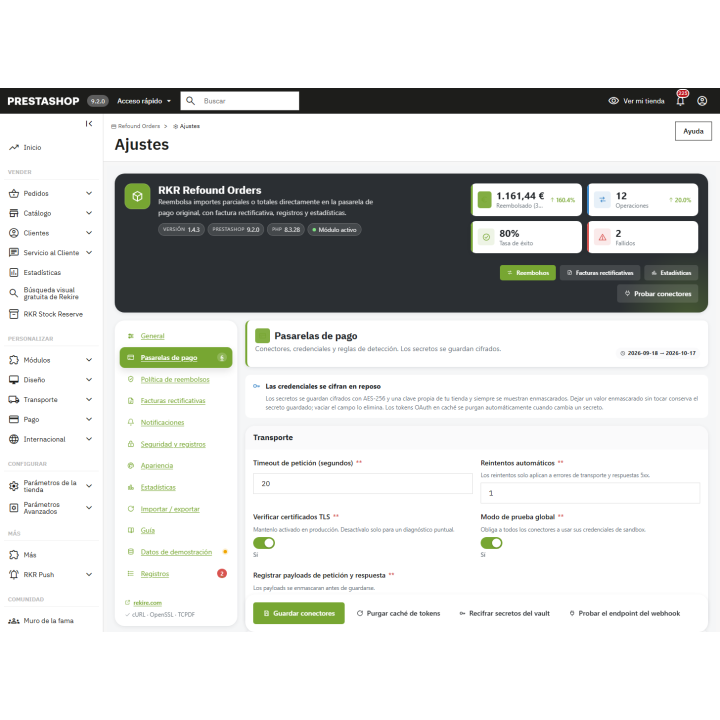

RKR Refund Orders: Refunds on the payment gateway with a corrective invoice images
RKR Refund Orders: Refunds on the payment gateway with a corrective invoice
Price:
€145.08
€119.90 Sin impuesto
€145.08 Con impuesto
Refund all or part of an order through the original payment gateway without leaving the back office: Stripe, PayPal, Redsys/Bizum, Paycomet, manually or via hook. Includes PDF invoice corrections, full audit trail, customer refund requests, statistics, and import/export functionality. Rekire module, tested in live stores.
Compatible with PrestaShop 1.7.8 to 9.2, with PHP 7.1 to 8.3.
Refunds
Getting a refund shouldn't be a three-screen process.
Refunding through the payment gateway, opening a separate invoice tool, and manually tracking who did what is time-consuming and prone to errors. RKR Refund Orders lets you refund the full or partial amount through the original payment gateway without leaving the order, providing a corrected invoice in PDF format and ensuring everything is properly recorded.
6 connectors
Stripe, PayPal, Redsys/Bizum, Paycomet, manual refund, and a per-hook connector for other payment modules
PDF on any server
The corrective invoice is generated using PrestaShop's TCPDF; if it's not available, with a custom PDF writer; and if that's not available either, as a printable page.
1.7.8 → 9.2
a single version of the module for your PrestaShop stores, with PHP 7.1 to 8.3
/ Refund from the order itself
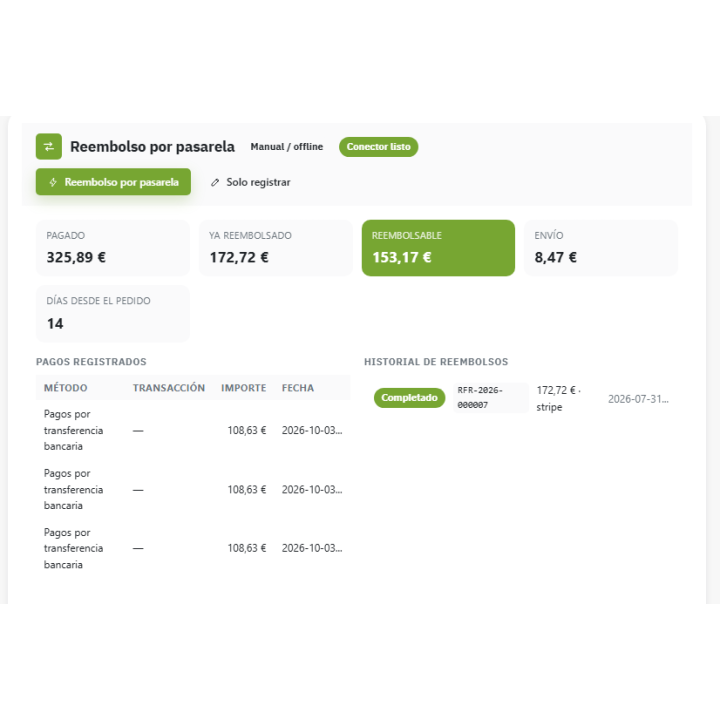
You open the order and find the "Refund via Payment Gateway" panel. You see the amount charged, the amount already refunded, and the remaining balance that can be refunded. You select the lines and quantities, or enter a free amount, and you can include shipping costs. You choose the reason, add an internal note and a message for the customer, and click "Refund Now." The module detects the payment gateway used for the order; if any payment module requires a special rule, you define it.
Do you just want to register a return you already made elsewhere? "Just register" registers it without calling the payment gateway.
The gateways you already use
Stripe and PayPal
The refund is processed through the payment gateway itself. Each connector tells you if it's ready, incomplete, or deactivated, and has a button to test the connection.
Redsys, Bizum and Paycomet
For Spanish stores: full and partial refunds using your POS credentials, in real or test mode.
Manual and by hook
Cash, transfer, balance or voucher without an external call; and, if your gateway is different, its module can execute the refund with the actionRkrRefundProcess hook.
No duplicate charges
If the connection fails and you request a refund again, the module prevents it from being issued twice: it avoids this by order, amount, and connector. Failures are retried up to a limit you set, and you can require approval above a certain amount, so the payment gateway remains untouched until an authorized user releases the funds.
/ Corrective invoice ready, in PDF
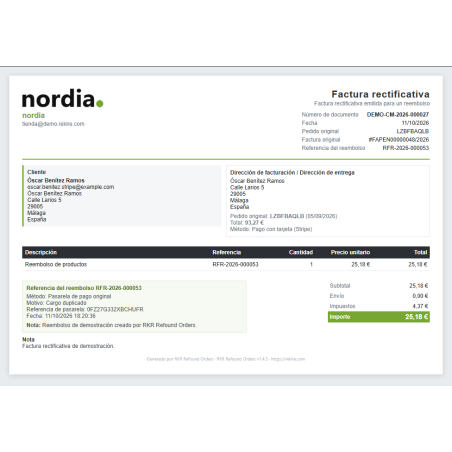
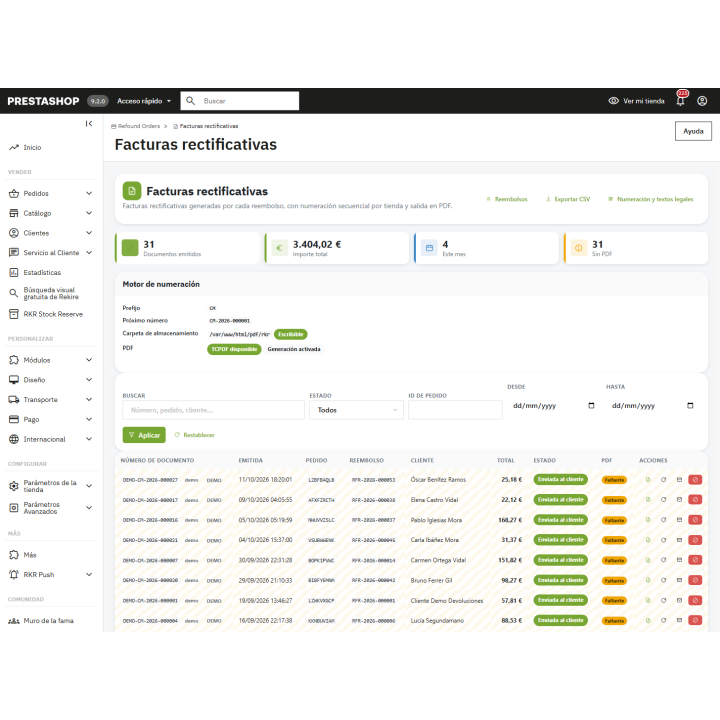
Each refund generates its own credit note with its own unique numbering (prefix, first number, and leading zeros as you wish), including the issuer's name, legal notice, and footer in each language, printed in the language of the order. From the list, you can view, regenerate, send to the customer, or cancel it. Optionally, it also creates the native PrestaShop voucher, replenishes the stock, and changes the order status to "refunded" or "partially refunded."
/ That the customer requests the refund themselves
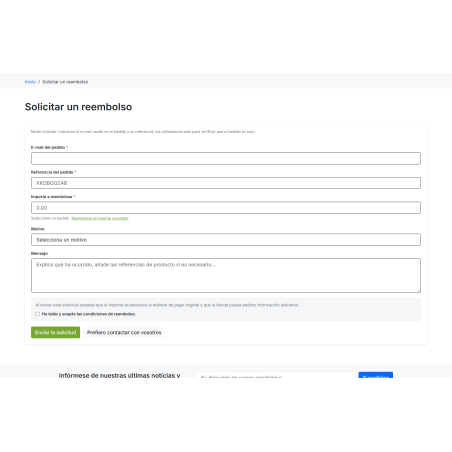
The store includes a "Request a Refund" page, accessible via a block in "My Account." Registered customers or guests can request a refund using their email address and order reference, which are verified against the order. You define the return window in days and the reasons for the return. From the back office, you can approve, reject with a response, or issue a refund with a single click. Smaller requests can also be automatically approved up to a specified amount, with a limit per customer every 30 days. If the payment gateway fails, the request is returned for manual review.
Everything is recorded
Audit
Every validation, call, retry, approval, and import leaves a trace, including employee, IP address, and latency. Sensitive data is masked, and records expire according to your chosen retention period.
Statistics
Amount refunded, transactions, success rate, failures, and affected orders, compared to the previous period; breakdown by payment gateway, status, and reason; activity by hour and day of the week; and 7-day forecast. These data are exported to CSV.
Notices
Emails are sent to the customer and the store when a refund is completed, fails, or a request is received, in both Spanish and English. If needed, a webhook signed with HMAC-SHA256 notifies your systems.
Import , export, and test risk-free
Export refunds, invoices, records, requests, and adjustments in CSV, JSON, or XML format. Import refunds and adjustments with a preview simulation that shows you the row and error report, and with automatic backups before each actual import. You can also install demo data to view all statuses and delete it with a single click without affecting your live data.
What worries us
Your passwords are safe
Gateway credentials are stored encrypted with AES-256-CBC and are always displayed masked.
Who can do what?
Separate permissions for viewing, refunding, approving, configuring, and exporting, per employee profile. Additional IP lists and request limits for the back office and store.
Multi-store and multi-language
Configuration, keys, and numbering per store. Panel in Spanish and English, with texts and documents in each language of your store.
A panel that adapts to you
Choose from 24 color themes for the module panel, with preview.
To process refunds through the payment gateway, you need an active account and API credentials for each service (Stripe, PayPal, Redsys, Paycomet). The module uses cURL to communicate with them. Each gateway is a third-party service with its own terms and conditions. Always test with a small amount in test mode before using a live account.
Compatible with PrestaShop 1.7.8 to 9.2, with PHP 7.1 to 8.3
Developed and maintained by REKIRE
-
Referencerkrrefoundingorders
v1.4.4
Fixed
- Back office: the module's stylesheet and scripts were loaded on every screen, and its generic
.rkr-modal/.rkr-drawerrules (hidden until opened) left the dialogs of other Rekire modules invisible, such as the RKR Mail Editor editor on PrestaShop 9.0. They now load only on the module's own screens, its configuration page and the order and customer pages. - Every back office rule now only applies inside the module's own markup, the dialog classes are
.rro-modal/.rro-drawerand the animations are renamed, so nothing collides with another module even on a shared screen.
v1.4.3
Fixed
- Front office: the request page loaded neither its stylesheet nor its script (the asset paths carried a query string the core drops), and once the script loaded no request was ever saved (it disabled the submit button, so the form arrived without it).
- "Customers and guests" mode: a logged-in customer could not send a request, because the guest e-mail was required.
- "My account": the link uses the Hummingbird account menu (and the classic tile on Classic); the footer list gets a plain link.
- Order page panel: it vanished in debug mode and "Payments recorded" was always empty.
- Back office: "Refund via gateway", "Register only" and "New refund" did not open the refund window, and dismiss / confirm buttons did nothing (delegated click handlers).
- Filtering the refund, credit memo and log lists ended on the "Invalid token" page.
- Order states "Refunded" / "Partially refunded" are named in every language; status labels in the singular; request statuses, refund statuses and the policy error messages translated.
- Demo data: every demo credit memo had the same number, and some demo requests were 0.00.
- Credit memo preview: the shop logo did not load.
- Wide log tables run off the card at 1280 px; the customer's request table broke one word per line on a phone.
4 other products in the same category

Extended registration module. Address fields during customer registration
 Blog
Blog
€60.44
€49.95 Sin impuesto
€60.44 Con impuesto
Product Videos

Connector module with AI catalog flow app
€605.00
€500.00 Sin impuesto
€605.00 Con impuesto

Sentinel module - Telegram alerts for all website errors
€302.50
€250.00 Sin impuesto
€302.50 Con impuesto
Viewed products
- New

RKR Programmatic SEO: Batch SEO landing pages for PrestaShop
€120.88
€99.90 Sin impuesto
€120.88 Con impuesto
Product Videos
También podría interesarte

€60.44
€49.95 Sin impuesto
€60.44 Con impuesto

€12.09
€9.99 Sin impuesto
€12.09 Con impuesto
- On sale!


€96.79
€79.99 Sin impuesto
€96.79 Con impuesto


€96.79
€79.99 Sin impuesto
€96.79 Con impuesto


€84.69
€69.99 Sin impuesto
€84.69 Con impuesto

€120.99
€99.99 Sin impuesto
€120.99 Con impuesto


€60.50
€50.00 Sin impuesto
€60.50 Con impuesto


€96.79
€79.99 Sin impuesto
€96.79 Con impuesto


€302.50
€250.00 Sin impuesto
€302.50 Con impuesto


€181.50
€150.00 Sin impuesto
€181.50 Con impuesto
Questions and answers
Nobody has asked anything about this product yet.

