







- New




RKR Vape & Nicotine Excise Tax: Special Tax and Form 573 for PrestaShop images
RKR Vape & Nicotine Excise Tax: Special Tax and Form 573 for PrestaShop
Price:
€157.18
€129.90 Sin impuesto
€157.18 Con impuesto
It calculates the special tax on vaping liquids and nicotine products (Law 7/2024) per product and combination, displays it on the product sheet, shopping cart and invoice, charges it with its VAT if you need it and gives you the monthly summary by heading for Model 573, with 23 design themes.
Compatible with PrestaShop 1.7.8 to 9.2. Tested on PrestaShop 1.7.8 , 8.2, 9.0 and 9.2.
Special vaping tax
From April 1, 2025, every milliliter of e-liquid and every gram of nicotine pouches is subject to a tax. Do you know how much each product in your store is taxed?
Law 7/2024 taxes liquids for electronic cigarettes and other tobacco-related products, and the amount changes with the volume, concentration and weight of each version. RKR Vape & Nicotine Excise Tax It calculates it by product and by combination, displays it where appropriate, and provides you with a summary by heading each month, ready for your accountant.
4 headings
0L1, 0L2, 0L3 and 0L4, with the default types already loaded and editable in case the regulations change
23 design themes
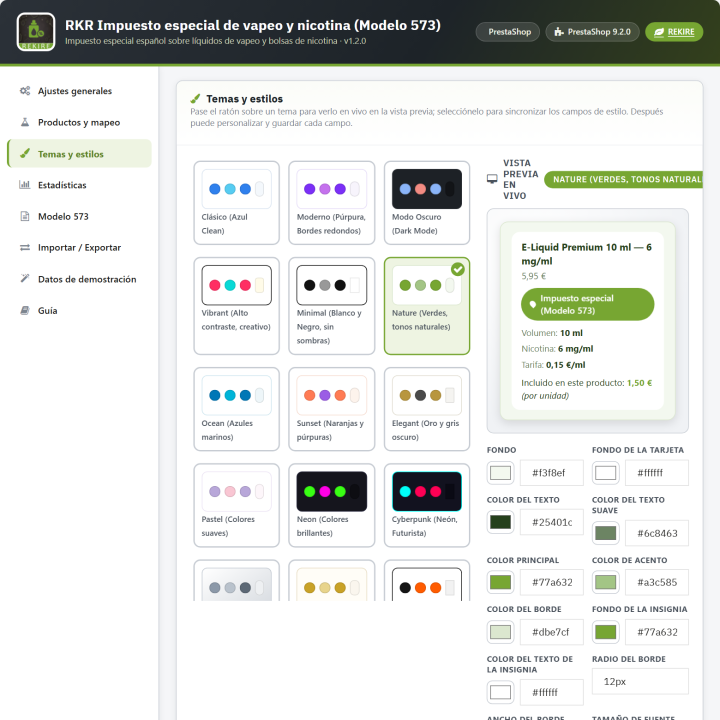
with live preview so the tax block fits your store
1.7.8 → 9.2
a single version of the module for all your PrestaShop stores, with PHP 7.1 to 8.4
/ Each version pays its fair share.
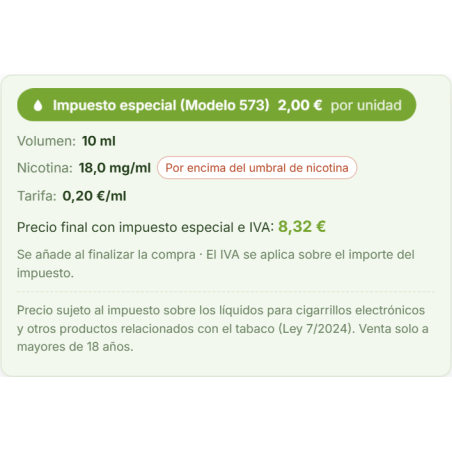
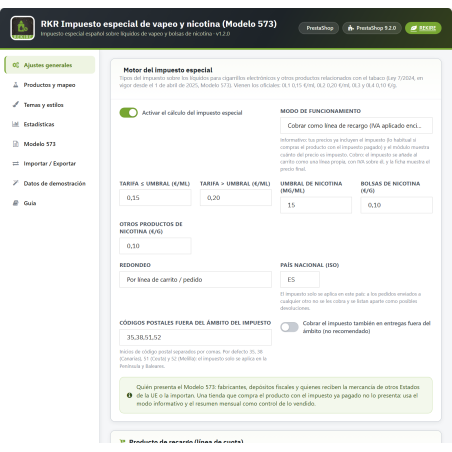
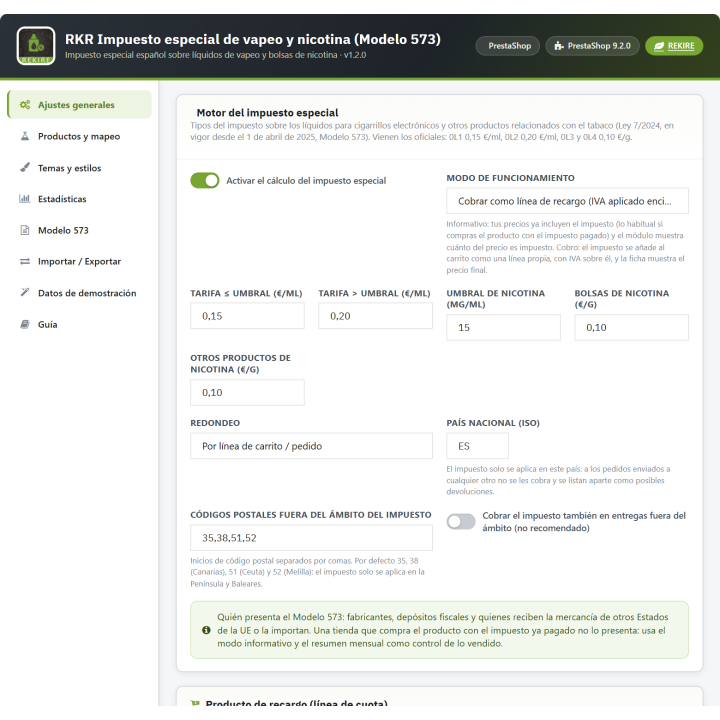
The module works with the four tax headings: 0L1, nicotine-free liquid or up to 15 mg/ml (€0.15/ml); 0L2, liquid with more than 15 mg/ml (€0.20/ml); 0L3, nicotine pouches (€0.10/g), and 0L4, Other nicotine products (€0.10/g). Types, nicotine threshold, and rounding (per line or per unit) can be changed in the settings.
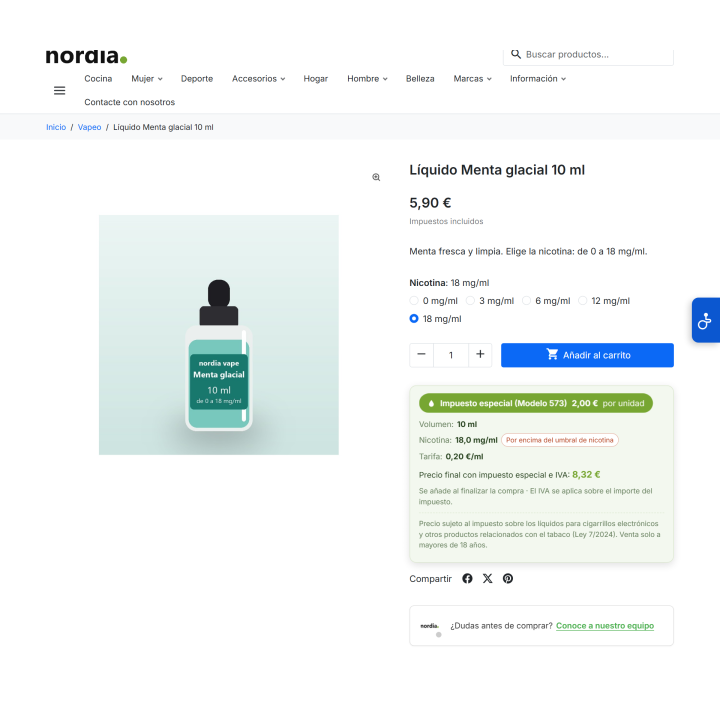
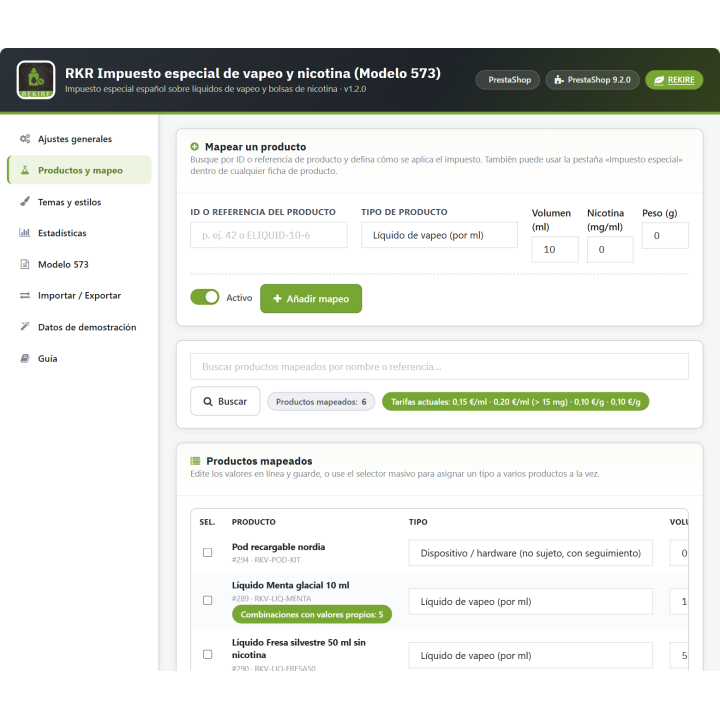
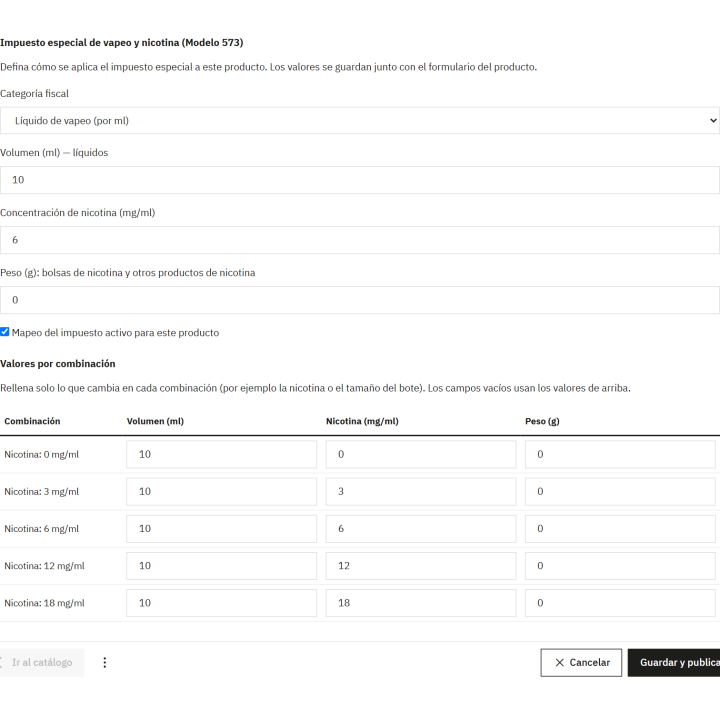
Each product is associated with its type, volume, nicotine concentration, or weight. And importantly: The values are in combination.. The same liquid in 0, 3, 6, 12 or 18 mg, or in 10 and 50 ml, pays what corresponds to each version, not a single figure for all.
Products and Mapping Tab
Quick registration by ID or reference, editable table, block type assignment, and pagination.
Module tab in each product
Within the back-office record: type, volume, nicotine, weight and, below, the values that change in each combination.
Import via CSV
For stores with hundreds of references: id_product, id_product_attribute, type, volume, nicotine and weight in a single file.
/ Two ways of working: informational or collection
Information mode (the default setting)
Your prices already include the tax because you're buying the goods with it already paid for. Nothing is added to the cart: the module shows how much of each price is excise tax and saves the monthly figures.
Payment method
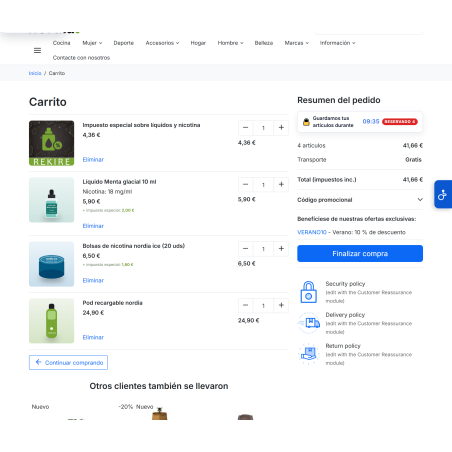
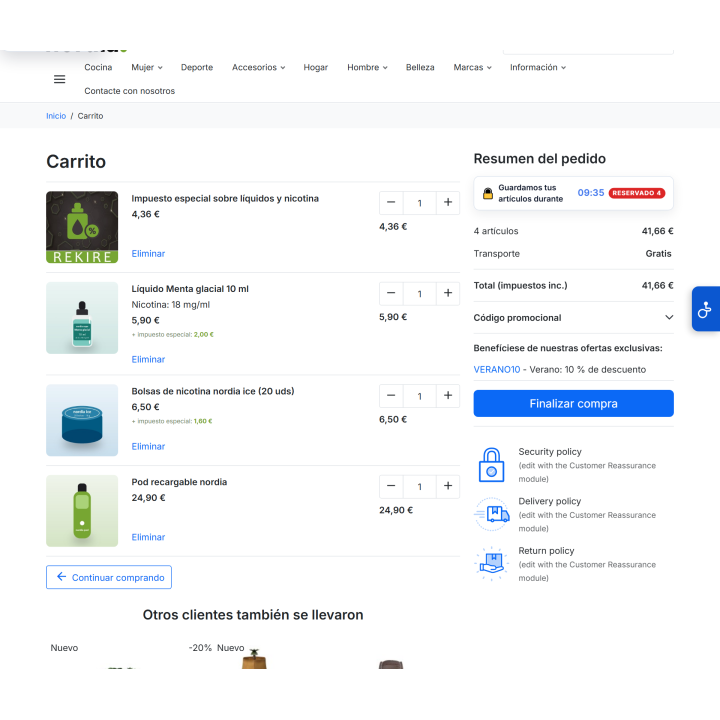
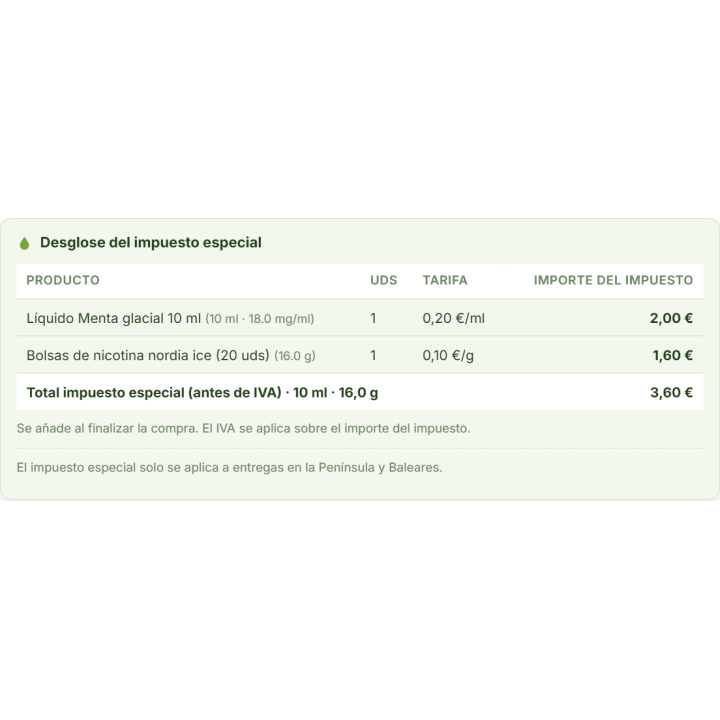
Your prices do not include it. The tax is entered as a separate line item in the shopping cart, with the VAT calculated above it, and the product page displays the final price. That line item always shows one unit: the customer cannot multiply it or charge it twice.
/ The customer sees it clearly, in their own currency.
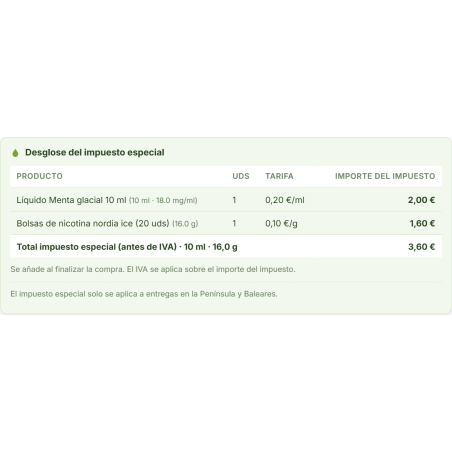
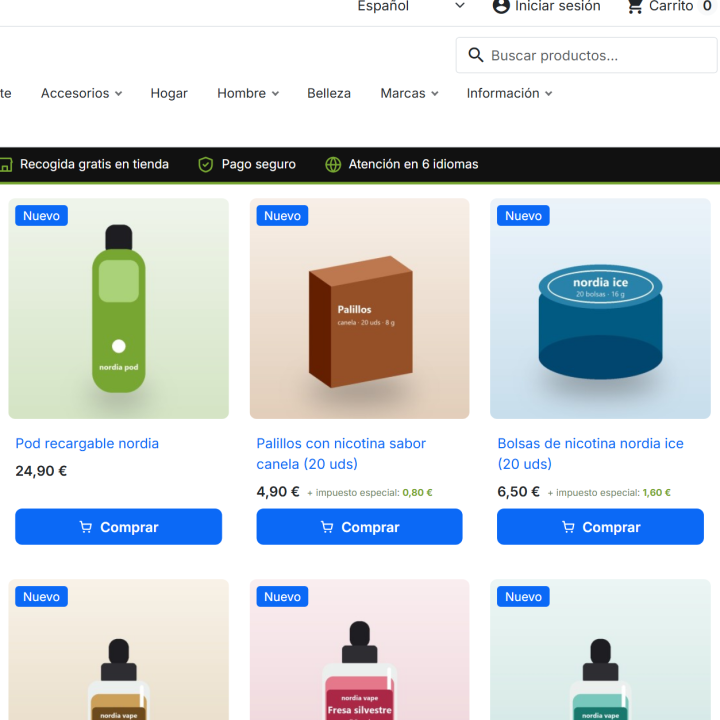
The breakdown appears in the product sheet, in the lists (one note, not one per thumbnail), in the shopping cart (which refreshes when quantities change without reloading the page), in the PDF invoice and in the back-office order. Amounts are displayed in the customer's and order's currency, and each field can be activated or hidden separately. Legal notices are editable in each language.
/ Only where applicable: Peninsula and Balearic Islands
The tax applies in mainland Spain and the Balearic Islands. Deliveries to the Canary Islands, Ceuta, Melilla, or abroad are free of charge. The delivery area is determined by postal code, with the prefixes 35, 38, 51, and 52 excluded by default and editable. These orders are placed on a separate list. possible returns (models A24 and 590) so that you mark them as requested, without subtracting them from the summary.
/ The monthly summary, by heading
You choose a month and see, for each item, the base (milliliters or grams), the type, and the fee, along with the total. Cancelled orders, payment errors, and sample data are not included. VAT on the tax and shipments outside the designated area are shown as informational lines.
Months submitted, closed
You save the month as a draft or submitted. A submitted month retains what you submitted and is only recalculated if you explicitly request it.
CSV for your manager
Export by month, by quarter or by year: summary by heading, detail by order and details of returns.
Refund vouchers
Units returned with a voucher adjust the order lines and are removed from the summary.
Regarding Model 573: The module prepares the figures, it does not present the model.. Manufacturers, tax warehouses, and those who receive or import products from other EU member states submit their own certificate on the AEAT website. If you purchase a product with the tax already paid, you don't need to submit it yourself: the informational form and monthly summary serve as your control. Consult your tax advisor; the module does not replace them.
/ Statistics, import, and demo
Statistics
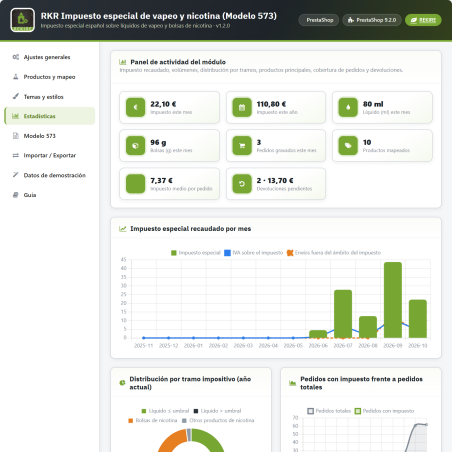
Monthly and yearly indicators (tax, milliliters, grams, orders with tax, pending returns) and 5 charts: monthly trend, distribution by segment, orders with tax versus total, top 10 products, and volumes. Chart.js is included in the module: no CDN or external services required.
Import and export
Product mapping with combinations, reports, and orders in CSV format, and configuration in JSON format for transfer to another store. Values are validated upon importing the configuration.
Demonstration data
Three sample products, created in a deactivated state so no one can buy them, and six months of simulated activity to view the statistics. They can be removed with a click and never appear in the summary.
/ What worries you
Your store's tax information
Everything is saved in your database. Orders with tax are recorded upon validation, and uninstalling the module retains the data unless you explicitly enable deletion.
Security
Back-office forms and exports are protected with a proprietary token validated on the server, and incoming data is sanitized before being saved.
Multistore
Types, mode, notes, theme, and mappings are saved per store: each store can have different values for the same product.
Languages
Interface in Spanish and English, with an integrated guide. Texts can be changed from International > Translations, and legal notices are edited by language.
Topics
Compatible with Classic and Hummingbird themes. The block's design uses CSS variables, and a file is generated per store; you can add your own CSS.
/ Designed for vape shops in Spain
If you sell liquids, nicotine pouches, or other nicotine products in Spain and need to know how much of each price is special tax, display it on the product sheet and invoice, or include it in the shopping cart along with VAT, here you have it all in a single module and without touching spreadsheets.
Compatible with PrestaShop 1.7.8 9.2
Developed and maintained by REQUIRE
-
Referencerkrvatvape
v1.2.0
Complete review, both fiscal and technical.
Fiscal
- New heading 0L4, other nicotine products (€0.10/g), in addition to 0L1, 0L2 and 0L3.
- Territorial scope : the tax only applies in mainland Spain and the Balearic Islands. Deliveries to the Canary Islands, Ceuta, Melilla, or abroad are no longer subject to this tax (configurable postal codes) and are processed separately as potential returns (A24 / 590), without being deducted from the total.
- The summary of Model 573 is presented by heading (base, type and fee) and excludes cancelled orders, payment errors and demonstration data.
- A submitted month is closed: what was submitted is seen and it is only recalculated if expressly requested.
- The VAT on the tax is taken from the surcharge line actually charged.
Arrangements
- The surcharge line can no longer be multiplied: it always includes one unit (previously, pressing "+" in the cart charged the tax twice). Your card returns 404.
- The combinations (0 / 3 / 6 / 12 / 18 mg, 10 / 50 ml) have their own values: before, they all paid the same as the product.
- Return vouchers actually adjust the order lines (previously the adjustment was never executed).
- The PDF invoice shows the tax block (a hook was used that the PDF does not call).
- Amounts are shown in the currency of the customer and the order.
- Installing via console or from another module no longer leaves the module incomplete (stock of the surcharge without employee in PrestaShop 8/9).
- Reinstalling without deleting data reuses the recharge product instead of creating another one, and when uninstalling or regenerating it, it is removed from open shopping carts.
- Importing a configuration can no longer target the surcharge to an actual product.
- Saving a declaration in PrestaShop 9.0 resulted in an SQL error.
- Importing the CSV exported by the module itself (with BOM) skipped the first column.
- The listing note appeared repeatedly in each thumbnail; now once and in both modes.
- The cart breakdown refreshes when quantities are changed without reloading the page.
Improvements
- Default information mode (the case of a store that buys with the tax paid); in payment mode the card shows the final price with tax and VAT.
- Demo products are created disabled.
- Integrated guide, revised texts and Spanish translation.
- Fail-safe PrestaShop Addons validator; AFL-3.0 license on all files.
4 other products in the same category


Stripe payments module in the subscription
€121.00
€100.00 Sin impuesto
€121.00 Con impuesto

- New

RKR Interactive Spare Parts Breakdowns
€108.78
€89.90 Sin impuesto
€108.78 Con impuesto
También podría interesarte


€60.44
€49.95 Sin impuesto
€60.44 Con impuesto

€12.09
€9.99 Sin impuesto
€12.09 Con impuesto
- On sale!


€96.79
€79.99 Sin impuesto
€96.79 Con impuesto


€96.79
€79.99 Sin impuesto
€96.79 Con impuesto


€84.69
€69.99 Sin impuesto
€84.69 Con impuesto

€120.99
€99.99 Sin impuesto
€120.99 Con impuesto


€60.50
€50.00 Sin impuesto
€60.50 Con impuesto


€96.79
€79.99 Sin impuesto
€96.79 Con impuesto


€302.50
€250.00 Sin impuesto
€302.50 Con impuesto


€181.50
€150.00 Sin impuesto
€181.50 Con impuesto
Questions and answers
Nobody has asked anything about this product yet.

