










What it does for your store
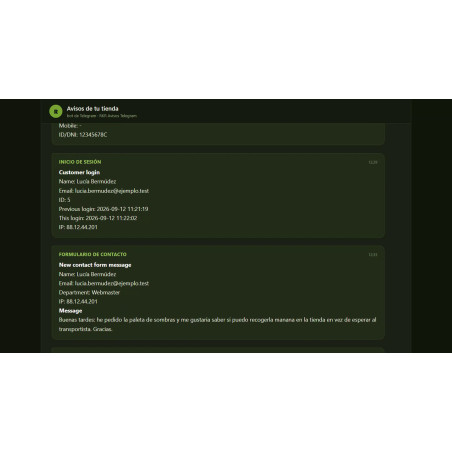
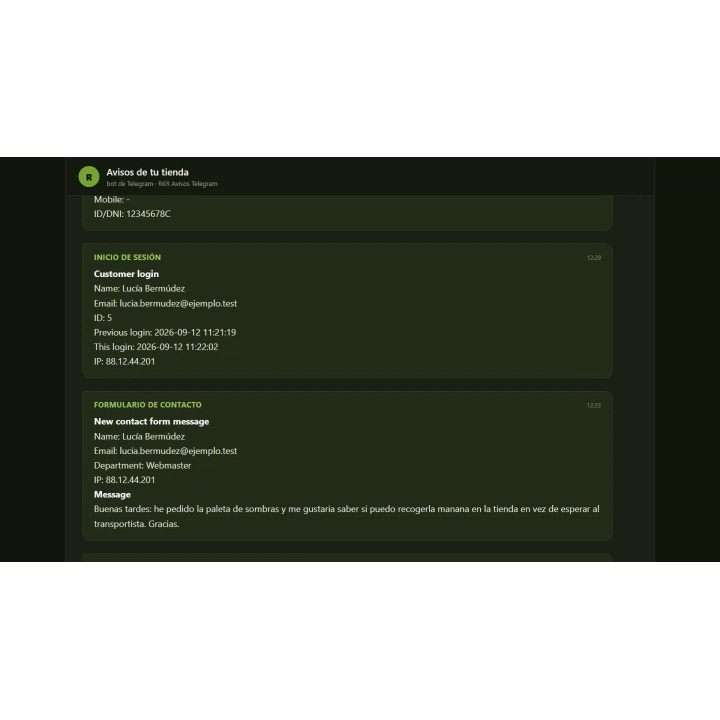
- Eight notifications tailored to your needs: Sign-ups, addresses, logins, visited pages, contact, shopping carts and orders: activate only the ones you want and each one can go to a different chat.
- The margin of each order The order notice shows the cost, gross margin and net profit, and tells you how many products do not have a cost price.
- Instant Carts You know when someone adds products to the cart, whether a customer or an unregistered visitor, with everything inside.
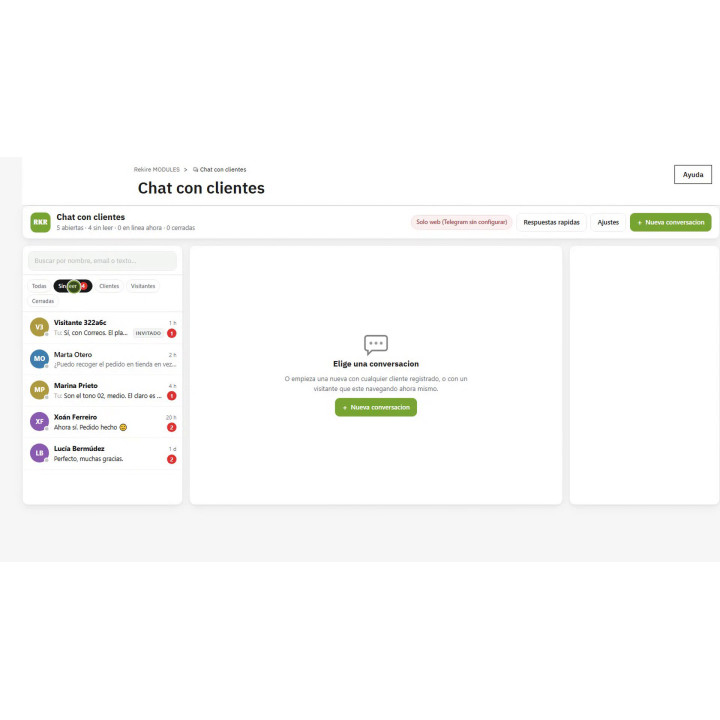
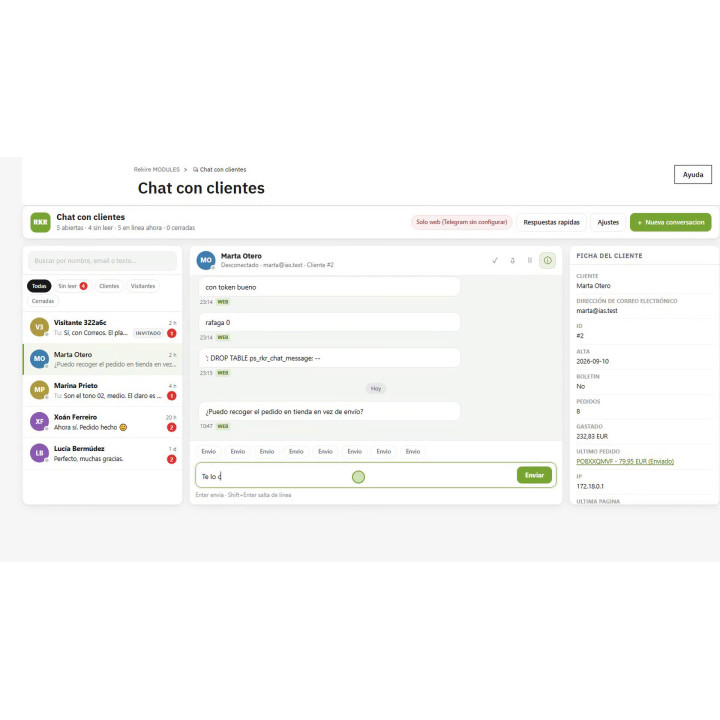
- Chat with your customers. A tray in the back-office to talk to customers and visitors, with their record next to it: orders, spending, current cart and last page.
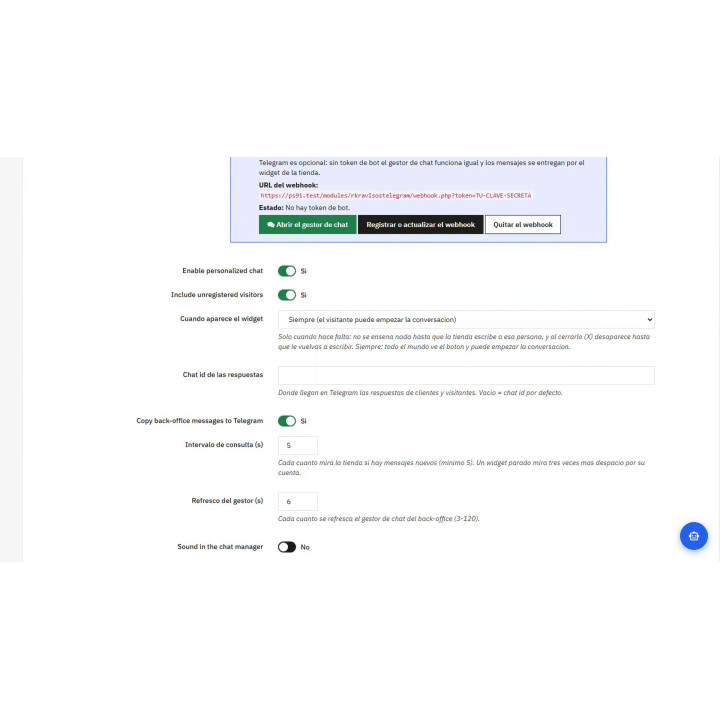
- Telegram is optional. The chat reaches the customer through the store itself even if you don't have a bot; with Telegram, you also receive their messages on your mobile.
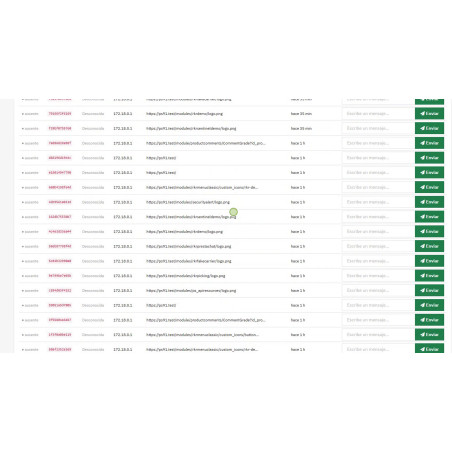
- Live Visitors : You can see who is currently browsing your store, from which country and on which page, and you can message them directly.
Telegram module total notifications
Price:
€108.78
This product can be bought as a subscription. Below you can see what each option includes and what it costs.
First year:
€108.78
tax incl.
From the second year:
€27.20/year
tax incl.
- One year of technical support and lifetime updates; from the second year, support is extended for €27.20/year and includes taking on your general improvement ideas for the module.
- Renews automatically; cancel whenever you want, with no minimum term.
One-time payment:
€108.78
tax incl.
- One year of technical support and lifetime updates; after that, support ends (with the subscription it is extended for €27.20/year).
- A single payment, with no automatic charges.
€89.90 Sin impuesto
€108.78 Con impuesto
Eight notifications from your store on Telegram — sign-up, address, login, visits, contact, customer cart, guest cart, and new order with margin summary — each with its own switch and chat.
And a two-way chat with your customers : inbox in the back office, widget in the store, and replies directly from Telegram. Telegram is optional: without a bot, the chat works through the website. PrestaShop 8 and 9.
Installation, updates and support
Free installation
We'll do it for you! We'll install and configure the module in your store completely free of charge , guaranteeing a quick and hassle-free start.
Lifetime updates
Get permanent access to the latest version of your module. Your investment is protected and it will always be compatible with new versions of PrestaShop.
Certified quality
Our modules have passed the official PrestaShop validation, ensuring their security, performance and compatibility with the platform's standards.
Premium support (1 year)
You have a full year of dedicated support . Any questions or problems that arise regarding the module will be resolved by our expert team.
Why did we create this module?
It's a way to receive many notifications without being intrusive. It allows you to select what you want; for example, we've activated it to notify us when a registered user adds products to their cart, and a B2B client wants to know when someone new registers on the website.
Stop logging into the back office and see if anything has happened.
RKR Telegram Alerts sends you to your mobile phone what's happening in your store —a new registration, a shopping cart, an order— with all the data inside the message, so I don't have to go inside to look at it.
And it goes both ways: it also brings a chat with your customers which is handled from the back-office, from the store, and from Telegram itself.
8
notifications, each with its own switch and chat
1
A bot for everything, without any additional setup.
3
Sites from which to provide service: back-office, store and Telegram
The eight warnings
Each one lights up separately and can go to a different chat: orders to the administration group, new registrations to the marketing group, and contacts to the person who handles them.
New orderCustomer, telephone number, address, carrier and payment method; the products line by line with their cost; and the margin summary: cost, gross margin, shipping and net profit.
Added to cartThe entire shopping cart with the customer's information, phone number, and address. And the version for unregistered visitors, with your IP address, your likely location, and the identifier to write to you.
Customer registrationComplete registration details: name, email, birthday, company, newsletter, date and IP.
New addressThe full address with the phone number and email highlighted, which is what's needed if we have to call.
LoginWho has entered and when they entered last time.
Contact formThe message they just wrote, with the client and the subject.
Pages visitedA summary grouped by client Released by CRON, not one message per page: the group remains readable.
The order notification includes the margin already made
It's not just about the price. Below the products, you'll find the summary that really matters:
- Cost of products, taken from the cost price you already have in the record (the wholesale price of the core).
- Gross margin: income before taxes less that cost.
- Net profit: the gross margin minus the shipping costs you pay.
And if any product has no listed price, the message He says it and counts how many there are, instead of showing you a round margin that isn't real.
The other half: talking to the customer
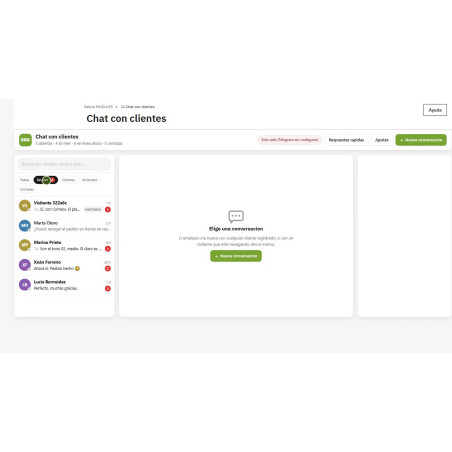
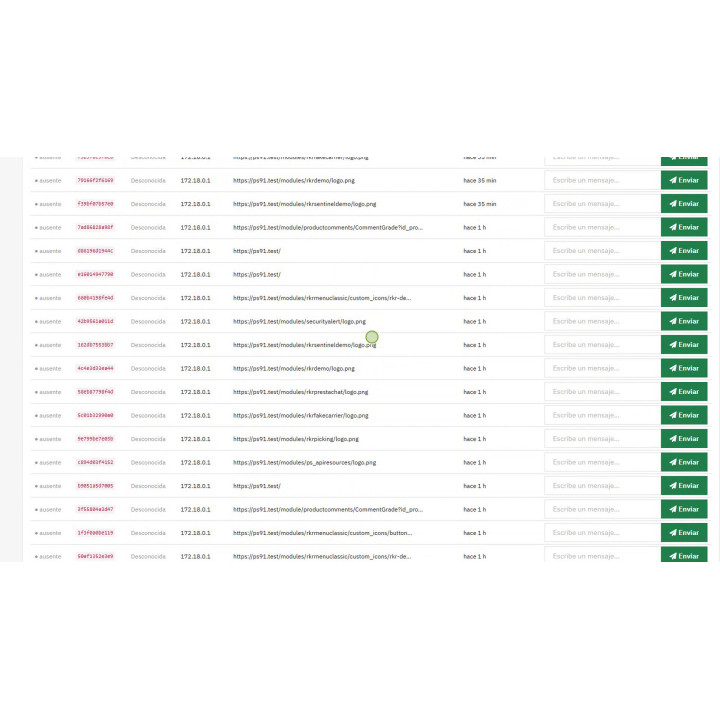
The chat manager lives in the back office, in Modules Rekire → Chat with customers, And it's a real inbox.
TrayAll conversations are searchable, filtered (unread, clients, guests, closed), and include online presence and a task counter. It refreshes automatically.
ConversationDay separators, the time of each message, who wrote it, how it came in —store, back-office or Telegram— and the read receipt when the customer actually sees it.
Customer recordNext to it: email, registration, orders, total spent, last order, current cart, last page, IP and country, with links to the customer, the order and the cart.
With saved responses for repeated messages, deletion of individual messages, closing and reopening the conversation, and downloading the entire conversation as text.
What the customer sees
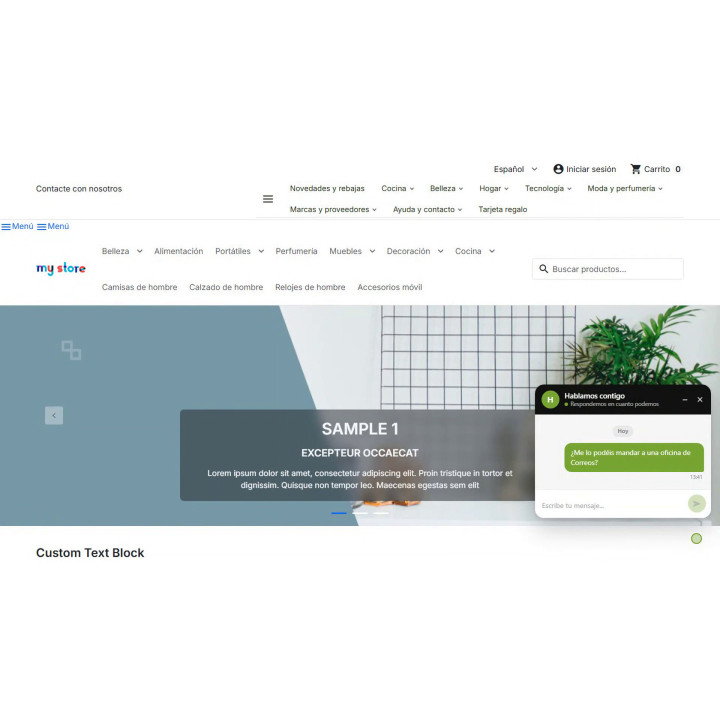
A floating chat in the store, with your store name and the color of your choice. With two controls that do different things, and that matters:
- Minimize Leave the balloon, with a warning if there is anything unread.
- Close It makes it disappear, and it doesn't return until the store writes.
By default, it's not even shown: it only appears when the store types first. If you prefer anyone to initiate a conversation, that's a setting you can adjust.
The unregistered visitors They are also included: they are identified by a session cookie—not by their IP address, which is shared and changes—and if they are subsequently registered, Their conversation stays with them instead of getting lost. There is also a panel of live visitors who you are currently browsing with, your country, your last page, and a box to write to you.
Telegram is optional
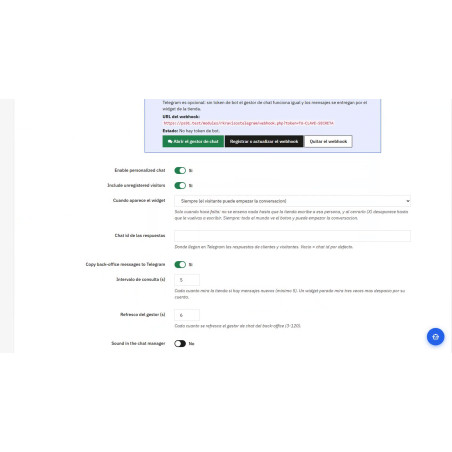
The chat with the customer works the same way. without any botsWhat you write in the manager is sent to the store. Telegram adds the ability to reply from your mobile and receive all eight notifications; if you enable this, both methods display the same conversation.
Start-up
- He bot token @BotFather will give it to you in a minute; the chat id It is read with @RawDataBot.
- There is a test message on save, so as not to discover that the token was wrong on the day the first order comes in.
- The summary of visited pages and the cleanup of old conversations are in progress. CHRON, with the URL that the screen itself gives you.
- To reply from Telegram, a button registers the webhook from the bot.
- Only the chats you configure can send orders to the bot: no one who finds it can write to your customers.
Compatible with PrestaShop 8 and PrestaShop 9 • Spanish and English
Developed and maintained by REQUIRE
-
Referencerkravisostelegram
| Version | 1.5.1 |
|---|---|
| Compatibility | PrestaShop 8.0 – 9.1 (in 9 with Apache, no response from Telegram or cron via URL) |
| Multistore | Yes: each conversation is related to its store, and each employee only sees the conversations related to their stores. |
| Languages included | Spanish and English (Telegram notifications arrive in English) |
| Modify the core | No: no overrides |
| Own tables | Yes: conversations, visitors, accesses, and pages visited |
| Scheduled tasks | Yes, for the summary of visited pages and the deletion of closed conversations |
| Requirements | A Telegram bot (token of @BotFather) and the chat ID of each destination; chat with clients works without it |
| Documentation | README in English included in the module |
v1.7.1
Notice 9 also works with RKR Messaging , which is RKR Push by a new name. Listen to both: with either one, each new push notification subscriber arrives in Telegram, and the total number of active subscribers is counted in the table of the module that registered them.
v1.7.0
New notification, number 9: Every new subscriber to RKR Push notifications arrives in Telegram. It tells you who they are (or if they're a visitor without an account), their browser and device, country, where they subscribed from, whether they have the store installed on their home screen, their IP address, and how many active subscribers there are already. Like the others, they have their own toggle switch and destination chat.
- It only notifies you of new subscriptions : a browser that was already subscribed and renews its subscription does not receive another notification.
- There's no need to touch RKR Push: the notification comes from the event that PrestaShop triggers when saving the subscription. Without RKR Push installed, it simply never appears.
- The update logs the event and leaves the alert on.
v1.6.0
Out with the chat: the module reverts to its original purpose, sending notifications to Telegram. The two-way chat added in version 1.4.0 is completely removed: the storefront widget, the conversation manager, the live visitor display, the webhook, and the /msg , /vmsg , and /chats commands. The eight notifications—registration, address, login, page visits, contact form, two add-to-cart notifications, and order—remain unchanged, each with its own toggle and destination chat.
What remains unchanged : the bot, chat IDs, visit cron, order margin summary, and notification translations. A store that only uses notifications won't notice anything when updating, except that the settings form will be half as long.
What the update does for you
- Remove the two menu entries ("Chat with customers" and "Live visitors"). Without them, there would be two links that open a controller that no longer exists; that is, an error, not an empty screen.
- Remove the webhook in Telegram , so that the bot doesn't spend its time retrying against a URL that this module no longer works for.
- Delete the chat settings (
RKR_TG_CHAT_*).
What it DOESN'T erase, and why
The five chat tables remain as they are : rkr_chat_thread , rkr_chat_message , rkr_chat_canned , rkr_tg_map , and rkr_visitor . These conversations are store data, and an update is not the place to delete data that no one has requested. Uninstalling the module will delete them, and anyone who wants the space without uninstalling can find the SQL in the README.
Besides
-
config_es.xmlis no longer included in the package. It's now generated by the core (Module::_generateConfigXml) and in a Spanish back office, it takes precedence overconfig.xml: the previous version was stuck on 1.5.2 , so the module list displayed that version and the description included with the chat. Now, the store generates it using the data fromconfig.xml. -
config.xmlsays the same thing as the module , word for word (description and uninstallation notice), which is what the Addons validation asks for.
v1.5.1
- Fixed: In stores with multiple languages, the module menu appears in each employee's language.
v1.5.0
- Improved The entire module in Spanish and English: the store chat, the manager, visitors and settings, and any text is changed from the PrestaShop translations.
- Security: Security fixes in the store chat and in the back-office manager.
v1.4.0
- New chat manager in the back-office: inbox with search engine and filters, customer profile on the side, saved responses and conversation download.
- New: You can now write to a customer or visitor even if you don't have Telegram set up; they will receive it through the store chat.
- Fixed: The store chat no longer reappears on all pages: it can be minimized or closed, and new messages are not lost.
- Improved store chat, now updated with the time of each message, mobile version and color to choose from, and automatic deletion of closed conversations.
v1.3.0
- New Chat also available for unregistered visitors.
- New "Live Visitors" panel in the back office, showing their last visit, their country, and the page they are on.
v1.2.0
- New two-way chat with registered customers: you write to them from Telegram and receive their reply.
v1.1.0
- New Eight configurable alerts, each with its destination chat, summary of pages visited by cron and profit margin in the order alert.
At Rekire we want to make things easy for you. That's why our PrestaShop modules come with a flexible usage license:
- Unlimited use in your projects. You can use the module in as many of your own installations as you want, even if you are an agency and manage several websites (without needing to be in multi-store mode).
- Distribution restrictions. It is not permitted to exchange, distribute, sell, or republish the module to third parties.
Professional ethics. This software is our livelihood. We ask for your professional ethics and that you make new purchases if the volume of projects requires it: it's the only way for us to make it worthwhile to continue developing such great modules and maintain our constant improvements.
Technical support
In order to provide you with the best service, module support is governed by these conditions:
- Support is provided exclusively on the website declared as the main site .
- If you have not declared a primary site, support is automatically applied to the first installation where the module is activated.
You might also like

Sentinel module - Telegram alerts for all website errors
€302.50
€250.00 Sin impuesto
€302.50 Con impuesto
4 other products in the same category

Free translation locator module and translator with Google extension
 Blog
Blog
€48.40
€40.00 Sin impuesto
€48.40 Con impuesto
Product Videos


- New

RKR Programmatic SEO: Batch SEO landing pages for PrestaShop
€120.88
€99.90 Sin impuesto
€120.88 Con impuesto
Product Videos

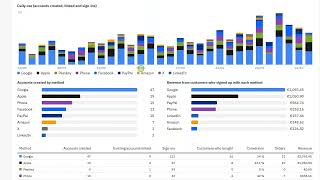
More than just a social login module
 Blog
Blog
€108.90
€90.00 Sin impuesto
€108.90 Con impuesto
Product Videos
También podría interesarte


€60.44
€49.95 Sin impuesto
€60.44 Con impuesto

€12.09
€9.99 Sin impuesto
€12.09 Con impuesto
- On sale!


€96.79
€79.99 Sin impuesto
€96.79 Con impuesto


€96.79
€79.99 Sin impuesto
€96.79 Con impuesto


€84.69
€69.99 Sin impuesto
€84.69 Con impuesto

€120.99
€99.99 Sin impuesto
€120.99 Con impuesto


€60.50
€50.00 Sin impuesto
€60.50 Con impuesto


€96.79
€79.99 Sin impuesto
€96.79 Con impuesto


€302.50
€250.00 Sin impuesto
€302.50 Con impuesto


€181.50
€150.00 Sin impuesto
€181.50 Con impuesto
Questions and answers
Nobody has asked anything about this product yet.

