





- New


RKR Order Archive: archive of old orders for PrestaShop images
RKR Order Archive: archive of old orders for PrestaShop
Price:
€108.78
This product can be bought as a subscription. Below you can see what each option includes and what it costs.
First year:
€108.78
tax incl.
From the second year:
€27.20/year
tax incl.
- One year of technical support and lifetime updates; from the second year, support is extended for €27.20/year and includes taking on your general improvement ideas for the module.
- Renews automatically; cancel whenever you want, with no minimum term.
One-time payment:
€108.78
tax incl.
- One year of technical support and lifetime updates; after that, support ends (with the subscription it is extended for €27.20/year).
- A single payment, with no automatic charges.
€89.90 Sin impuesto
€108.78 Con impuesto
Remove old orders from active tables and save them, complete, in a file that you can consult and restore: your order list will run quickly again. Features include a simulation, cron job with token, email notifications, and permanent deletion blocked by default. Rekire module.
Compatible with PrestaShop 1.7.8.0 to 9.2.x , with PHP 7.2.5 or higher.
Back-office performance
Your order list is slow because it stores all orders from the store's history.
Each year, order tables grow and the back office gets bogged down. RKR Order Archive extracts old orders from active tables and stores them in archive tables, complete and ready to retrieve whenever you need them.
20 boards per order
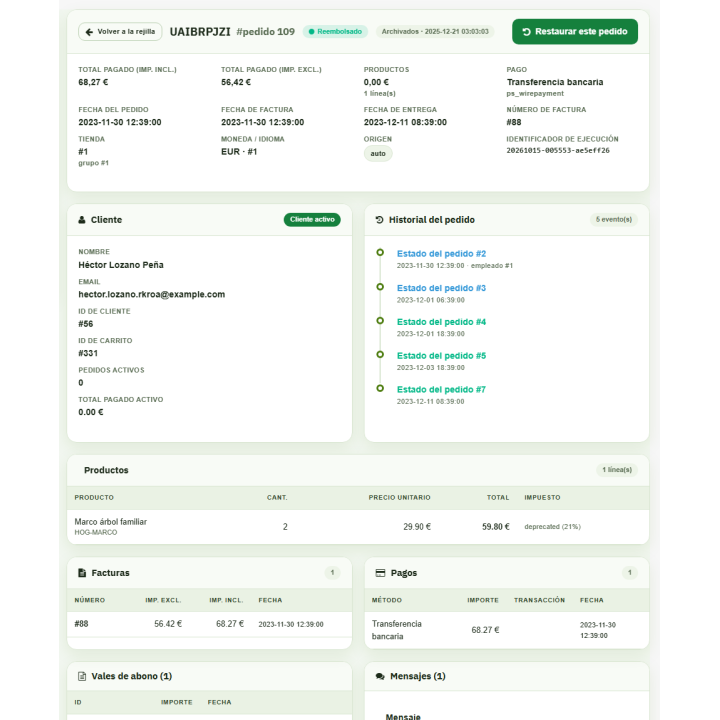
The entire order is included: lines, history, invoices, payments, returns, credits, shopping cart, and messages
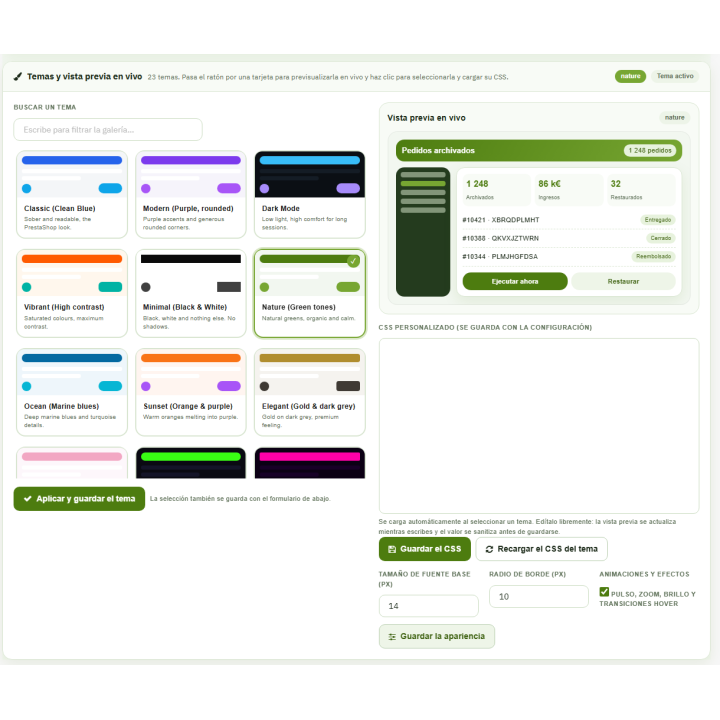
23 color themes
for the module panel, with live preview
1.7.8 → 9.2
a single version of the module for PrestaShop 1.7.8.0 up to 9.2.x
Choose what to archive and when
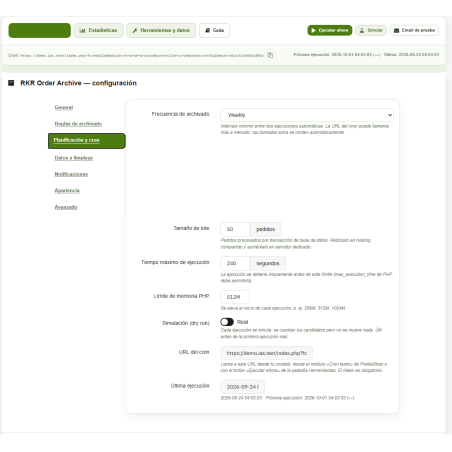
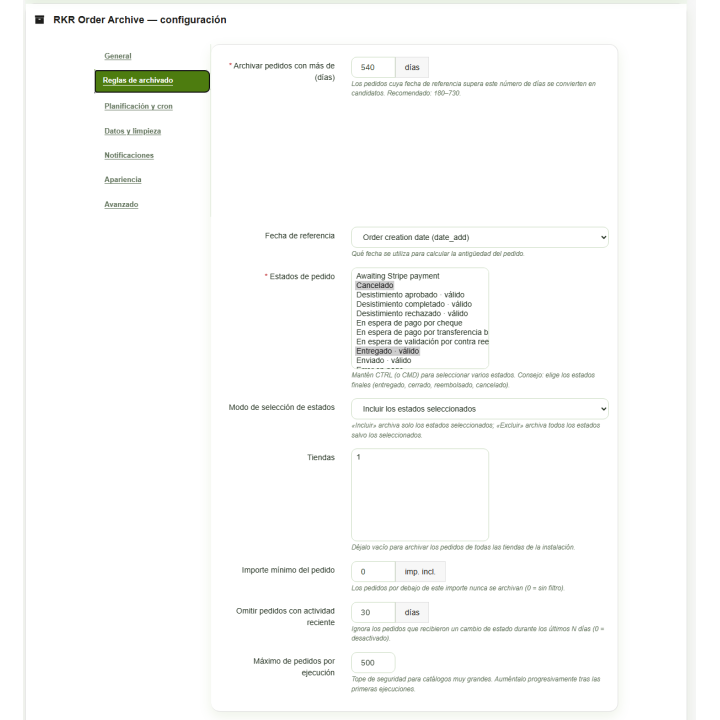
You set how many days an order must be before being archived (180 by default) and in what statuses: only those you select, or all except those you select. You can limit by store, by minimum amount, and by maximum number of orders in each pass, and exclude orders with recent activity in their history.
Simulation before touching anything
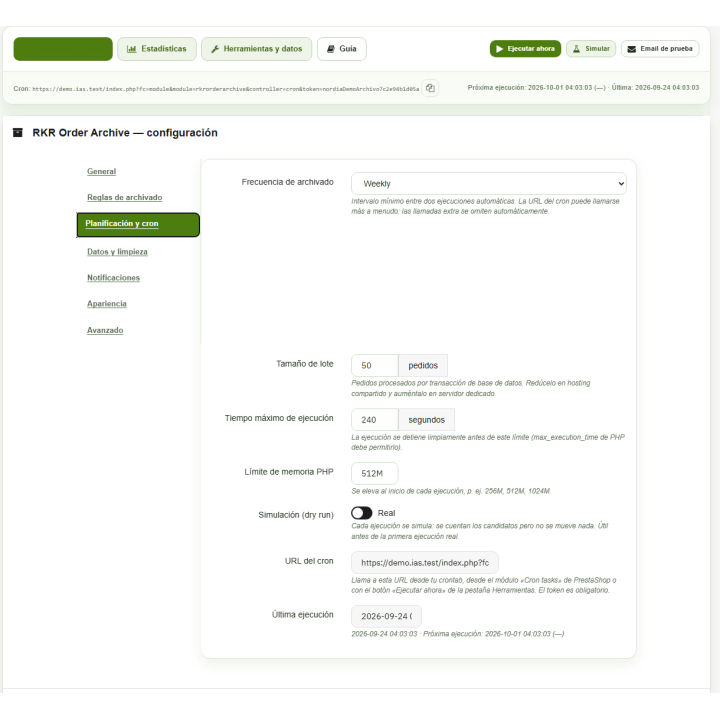
In simulation mode, the module counts potential orders and the rows they would move, without actually moving any. When you're satisfied with the figures, you can deactivate it and start with small batches.
Automatic execution by cron
A URL with its own 40-character token, which you can regenerate at any time, for your task planner. Frequency options include hourly, daily, weekly, or monthly, and a lock to prevent two executions from overlapping.
Report by email
After each run, you receive an email with the result, and another if something goes wrong. You choose the recipients, a minimum number of orders to be notified, or whether you only receive notifications when there are changes. The emails are sent in both Spanish and English.
/ A file to be consulted, not a closed drawer
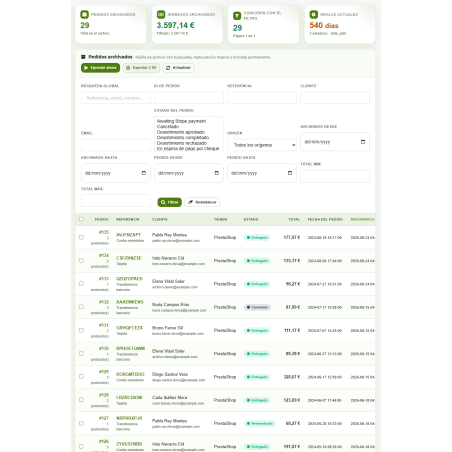
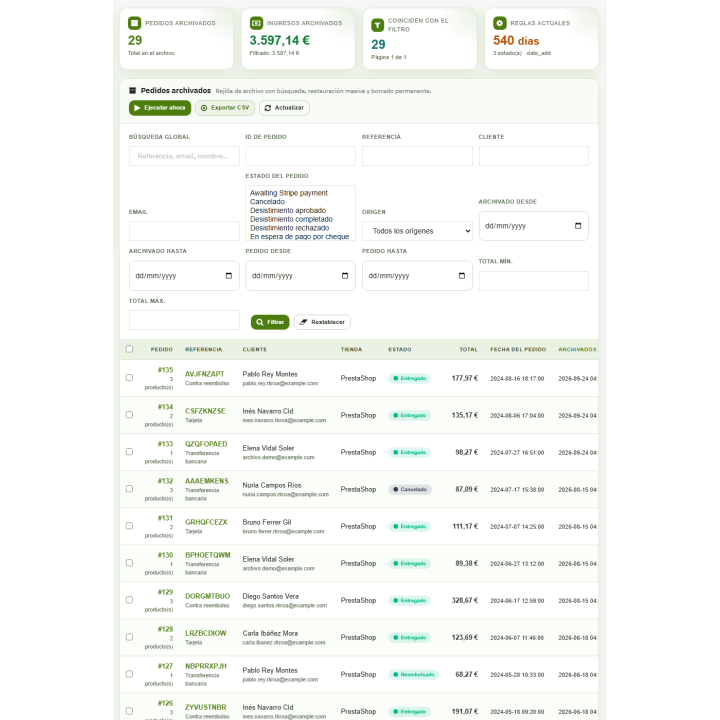
Listing with search engine and filters
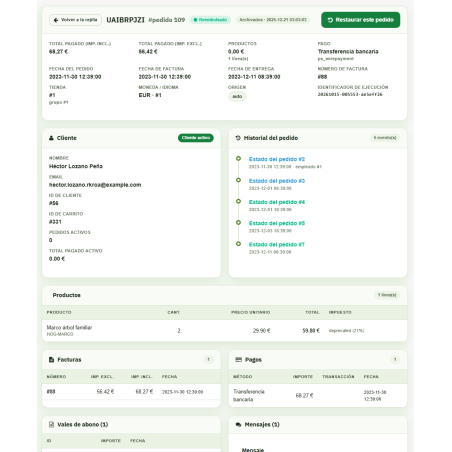
The archive has its own list, which is quick because it relies on its own record of archived orders. On the order's record in the back office, you'll see a badge indicating that it's archived or restored.
Exact restoration
You select one or more orders, and they are returned to the PrestaShop tables with the same order number. The module retrieves the addresses from that order and prevents a new order from receiving the number of an archived one.
Permanent deletion, blocked by default
To permanently delete an archived order, you must explicitly unlock it in the settings, and you also need the employee's "Delete" permission.
Designed not to spoil anything
Archiving, restoring, and deleting function as a single transaction: if something goes wrong mid-process, the entire order is undone, not left incomplete. The module doesn't archive the order with the last invoice, delivery note, or order number because PrestaShop would calculate the next one based on it and repeat the process. Orders that share a cart or reference with another active order (split orders) wait until the entire group can be archived.
What changes when you archive an order? An archived order is removed from the PrestaShop core tables, so it stops appearing in core statistics and customer history until you restore it. You can show your customers a notification in "My Account" that their old orders have been archived. Make a full database backup before your first archiving .
/ Data to decide
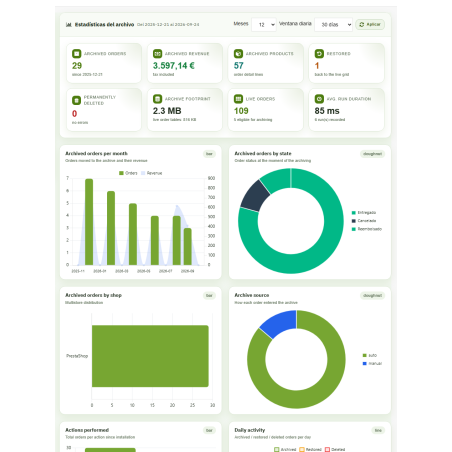
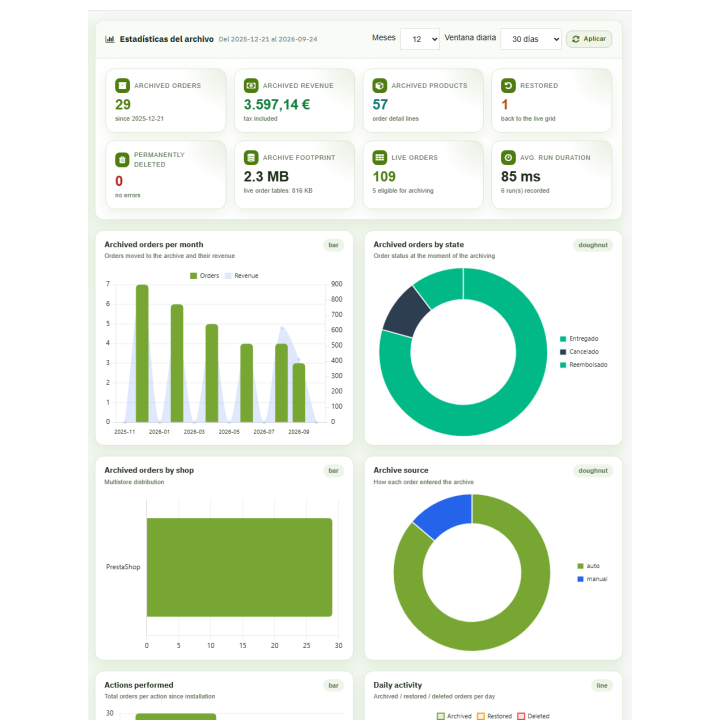
The statistics tab displays archived orders, archived revenue (including taxes), archived product lines, and restored orders, along with charts. These are generated using Chart.js, and if that library cannot be loaded, the module displays them using its own SVG charts. You can disable them if you don't want them.
Yours to take away and to order
Import and export
Export the log in JSON or CSV format and import it into another installation; you can also take the configuration with you.
Maintenance and record keeping
Table optimization after each execution (optional), log recalculation, execution logging with debugging of old entries, and a step-by-step guide within the module.
Address file
Optionally, it also archives delivery and billing addresses, but only when they are not used by any other order or cart.
/ Updating means uploading the ZIP file.
You install the module, configure it from the REKIRE MODULES menu, and keep the simulation active on the first run. New versions are installed by uploading the ZIP file, and the module repairs what's necessary.
Compatible with PrestaShop 1.7.8.0 to 9.2.x , with PHP 7.2.5 or higher
Developed and maintained by REKIRE
-
Referencerkrorderarchive
v1.1.26
- Restoring from an archived order's details page and from the archive grid is working again: the JavaScript was reading the page configuration (and its token) before it existed. A rejected token in an AJAX request was returning a JSON error instead of rendering the entire page (which resulted in a 500 memory error). After restoring from the details page, the grid is restored.
- "Filter" in the file no longer leads to the "Invalid Token" warning in PrestaShop 9.
- Confirmation windows ("Cancel", "Confirm", "Restore") and names of the 23 themes in the back office language.
- "Candidates" is updated as soon as it is archived, restored, or deleted.
- Archived order sheet: amounts in language format, tax as percentage and status in the employee's language (also in the status graph).
- The "My Account" notice appears only once and spans the entire width (in Hummingbird, at the top of the page).
- The back office menu is named after the module in each language.
v1.1.25
- Security: The configuration embedded in the module's tab used to execute actions (launch archiving, regenerate the cron token, send test emails, save settings) without regard to permissions and also via GET requests. Now it only executes via POST requests, using the module's token and the "Edit" permission for the tab.
- The back office is now available in Spanish: the catalogs are now in XLIFF 1.2 format (in 2.0, Symfony used the
nameattribute as the key and couldn't find any translations). The dropdown options (frequency, reference date, etc.) are also translated. - The "My Account" warning is displayed: the template did not compile due to the JavaScript in the close button, and the error was lost; now it remains in the PrestaShop log.
- The "restored" badge appears on the order record: restored orders are recorded in their own history.
- Record of an archived order: the history shows the state name and the total of products no longer shows zero.
- Statistics: indicators, chart titles, and translatable notices.
- The simulation uses the same tables as the actual execution (third-party tables and addresses).
- The main button in the header no longer appears empty (the text was the color of the background) and the gap after the first field of each settings tab disappears.
- Planning and status of the last execution translated ("Daily", "completed").
- The installation trace is only displayed in debug mode.
- The order card badge carries its styles, also on the Symfony page of the order.
4 other products in the same category

Legal compliance module for PrestaShop Omnibus. Minimum price
 Blog
Blog
€60.50
€50.00 Sin impuesto
€60.50 Con impuesto
Product Videos

Simple product module as if they were combinations + canonical + related + accessories
 Blog
Blog
€96.79
€79.99 Sin impuesto
€96.79 Con impuesto
Product Videos

También podría interesarte


€60.44
€49.95 Sin impuesto
€60.44 Con impuesto

€12.09
€9.99 Sin impuesto
€12.09 Con impuesto
- On sale!

€96.79
€79.99 Sin impuesto
€96.79 Con impuesto


€96.79
€79.99 Sin impuesto
€96.79 Con impuesto


€84.69
€69.99 Sin impuesto
€84.69 Con impuesto

€120.99
€99.99 Sin impuesto
€120.99 Con impuesto

€60.50
€50.00 Sin impuesto
€60.50 Con impuesto


€96.79
€79.99 Sin impuesto
€96.79 Con impuesto


€302.50
€250.00 Sin impuesto
€302.50 Con impuesto


€181.50
€150.00 Sin impuesto
€181.50 Con impuesto
Questions and answers
Nobody has asked anything about this product yet.

