


- New





RKR Product Dependencies: Selling with requirements and "Add what's missing" for PrestaShop images
RKR Product Dependencies: Selling with requirements and "Add what's missing" for PrestaShop
Price:
€96.68
€79.90 Sin impuesto
€96.68 Con impuesto
Sell replacement parts, accessories, upgrades, or courses only to customers who meet your criteria: having purchased another product, having it in their cart, belonging to a group, meeting a minimum spend, or purchasing a product from the same category. Features include server-side blocking, language-configurable notifications, and an "Add what's missing" button that adds the necessary items to the cart. 23 themes, a rules simulator, and retrieved sales statistics are also included.
Compatible with PrestaShop 1.7.8 to 9.2. Rekire Module.
Sale with requirements
There are some products you shouldn't sell to just anyone.
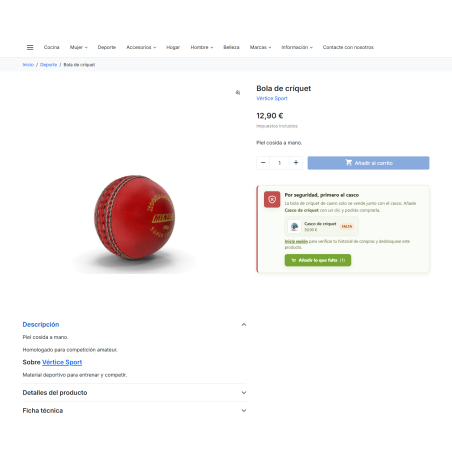
A replacement part without the machine, an advanced course for someone who hasn't done the basic one, an upgrade for a product the customer doesn't have: every sale that doesn't fit ends in a return, a support inquiry, or a bad review. RKR Product Dependencies Let a product be purchased only when the customer meets your requirements, and help them achieve them with a click.
5 types of requirement
specific product, products within a category, customer group, minimum spend, or product within the same category
3 actions
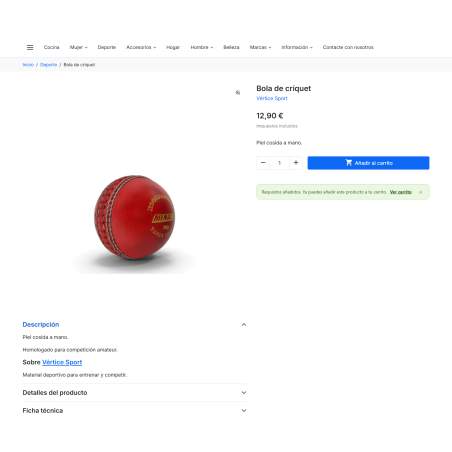
block the purchase, hide the product, or allow it with a warning.
1 click
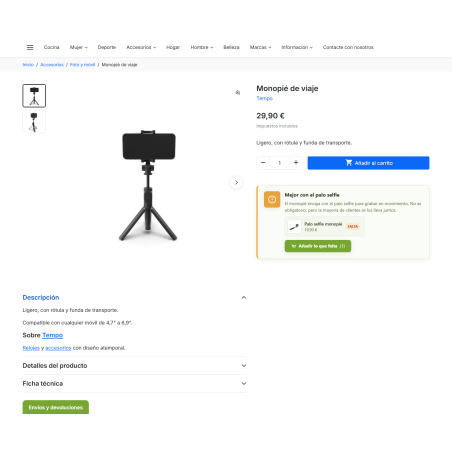
In "Add what's missing": the customer adds the necessary items to the cart and continues shopping
/ You decide what needs to be done.
Specific product
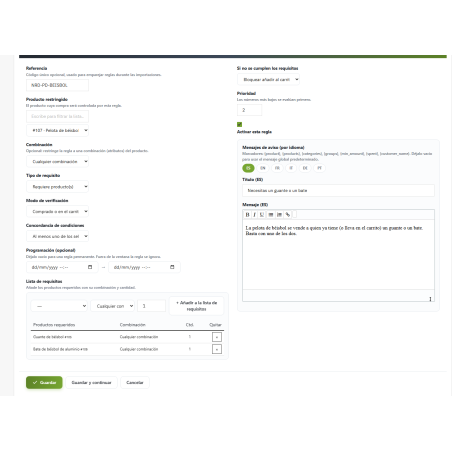
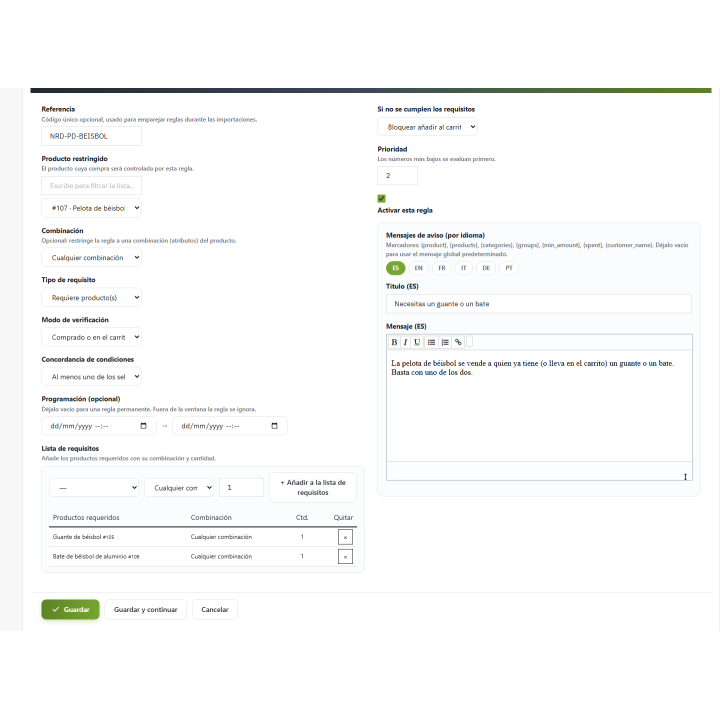
The customer must have previously purchased one or more products, have them in their cart, or both. You can request a combination and a quantity for each product required.
Product of a category
Simply have any product from the categories you choose. Ideal for an extended warranty valid for all mobile phones.
Customer group
Only customers from the groups you specify (from all or at least one) can purchase. Perfect for courses, professional lines, or reserved products.
Minimum expenditure
The sum of the customer's valid orders, including VAT, must reach the amount you specify. The amount is saved in your chosen currency and converted at checkout.
Product of the same category
An accessory that only makes sense alongside a product from its line: the cart or history must contain one from the same category.
Multiple rules about the same product
If a product has more than one active rule, all of them must be met. Within each rule, you choose whether all items are required or if one is enough, and whether items already purchased, items in the cart, or both count.
/ What happens when it is not fulfilled?
Block
The product is visible, the notice explains what's missing, and the buy button is disabled.
Disguise
How to block, and also the product disappears from searches when your theme or search engine allows it.
Allow with notice
The customer can buy, but sees a prominent advertisement. Designed for gentle cross-selling, without excluding anyone.
For guests, who have no history, group, or expenditure to verify, you decide whether to treat them as "requirement not met" (the recommended course of action) or as "met."
/ Server-side blocking: cannot be bypassed from the browser
In addition to the on-screen notification, the module checks each item saved in the shopping cart on the server. If a product arrives in the cart through another channel, it is removed, and the customer is notified. This check does not affect the order or payment process, so as not to disrupt the purchase.
/ "Add what's missing": from the notice to the sale
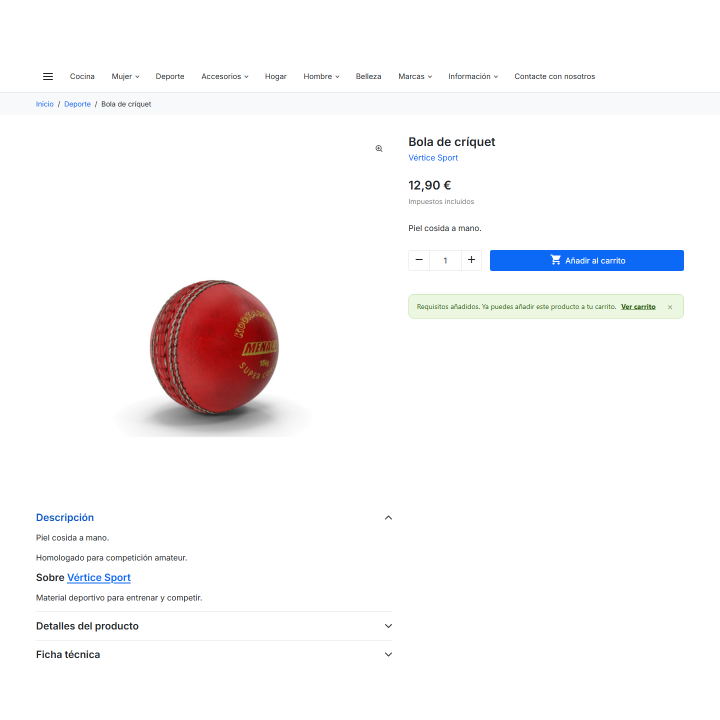
Instead of leaving the customer with a "you can't buy this" message, the notification displays the missing products with their image, name, and price, along with a button to add them to the cart. The requirements are recalculated on the server, and each product is checked to ensure it's active, orderable, in stock, and matches the correct combination. If a required product has options, the customer is taken directly to its product page. If something is unavailable, the customer is clearly informed.
The button requires the browser to have JavaScript enabled, just like the shopping cart in current PrestaShop themes.
/ Notices in your words, in every language
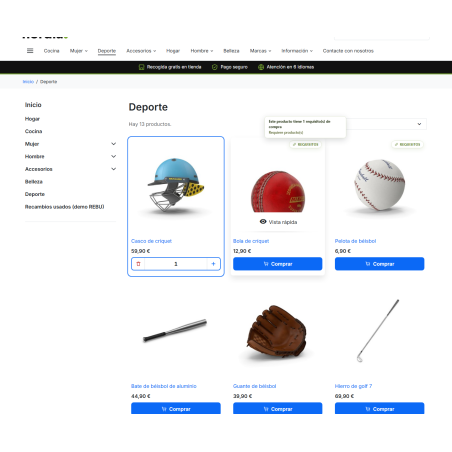
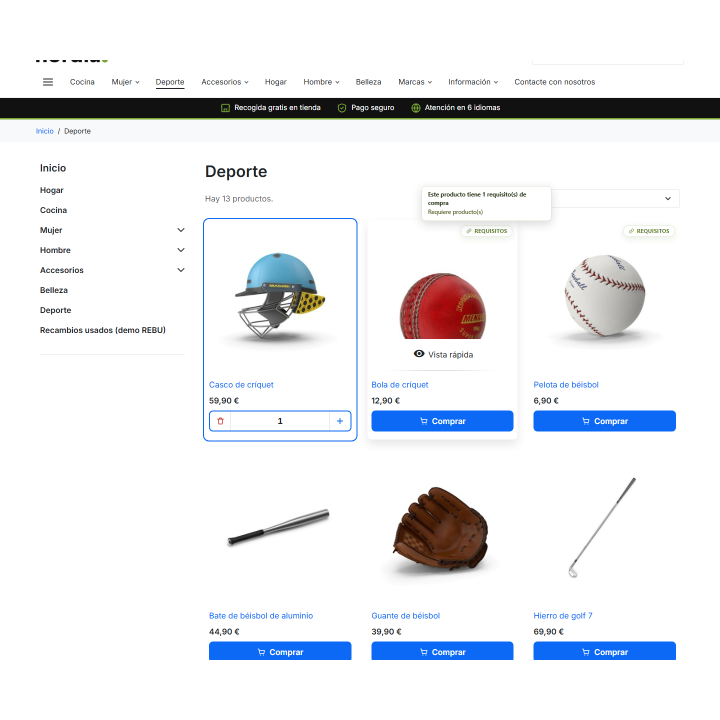
Each rule can have its own title and message per language, using the rich editor. If you don't write them, the general messages from the "Messages" tab are used. You can insert the product name, the missing products, categories, or groups, the minimum spend, the customer's total spending, and their name. The notification appears on the product page and in the shopping cart, and in listings, a "Requirements" badge with its explanation appears, which can be placed in 9 positions. When a purchase is rejected, the customer sees a dialog box detailing what's missing instead of a generic error message.
/ Test before opening to the public
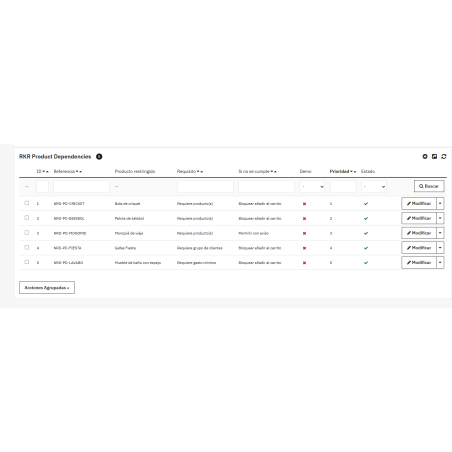
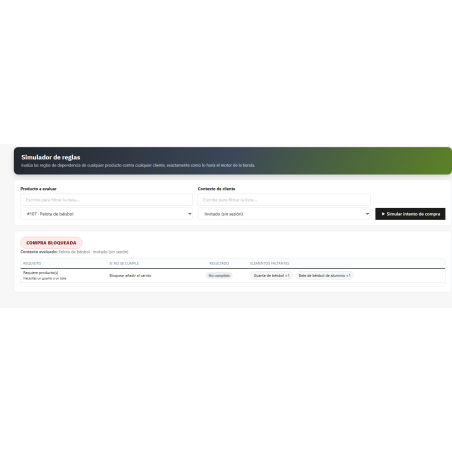
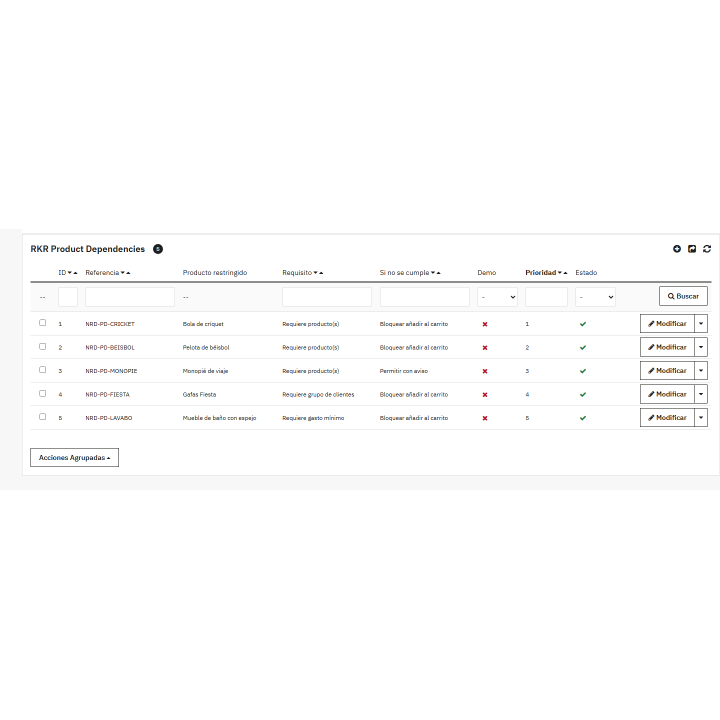
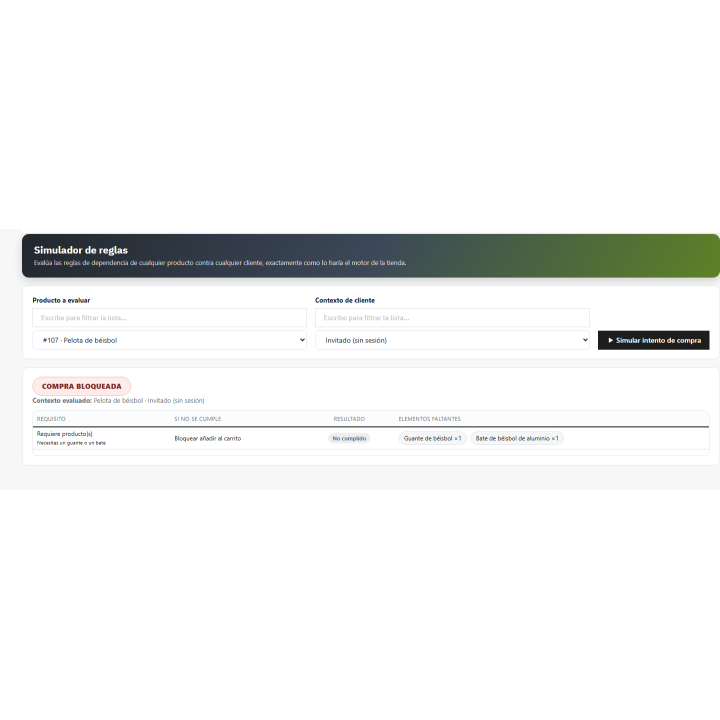
The simulator evaluates any product against any customer or guest and shows you the results rule by rule. It's the fastest way to validate a configuration and assist a customer who says, "I can't buy." Each rule can have start and end dates, and rules outside of those dates are ignored. From the list, you can activate, deactivate, duplicate, or delete multiple rules at once.
/ Measure how many sales you recover
What is recorded
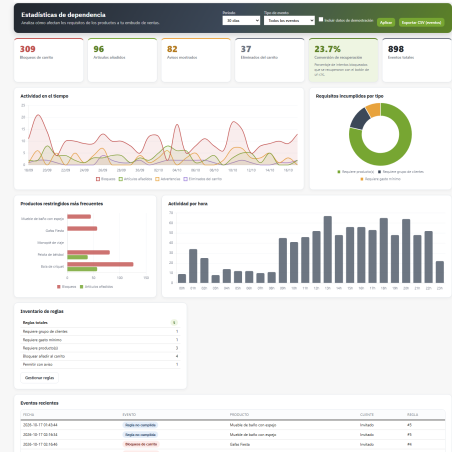
Blocked attempts, products removed from the cart by the server, displayed notices, products added with the button, and matches for each rule.
Statistics panel
Cards display totals, daily trends, most frequently restricted products, failures by requirement type, hourly activity, rules inventory, and recent events. Graphs are included in the module.
Recovery conversion
The percentage of blocked attempts that ended in a purchase of the remaining items. This tells you whether your requirements are hindering sales or driving them forward.
Privacy
You choose how many days the log is kept (180 by default), and it's automatically purged. Deleting a client deletes their events. The log can be exported to CSV.
/ Make the ad look like it's from your store.
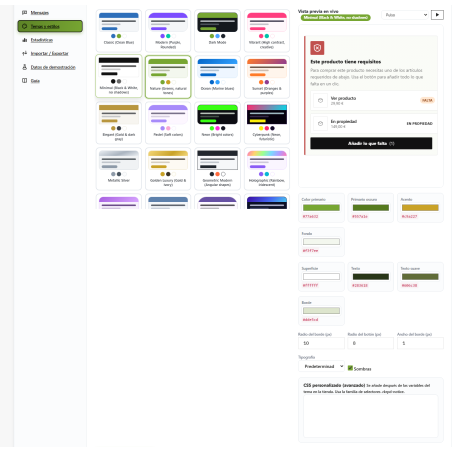
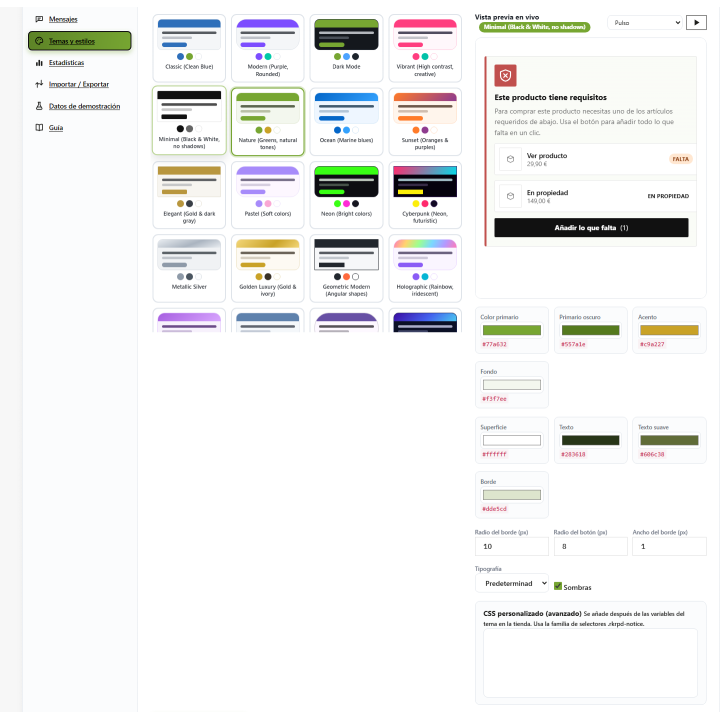
There are 23 design themes with live preview, 9 animation effects (pulse, zoom, shake, glow, bounce, appear, flash, side entrance, and light sweep), and adjustments for colors, borders, typography, and shadows. If you need more, add your own CSS or reset the styles with a button. The effects respect the visitor's "reduce motion" preference.
/ Multi-store, multiple languages and migration
Each rule can be used for one store or for all stores. The text is written by language, and the module includes translations into Spanish and English. Export your rules to JSON (with settings and messages) or CSV and import them into another store in two steps: first a simulation, then confirmation. Importing is done by reference, so re-importing updates rather than duplicates, and rules with products that don't exist in the target store are ignored without breaking anything.
/ Try it with sample data
A button installs 5 sample rules built with your own catalog and about 60 days of simulated statistics, all marked as a demo. Removing it only removes that: your actual settings and rules remain untouched.
/ It installs in one minute.
Upload the ZIP file and open "Product Dependencies" in the REQUIRE MODULES menu. This section has three subsections: rules, statistics, and simulator. The default settings are already working; create your first rule, test it in the simulator, and view the product details. A user guide is included within the module. Tested on PrestaShop 1.7.8 (back-office), 8.2 with the Classic theme, and 9.0 and 9.2 with Hummingbird.
Compatible with PrestaShop 1.7.8 to 9.2 and PHP 7.1 to 8.4
Developed and maintained by REQUIRE
-
Referencerkrproductdependencies
v1.1.4
- PrestaShop 1.7.8 and 8.x: the forms of the configuration page (General, Messages, Themes, Import/Export, Demo) posted to the module list and nothing was saved; the configure URL is now built so that every save works.
- Rule form: the combinations list of the restricted product failed (broken SQL string) and the combination label of a requirement used a method that does not exist; both work now on every version.
- Themes tab: with the theme colors not customized, the color pickers started at black, the live preview was black and saving the tab stored black for every color of the front notices. The pickers now start with the colors of the active theme.
- Back office menu translated per language from the module catalogues, and no "Translation not found" is written while the module is being installed.
- Spanish catalogs completed (Statistics screen, bulk actions, "View cart") and duplicated entries removed; The tooltip of the listing badge showed the requirement type in English.
- PrestaShop Addons rules: no direct core context calls, HMAC built on hash(), Tools::file_get_contents(), no HTML inside PHP, JSON data passed to the back office scripts through escaped data attributes, rich messages through cleanHtml, every template variable escaped, .htaccess in the module root, PHPStan level 5 and PHP CS Fixer clean, PHP 7.1 to 8.4 compatible.
- License: Academic Free License 3.0.
4 other products in the same category

Master access modules as a user with GDPR compliance
€36.30
€30.00 Sin impuesto
€36.30 Con impuesto


Module to prevent the use of expired coupons
 Blog
Blog
€36.30
€30.00 Sin impuesto
€36.30 Con impuesto
Product Videos
También podría interesarte


€60.44
€49.95 Sin impuesto
€60.44 Con impuesto

€12.09
€9.99 Sin impuesto
€12.09 Con impuesto
- On sale!


€96.79
€79.99 Sin impuesto
€96.79 Con impuesto


€96.79
€79.99 Sin impuesto
€96.79 Con impuesto


€84.69
€69.99 Sin impuesto
€84.69 Con impuesto

€120.99
€99.99 Sin impuesto
€120.99 Con impuesto


€60.50
€50.00 Sin impuesto
€60.50 Con impuesto


€96.79
€79.99 Sin impuesto
€96.79 Con impuesto


€302.50
€250.00 Sin impuesto
€302.50 Con impuesto


€181.50
€150.00 Sin impuesto
€181.50 Con impuesto
Questions and answers
Nobody has asked anything about this product yet.

