Shipping and after-sales service
A lost package costs you the order. And the customer's trust.
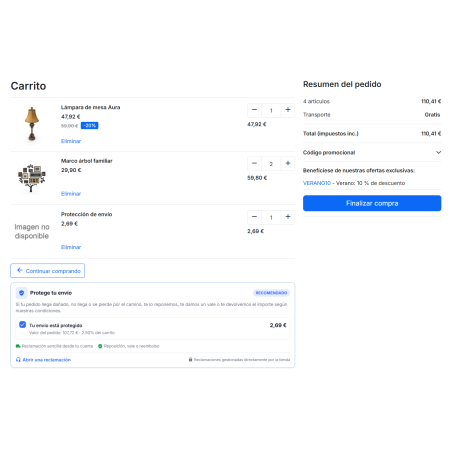
Many customers would pay a few euros to know that, if something goes wrong, the store will take responsibility. RKR Shipping Protection It offers optional shipping protection in the shopping cart, charges a fee that is your revenue, and handles claims from its own portal.
3 ways to solve
Refund with native credit, replacement order or store credit voucher, from the claim itself
23 color themes
To make the protective box match your store, you'll need more custom CSS if you want to fine-tune it.
1.7.8 → 9.x
a single version of the module for all your PrestaShop stores
/ An optional fee that you decide.
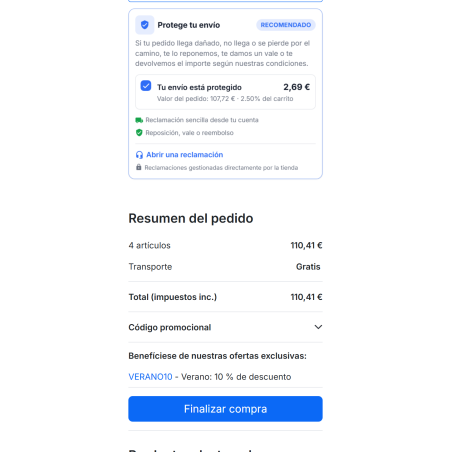
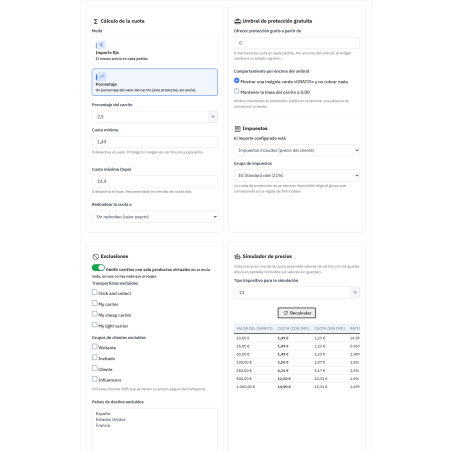
The customer checks a box in the shopping cart, and the protection is added as another line item to the order, including VAT and in the currency they are using. You choose how it's calculated:
Percentage or fixed amount
A percentage of the products in the cart (including taxes, excluding shipping) or a fixed fee per order.
Minimum, maximum and rounding
Put a floor for small carts, a roof for large ones, and round up to the step you choose (0.50, 1…) so that the prices are clear.
Free from a certain amount
Above the threshold you set, the protection is free: you show it as a token of trust or as a line at 0.00.
Rules by carrier
Change the price, or disable the protection, for a specific carrier, for example, a store pickup.
VAT and foreign exchange
Price includes or excludes taxes, with its corresponding tax rules. In multi-currency transactions, amounts are converted to the cart currency or fixed currency by currency.
Exclusions
It is not offered in virtual product-only shopping carts or to carriers, customer groups, or countries that you exclude.
Before saving, a simulator shows you the exact fee for different cart values with the settings you have on screen.
/ It shows where the customer decides
The box can be placed in up to seven locations, which you activate separately: cart footer, cart summary, express checkout, trust block, product page, footer, and a link in the top bar to the portal. The price updates instantly when the cart changes, without reloading the page. You can choose from 18 attention effects, or none at all, and edit the title and text for each language.
/ Claims without email chains
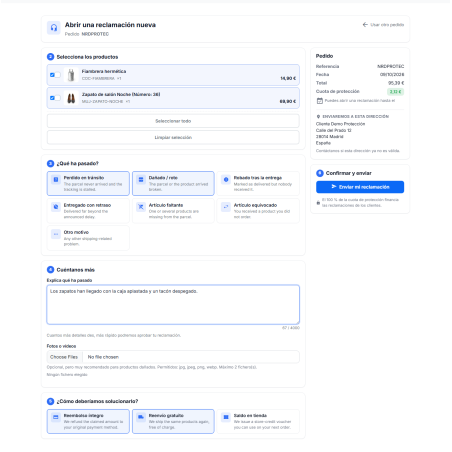
When something goes wrong, the customer logs into your portal, checks their order using the reference number and their email address, selects which products are affected, the reason (lost, damaged, stolen, delayed, missing item, wrong item, or other), attaches photos or documents, and indicates how they prefer to resolve the issue. They can track the status from their account and order details, which include the complete claim history.
Deadline that you define
The number of days the customer has to make a claim is counted from the delivery date, if known, and if not, from the order date. By default, it's 30 days; with 0 days, there is no limit.
Controlled tests
You choose the file extensions, number of files, and maximum size. Files are checked upon upload and can only be downloaded with a signed link.
Protected from abuse
Order verification and claims submission have a limit of attempts per connection.
/ You decide how to respond, and sometimes the module does.
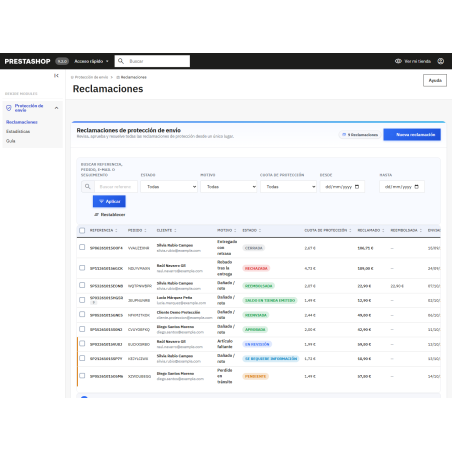
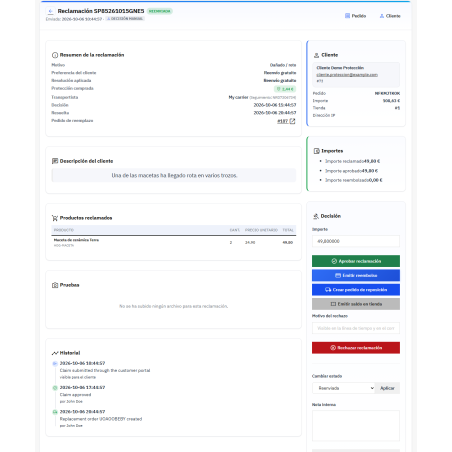
From the back office, you can view all claims with filters, search capabilities, and bulk actions. You can also manually create a claim for a customer who emails or calls you. With one click, each claim is resolved and recorded in the history.
Refund
Generates a native PrestaShop credit note, including shipping costs and stock replenishment if activated.
Replacement
Create a new order with the claimed products at a price of 0, ready to ship.
Balance voucher
Create a voucher linked to the customer, with the prefix and validity days that you configure (default, 365).
If you prefer not to review everything manually, activate automatic approval (it's disabled by default). You set the maximum amount, the minimum number of days since delivery, the reasons you accept, a minimum number of orders with that carrier, and whether photos are required for damage or incorrect items. Anything that doesn't meet the rules is reviewed manually with the reason noted, and claims for orders without protection are automatically rejected. The automated action can either respect the customer's request or always apply the same resolution.
Mailing Notices To the customer and to you, in Spanish, English, and French: complaint received, status changes, and resolution. Each notification is activated separately, and you can add a blind copy to your support inbox.
/ Weigh whether it's worth it for you
A read-only statistics dashboard, with date ranges, shows you how much you collect in protections, how much you pay in claims, and how much you have left. It includes adoption (protected orders divided by total orders), claim and approval rates, average resolution time, and charts by reason, status, carrier, and payment method, with a funnel and heat map. The charts are generated on your server, without external libraries or services. You use this data to adjust your fee pricing.
/ Work the way you work
Panel in the order
In the back-office order details, you can see if it has protection, its fee, and any open claims.
Multistore and languages
Prices, texts, theme, and rules are saved per store. Includes Spanish and French translations.
Import and export
Export configuration, claims, and carrier rules to CSV or JSON; import with pre-simulation and undo a batch with one click.
Example data
Generate fictitious claims to see the panels in operation, and then delete them without touching the real ones.
Integrated guide
The module contains a guide with a search function for 18 chapters.
Maintenance
An optional scheduled task cleans up old logs and exports. And "Repair Installation" recreates what's missing.
What it is and what it isn't. It's a service guarantee for your store: you collect the fee, you handle the claim, and you're responsible for the refund or replacement. No insurance company is involved, and no policy is issued. Clearly state what is covered, what isn't, and the claim period, and have a professional review the text before publishing, as regulations regarding optional charges vary from country to country. Also, keep in mind that percentage discounts on the entire cart reduce the fee just like any other line item: if you don't want this, exclude the protection product from those cart rules.
Compatible with PrestaShop 1.7.8 and 9.x, with PHP 7.2.5 or higher
Developed and maintained by REQUIRE