





- New




RKR Free Return: Free refund at checkout for PrestaShop images
RKR Free Return: Free refund at checkout for PrestaShop
Price:
€145.08
€119.90 Sin impuesto
€145.08 Con impuesto
Sell free returns at checkout: the customer pays a small optional coverage fee and, if they return an item, receives a prepaid label and a refund, store credit, or exchange. You calculate the fee based on your actual return rate, or a fixed rate, as a percentage or according to rules. Includes attach rate, revenue, and margin statistics, 23 themes, and no commission per order. A Rekire module.
Compatible with PrestaShop from version 1.7.8.
Returns that pay for themselves
Free returns cost you money. Paid returns generate sales.
Either you give away the return label to everyone and it eats up your margin, or you charge for it and the customer hesitates and abandons the project. RKR Free Return It proposes a third option: in the final step of checkout, the customer decides whether to pay a small return coverage fee. Those who pay receive a prepaid label and a refund, store credit, or exchange; those who don't return the item at their own expense, as usual. The fees finance the labels, with no commission paid to any third party.
3 coverages
Refund, store credit or exchange: active separately, each with its name, description and benefits in each language
4 quota modes
fixed, percentage of cart, formula with your actual return rate, or rules by carrier, country, group, currency, and category.
No commission per order
Everything runs through your store: you collect the fee, with your payment gateway and your taxes.
/ A calculated fee, not an invented one
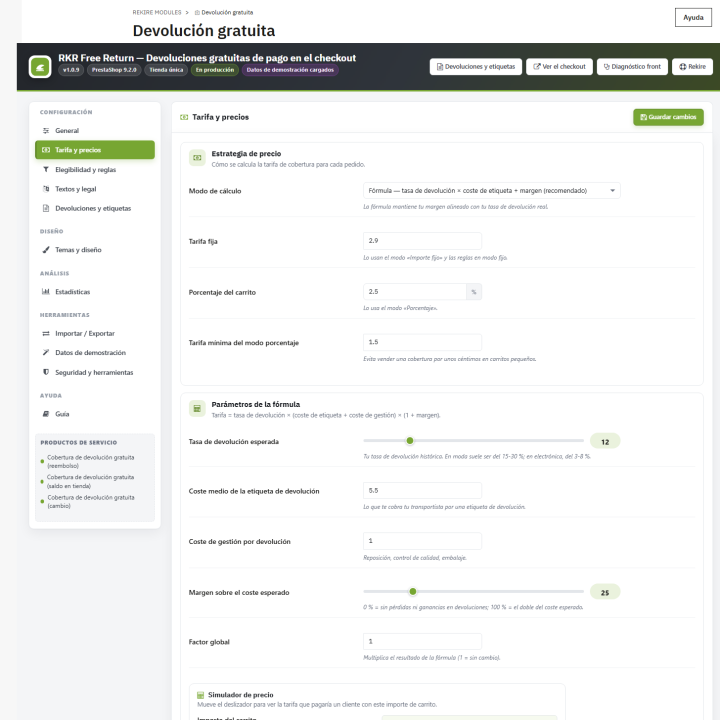
In formula mode, the fee is based on your own reality: return rate × (cost of label + handling) × (1 + margin). The starting values are a 12% return rate, €5.50 for the label, €1.00 for handling, and a 25% margin; you can change these to your own. If you prefer to keep things simple, use a fixed fee (starting at €2.90) or a percentage of the cart (2.5%, with a minimum of €1.50).
Rounding and limits
Round the fee to the nearest €0.01, €0.05, €0.10, €0.50, or €1.00 and set a floor and ceiling. Initially, set it between €0.90 and €9.90.
Free from a certain amount
You can offer free coverage starting from a certain cart amount, and a discount for recurring customers (50% starting).
Priority rules
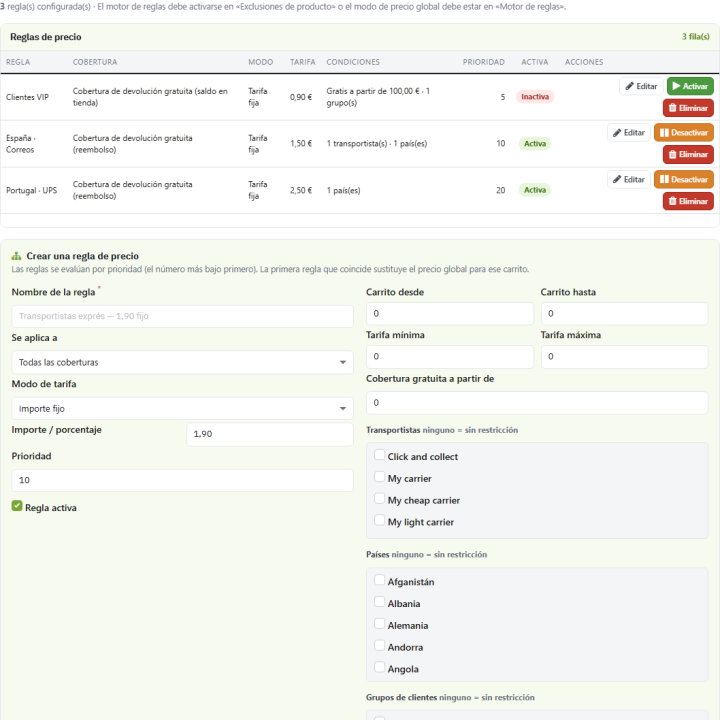
A different fee depending on the carrier, country, customer group, currency or category, with minimum and maximum cart amounts.
Simulator
In the settings you enter a cart amount and instantly see the resulting fee with its breakdown.
/ What does the paying customer receive?
Prepaid label
It's generated as a PDF from your store (or as printable HTML if there's no PDF) and sent via email with a personal link that expires (starting at 90 days) and limits downloads (starting at 5). It's also available in "My Free Returns" within your account and in the order confirmation. It also works for guests if you enable it.
Refund, credit, or exchange
You choose what you compensate: manual refund or with a discount voucher, store credit for the total order, the total products or just the fee, or exchange, with optional mandatory RMA.
The fee, refundable if you want
You can refund the customer the fee with a voucher when you mark the return as refunded.
/ At checkout, without touching the subject
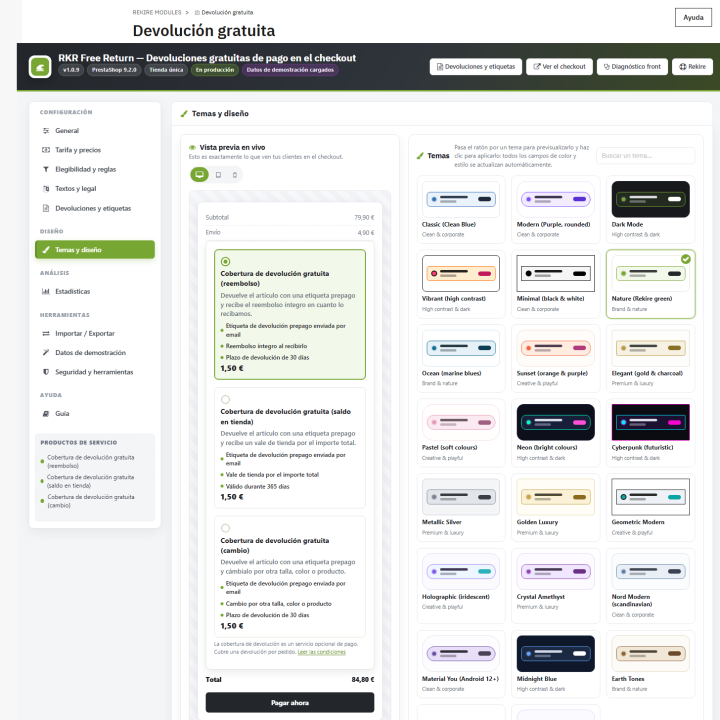
The coverage box displays the fee, benefits, and your legal text, and is placed in the position that best suits your theme from four options: before payment confirmation, in the summary header, in the cart footer, or in the trusted areas of all steps (the recommended option for Hummingbird and one-page checkouts). It's rendered using PrestaShop hooks, not injected by JavaScript. In the cart, the coverage line appears without a link or quantity selector. There are also 23 visual themes with previews, a color editor, and custom fonts and CSS.
Before opening it to real customers, activate the test modeYou see the box only by yourself, with a "Test mode" badge, and a diagnostic explains, check by check, why it is or is not shown.
/ Who can buy it: you decide
Coverage is only offered to those who meet your conditions: minimum and maximum cart amount, carrier, country, currency, customer group, coverage limit per customer, only on the first order, no virtual products or categories, excluded manufacturers or products, and a return window (30 days from the start). Each check is reviewed individually in the diagnostic.
/ Do you know if it's worth it for you?
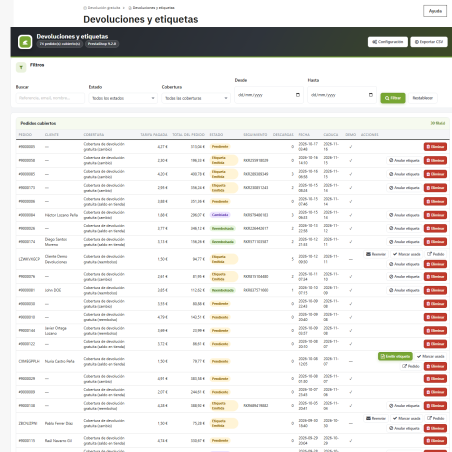
The Statistics tab calculates, for your chosen period: how many customers view the offer and how many accept or reject it, the attach rate (based on interactions and orders), revenue from installments, the average installment, the value of orders covered, the tags issued and used, their cost, and the net margin. It includes nine charts (funnel, revenue, coverage types, statuses, carriers, countries, days of the week, hours, and a 12-month projection). No external libraries are required.
/ Carrier labels, with your credentials
In addition to its own label, the module includes connectors for DHL, UPS, SEUR, Correos and Mondial Relay. You connect them using your credentials (API address, username, password, service code, and test mode), and the tracking number is saved on the label. If there are no credentials or the API fails, the module generates its own PDF label and records the failure, so the order is never interrupted.
An honest clarification: the connectors are made against each carrier's public documentation, but They have not yet been tested with real credentials. Try them in test mode with your contract before relying on them. Your own label works without them.
/ It is not a returns portal
RKR Free Return It sells the coverage and provides the label; it doesn't handle self-service return requests with approvals. If you also want the customer to open and track their return through a portal, RKR Returns It does just that, and the two complement each other: one converts the return into income, the other sorts it.
/ Your data and your settings
You export all the configuration to a JSON file to transfer to another store, with automatic backups before each import, and export data in CSV format. There's demo data, marked as such, to show the statistics populated before your first order; it can be deleted with a single click without affecting your own data. The module integrates with PrestaShop's personal data export and includes a 19-chapter guide within the back office.
/ It installs like any other module.
You upload it in the module manager and it appears in the menu Rekire, With its covered order screen and labels, and an 11-tab configuration, it works in multi-store mode (each store with its own hidden service products and settings) and comes in English, Spanish, and French. Daily maintenance (expiring returns, cleaning logs, and backups) is triggered automatically by traffic, without cron; if your store has very little traffic, there's a button to launch it manually.
Compatible with PrestaShop from the 1.7.8
Developed and maintained by REQUIRE
-
Referencerkrfreereturn
v1.0.9
Fixed
- PrestaShop 1.7.8 : the checkout block did not show with the default position. The payment step of 1.7.x has no
displayCheckoutBeforeConfirmationhook (it arrived with 8.0); on 1.7 the block now goes todisplayPaymentTop, at the top of the same step. - The block appeared twice when position 2, 3 or 4 was selected: the position-1 hook rendered whatever the setting.
- A selected coverage could not be removed when several coverage types are offered (radio buttons). Clicking the selected card now removes it, and one click on the card is no longer counted twice.
- Struck-through "old" price shown when the floor or the rounding raised the fee ( eg ~~€0.98~~€1.50). Only a real reduction is struck through.
- Order without its coverage line when the order is validated in the same request that added the coverage (import, script, a payment module validating at once): the cart kept its cached package list. The cart caches are now reset whenever the coverage line changes.
- Demonstration rows in real customer accounts. The demo data set picks random customers; its rows now stay out of "My free returns", the per-customer limits and the repeat-customer discount.
- Statistics: wrong net margin (it multiplied the number of used labels by the cost of all labels: -201 € instead of +52 €). It is now the coverage revenue minus the cost of the labels actually used.
- Statistics: the period switch only redrew the charts ; the cards and the period line stayed on the default period. A period now reloads the tab with every figure on the same days.
- "My free returns" on phones : the table was wider than the screen; below 640 px each coverage is now a card with its labels.
- Chart legends now use the color of their series.
- The benefit list of the live preview showed two bullets per line.
- Missing Spanish and French translations: coverage statuses on "My free returns", eligibility checks of the diagnosis, coverage descriptions.
- Duplicated hidden coverage products. Right after the install, the first shop visit ran the daily maintenance, whose self-heal did not see the new product ids yet and created another set. Creation is now serialized with a database lock and reads the ids from the table; leftover copies are removed (and uninstall removes every hidden coverage product).
- Coverage products kept their English name on the order, the invoice and the emails of shops in other languages: the default texts were translated after the products were created. Names now follow the Texts tab (on install, on save and on upgrade).
- Cart line without tax when the tax rules group was set by import or by code instead of the Fee tab: the checkout announced €1.50 and the cart added €1.24. The service products now take the configured tax group before entering the cart (and on upgrade).
- Coverage email ignored its switch ("Send the coverage email"): it read a setting that does not exist.
- Emails were not sent (an extra argument shifted the template path of
Mail::Send). - PrestaShop 1.7.8 : strings with "&" were not translated and reached the screen as
&; units (%, px) were sent to the translator. - Default settings that were never written on install (service product ids, theme colors) and several type issues found by static analysis.
Changed
- No
nofilterwithout sanitizer and no HTML built in PHP: customer texts are escaped (merchant HTML texts go throughcleanHtml), the widget and admin configuration travel indata-attributes, the theme variables in astyleattribute, the custom CSS in a generated stylesheet, and the nested back-office pieces are rendered with{rkrfr_render}. - Every template output is escaped (field descriptions, attributes, numbers, editor contents): a description with "
"lost that word on screen." -
getContent()returns a page with a link when the redirection to the module panel is not possible.
4 other products in the same category


- New

RKR Legal Assistant: Legal texts, consents and notices for PrestaShop

€157.18
€129.90 Sin impuesto
€157.18 Con impuesto
Product Videos
Viewed products
- New

RKR Refund Orders: Refunds on the payment gateway with a corrective invoice
€145.08
€119.90 Sin impuesto
€145.08 Con impuesto
Product Videos
- New

RKR Programmatic SEO: Batch SEO landing pages for PrestaShop
€120.88
€99.90 Sin impuesto
€120.88 Con impuesto
Product Videos
También podría interesarte


€60.44
€49.95 Sin impuesto
€60.44 Con impuesto

€12.09
€9.99 Sin impuesto
€12.09 Con impuesto
- On sale!


€96.79
€79.99 Sin impuesto
€96.79 Con impuesto


€96.79
€79.99 Sin impuesto
€96.79 Con impuesto


€84.69
€69.99 Sin impuesto
€84.69 Con impuesto

€120.99
€99.99 Sin impuesto
€120.99 Con impuesto


€60.50
€50.00 Sin impuesto
€60.50 Con impuesto


€96.79
€79.99 Sin impuesto
€96.79 Con impuesto


€302.50
€250.00 Sin impuesto
€302.50 Con impuesto


€181.50
€150.00 Sin impuesto
€181.50 Con impuesto
Questions and answers
Nobody has asked anything about this product yet.

