




- New


RKR Buy More Pro: order bump at checkout with A/B testing and statistics for PrestaShop images
RKR Buy More Pro: order bump at checkout with A/B testing and statistics for PrestaShop
Price:
€108.78
This product can be bought as a subscription. Below you can see what each option includes and what it costs.
First year:
€108.78
tax incl.
From the second year:
€27.20/year
tax incl.
- One year of technical support and lifetime updates; from the second year, support is extended for €27.20/year and includes taking on your general improvement ideas for the module.
- Renews automatically; cancel whenever you want, with no minimum term.
One-time payment:
€108.78
tax incl.
- One year of technical support and lifetime updates; after that, support ends (with the subscription it is extended for €27.20/year).
- A single payment, with no automatic charges.
€89.90 Sin impuesto
€108.78 Con impuesto
Show the customer an extra offer at a reduced price right at checkout, and let them accept it with one click. Order bump for cart, shipping, and payment, with exclusive discounts, A/B testing with a winner, reservations for customizable products, 23 themes, and statistics on what each offer brings you.
Compatible with PrestaShop 1.7.8 and 9.x. Rekire module.
Average ticket
Your customer has already decided to buy. It's the perfect time to offer them something extra.
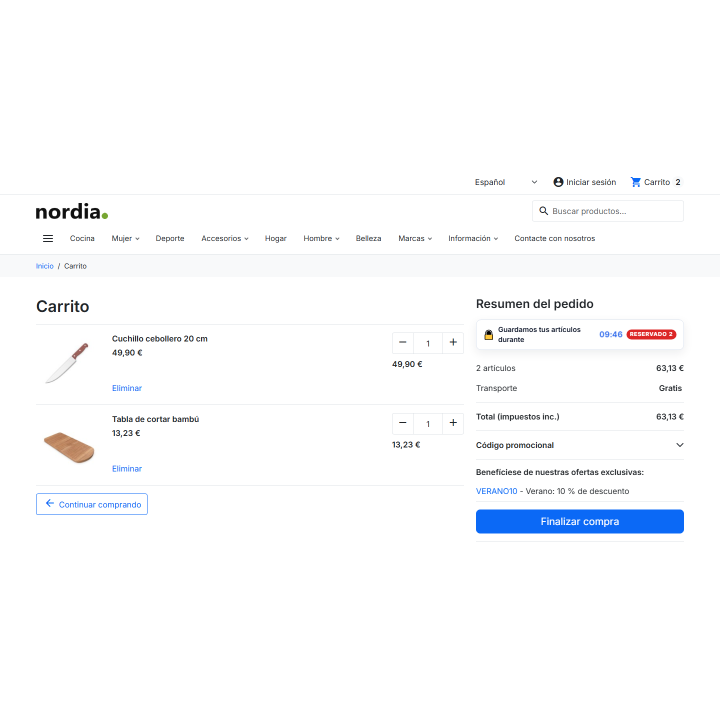
Every order that goes out without that case, that replacement part, or that warranty is a sale you had within your reach. RKR Buy More Pro It places a featured offer within the shopping cart and checkout process, and the customer accepts it with one click.
1 click
to add the offer to the order and another to undo it, without leaving the purchase process
3 moments
in the shopping cart, at the shipping step and at the payment step, the ones you choose
23 topics
with a live preview design, so the offer looks like it's part of your store
/ An offer that is accepted without effort.
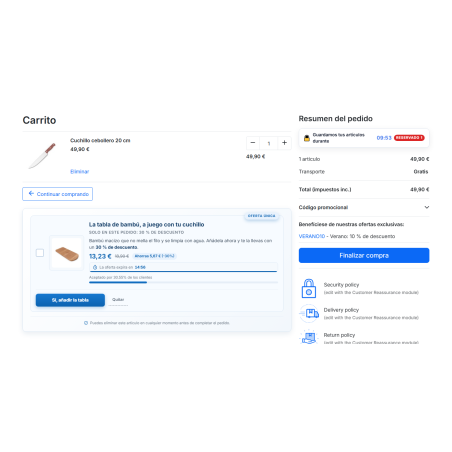
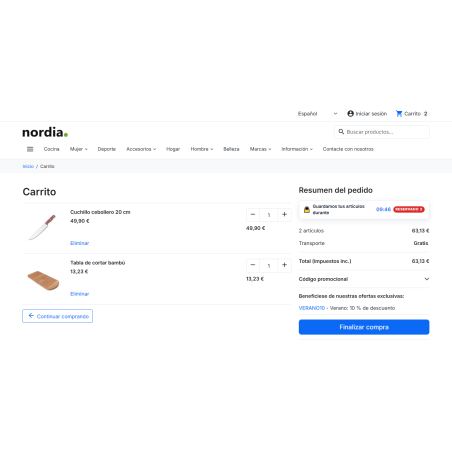
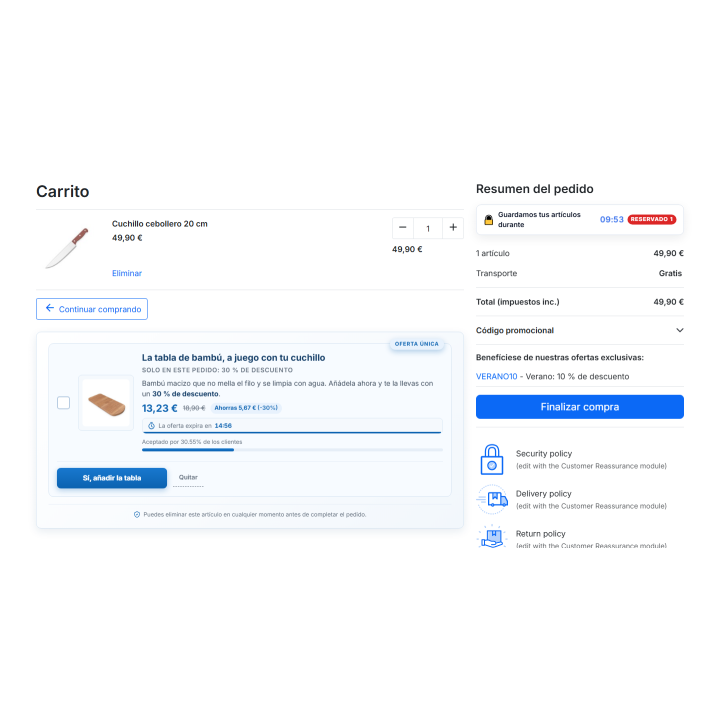
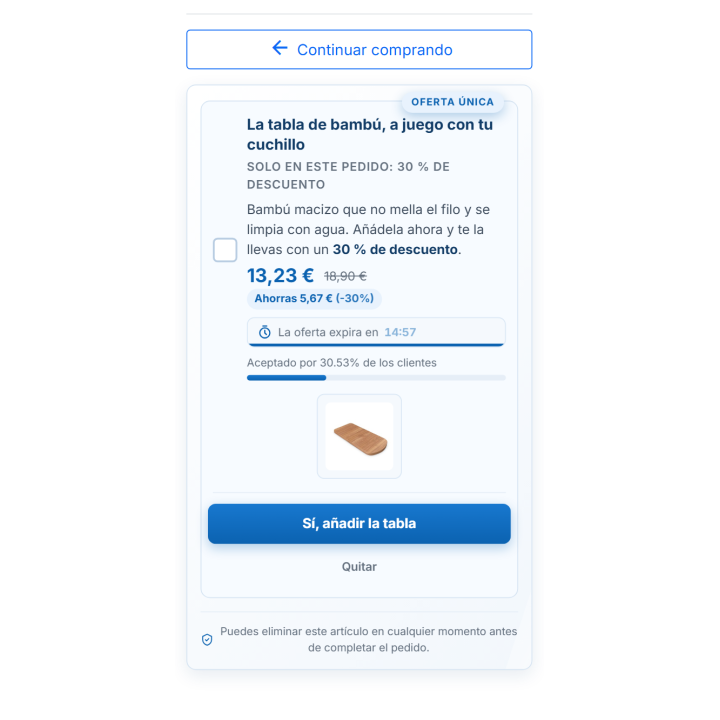
The offer appears as a card with the product image, the regular price crossed out, the sale price, and the customer's savings. Optionally, you can add a countdown timer, the remaining stock, and a notification such as "accepted by X% of customers," calculated using your own store's data. The customer checks the box, the product is added to their cart at the promised price, and the order summary is updated. If they change their mind, they can remove the item directly from the card.
You choose where each offer is displayed: in the cart, at checkout, or both. If you have multiple active offers, you decide which one appears first: the highest priority offer, the one that generates the most extra revenue, the cheapest offer, a random rotation, or the one that converts best.
/ You set the price and the conditions
Offer price
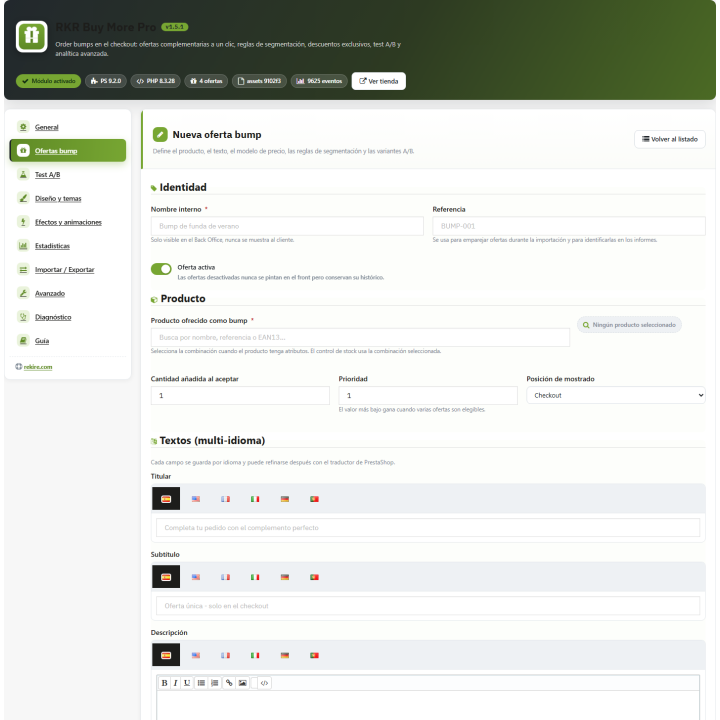
Regular price, fixed price, percentage off the regular price, or a gift. You can also apply an exclusive discount, either as a fixed amount, a percentage off the regular price, or a free discount. The discount is only valid for that product in that cart; it won't apply to other orders.
Who do you show it to?
You can filter by minimum and maximum cart amount, by number of items, by products, categories, manufacturers, or suppliers present in the cart, with product and category exclusions. You can also filter by customer group, country, currency, or specific customers, and you can decide whether guests can see it.
When and how many times
Start and end dates, days of the week, a limit on acceptances per customer, and a total limit. The offer automatically closes when the limit is reached.
If the conditions cease to be met
If the customer removes items from their cart that justified the offer or lowers the minimum purchase amount, the discounted item is automatically removed. The cart does not retain a price that no longer applies.
Various currencies and prices excluding VAT
Amounts are entered in the default currency and converted to the customer's currency. Groups viewing prices excluding VAT will see the prices displayed without VAT on the card.
/ Products with combinations and customizable products
The card allows you to choose the combination of the offered product with color samples and thumbnails, and the price, savings, and stock are updated as you make changes. If the product is customizable (engraving, text, photo), the offer functions as a reservation: the customer reserves it, completes the customization on the product page, and the offer price is applied when they add it to their cart. The reservation expires after 24 hours.
/ Discover which offer sells best with A/B testing
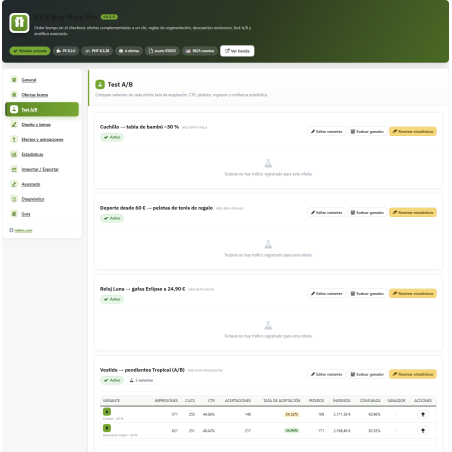
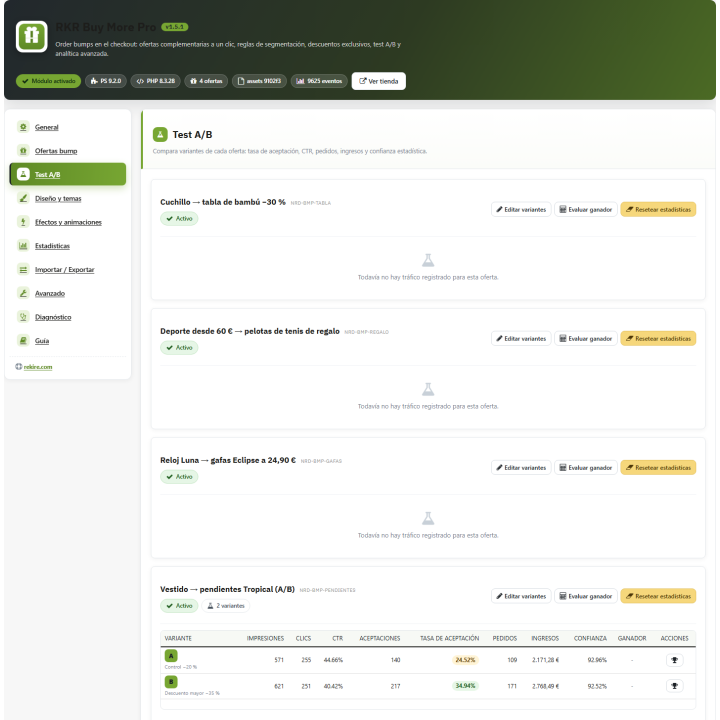
Each offer can have as many variations as you like, each with its own button text, logo, and price, and with the traffic distribution you choose. You decide how the traffic is distributed: randomly among visitors, a fixed amount per cart, or a fixed amount per customer. The module calculates the confidence level of each variation and, once it reaches the minimum sample size you configure, can declare the best one the winner and display it to everyone. You can also manually declare the winner or reset the data for an offer.
/ Measure how much each offer leaves you.
Statistics on the panel
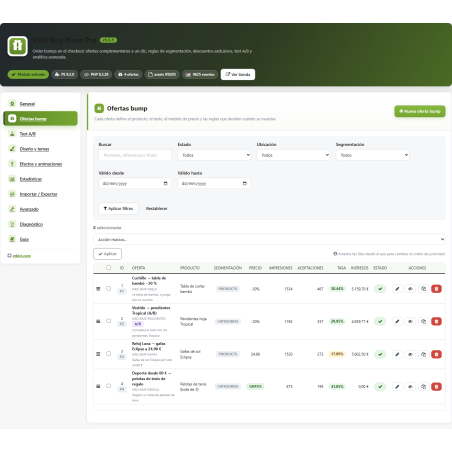
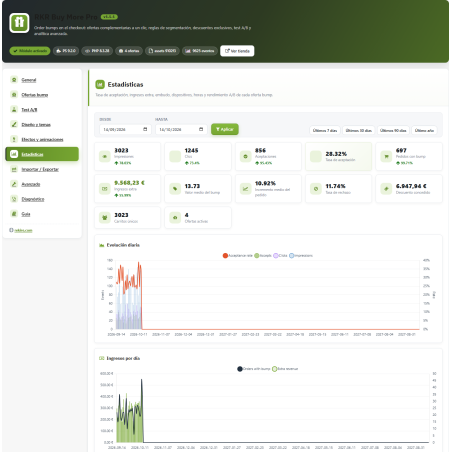
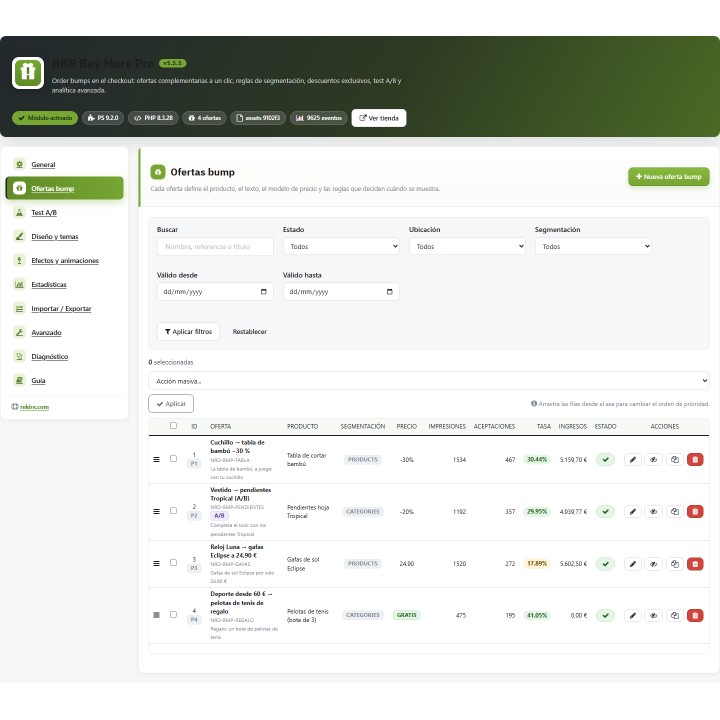
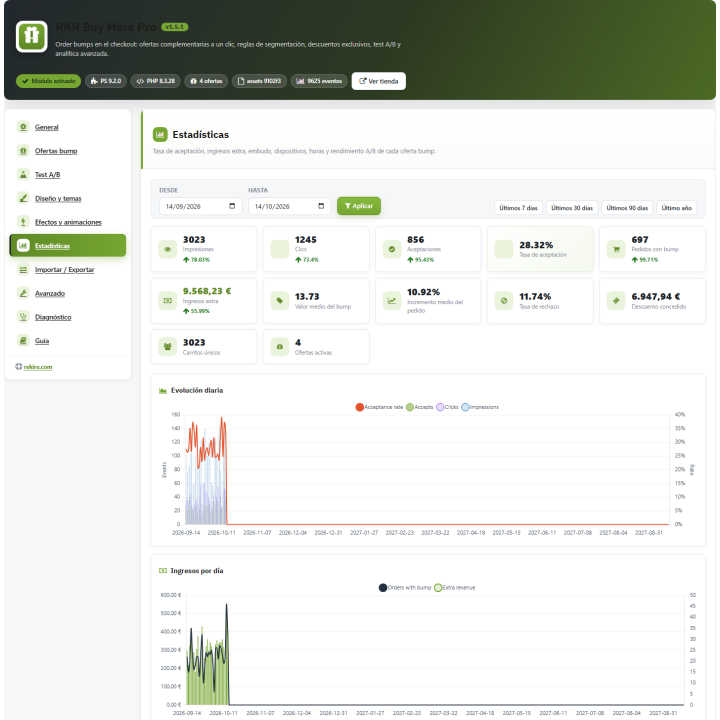
Impressions, clicks, acceptances, acceptance rate, rejections, orders, revenue, discounts granted, average offer value, and the increase in average order value, compared to the previous period. Daily trend charts, funnel, devices, times of day, and top-grossing offers.
What's in each order
In the back-office order details, you can see which lines came from a quote and what discount was applied to each one. If you make a payment, it's attributed to the quote line.
CSV reports
Export order traceability and A/B test results by offer and variant to CSV, ready to open in a spreadsheet.
To see the dashboard in action before you have real data, install the four sample offers with 60 days of simulated activity and remove them with a button when you're finished testing.
/ Make the offer look like yours
There are 23 design themes and a variable editor (backgrounds, gradients, borders, shadows, fonts, buttons, badges) with live preview, plus custom CSS. To grab attention, you have a global banner above the block and a badge for each offer ("Unique Offer," "Best Seller," etc.), 7 entry animations, button click, glow, and hover effects. The effects respect the visitor's "reduce motion" preference.
/ Don't let the offers overlap.
Mark an offer as exclusive, decide if it can be combined with coupons, and limit how many offers a single cart can have. When two offers clash, you choose the criteria: the higher priority offer wins (the other is automatically removed), or the first one accepted wins (the second is rejected).
/ In your language and for all your stores
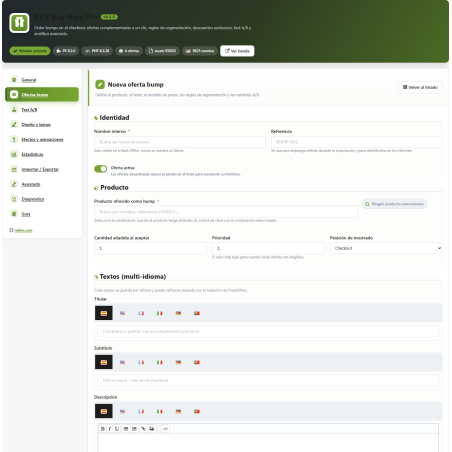
All texts seen by the customer are written in each language, with a rich text editor for the descriptions, and the module includes translations into Spanish and English. With multi-store functionality, each offer is associated with the stores you choose, and statistics are tracked per store.
/ Data coming in and going out
Export your offers to JSON or CSV and import them into another store: they are matched by reference, and you can choose whether to overwrite existing offers. The system checks that the product in each offer exists.
/ Tranquillity
Customer actions (accept, remove, reserve) are tokenized and have a request limit. In the back office, a diagnostics tab checks that the hooks, tables, and cart offers are in order and fixes anything missing. The graphs are included in the module itself.
If you have a developer, the module alerts you to important events (offer accepted, withdrawal, reserved, order registered, conflict resolved) with its own hooks, and leaves room for another module to add content within each card.
/ It installs and tests without complications
Upload the ZIP file, open "RKR Buy More Pro" in the REKIRE MODULES menu, and create your first offer, or install the sample data to see the module assembled. A user guide is available in the back office.
Compatible with PrestaShop 1.7.8 and 9.x
Developed and maintained by REQUIRE
-
Referencerkrbuymorepro
v1.5.6
- The shopping cart no longer gives a fatal error in PrestaShop 1.7.8 and 8.x ("Access level to ...:: $guestAllowed must be public"): the front controller declared
protected $guestAllowed, while the core has it setpublic. In 9.x, the property no longer exists, which is why the error was not appearing.
v1.5.5
- Templates: all printed variables are escaped (
escape:'html':'UTF-8') or converted to an integer (intval). This is what the second Addons validation requires (submission 3777754, "Function unknown in escape modifier list"). - A PHP comment no longer names HTML tags (Addons used to treat it as HTML in PHP).
v1.5.4
- First version in PrestaShop Addons (product 99260): module key. No functional changes.
v1.5.3
- The editor's "A/B Test" group was not displayed (the hidden field of the switch was read instead of the box): variants and cast can now be edited.
- Numbers and percentages in language format ("30.01%" in Spanish) on the card, rates, indicators and A/B significance, rounded.
- "95% CI" no longer comes out with the double percentage.
- Segmentation ("Products", "Categories"...) and preview of translated topics.
- Discount from the offer table and average bump value with currency.
- The long names in the "Top Offers by Income" chart are broken into lines instead of being cut off.
- The read-only grid of the menu tab fits in 1120px windows.
v1.5.2
- Editing an existing offer resulted in error 500 ("Cannot assign an empty string to a string offset"): the offer was loading in only one language. Now it loads in all languages.
- The editor displayed only one character per language in the offer texts.
- Previously, creating, duplicating, and importing only saved the back-office language. Now, all languages are saved, and an empty language uses the text from the default language.
- The global badge ("UNIQUE OFFER") is multilingual; the update converts the saved value.
- The "Daily Evolution" graph always displayed 367 days, regardless of the range.
- Legends for the graphs, funnel, and preview of translated topics.
- The panel header title was blank (it appeared dark on dark).
- The menu name is no longer rewritten when opening the panel: only when installing.
- The traffic distribution of variants A/B is respected (previously it was always in equal parts).
4 other products in the same category

SEO Link Groups Module: Improve Internal Linking in PrestaShop
 Blog
Blog
€145.20
€120.00 Sin impuesto
€145.20 Con impuesto
Product Videos
- New

RKR Refund Orders: Refunds on the payment gateway with a corrective invoice
€145.08
€119.90 Sin impuesto
€145.08 Con impuesto
Product Videos


También podría interesarte


€60.44
€49.95 Sin impuesto
€60.44 Con impuesto

€12.09
€9.99 Sin impuesto
€12.09 Con impuesto
- On sale!


€96.79
€79.99 Sin impuesto
€96.79 Con impuesto


€96.79
€79.99 Sin impuesto
€96.79 Con impuesto


€84.69
€69.99 Sin impuesto
€84.69 Con impuesto

€120.99
€99.99 Sin impuesto
€120.99 Con impuesto


€60.50
€50.00 Sin impuesto
€60.50 Con impuesto


€96.79
€79.99 Sin impuesto
€96.79 Con impuesto


€302.50
€250.00 Sin impuesto
€302.50 Con impuesto


€181.50
€150.00 Sin impuesto
€181.50 Con impuesto
Questions and answers
Nobody has asked anything about this product yet.

