




RKR Team Notes: Internal notes, mentions, and those responsible for orders
Price:
€96.68
This product can be bought as a subscription. Below you can see what each option includes and what it costs.
First year:
€96.68
tax incl.
From the second year:
€24.18/year
tax incl.
- One year of technical support and lifetime updates; from the second year, support is extended for €24.18/year and includes taking on your general improvement ideas for the module.
- Renews automatically; cancel whenever you want, with no minimum term.
One-time payment:
€96.68
tax incl.
- One year of technical support and lifetime updates; after that, support ends (with the subscription it is extended for €24.18/year).
- A single payment, with no automatic charges.
€79.90
+ VAT = €96.68
A private thread for each order and each back-office client , with @mentions to your colleagues (notifications via email and/or Telegram), a responsible party with a deadline, automatic notes for each status change, and a team dashboard with your pending orders. Goodbye to WhatsApp notifications and sticky notes. Rekire module, tested in real stores.
Compatible with PrestaShop 1.7.8 to 9.2.
Internal notes for the team
Don't let anyone ask "who's delivering this order?" via WhatsApp: just write it on the order itself.
A WhatsApp message gets lost, a post-it note falls off, and the next person to handle the order doesn't know what was discussed. RKR Team Notes opens a private thread for each order and each back-office client, with mentions of your colleagues and a designated person responsible with a deadline.
4 trays
My pending, unassigned orders, all with unread mentions, on the Team Dashboard
14 KPIs · 9 graphs
to see how much is being said, who is responding, and what is getting stuck
1.7.8 → 9.2
a single version of the module for your PrestaShop stores
Everything that is said about an order, in the order
A private thread in orders and customers
Warehouse, customer service, and administration all write on the same form. Only your team can see it from the back office; your customers see nothing.
Mention a colleague and they'll get the notification
Type @ and choose the person. They will be notified by email and/or Telegram, depending on their settings. The emails are available in six languages.
Notes already prepared
Standard responses that can be inserted with a click in each employee's language, so as not to write the same thing a hundred times.
Each order, with someone in charge
Responsible party and deadline
Assign an order or customer to a person, with a deadline. You can resolve it, reopen it, or press "assign me" if you pick it up.
Your inbox
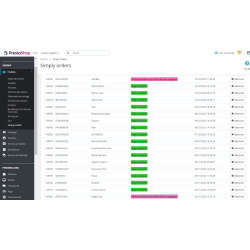
You can see your pending orders, those that no one is picking up, all orders, or those with unread mentions. Overdue orders are marked.
Answer without leaving the board
Open a thread in the side drawer of the Team Dashboard, reply, assign or set the note, and move on to the next one.
A thread explorer
Search by item type, author, dates, or text across all team conversations.
The history is written automatically .
Each order status change and assignment automatically generates a note, clearly marked to distinguish it from human input. You can also add a note for every new order. This way, the thread tells the complete story without anyone having to remember to write it down.
What 's happening in your team, in numbers?
The statistics show 14 indicators and 9 graphs: notes by day (manual and automatic), by employee and by type, mentions, pending orders by status, assignment age, hourly activity, and sent notifications. These help you see where the work is bogged down and which predefined notes no one is using.
Each one plays what belongs to them.
Permits with purpose
The Dashboard is available to all user profiles. Each employee deletes only their own notes, automatic notes can only be removed by the super administrator, and settings can only be changed by authorized users.
It looks like your back office
23 visual themes with preview, so the panel fits your workflow.
Try it without writing anything
Install demo data with one click and delete it just as easily. Import and export your notes in JSON and CSV, with a pre-test that writes nothing.
What you should know
It works with multiple stores and in six languages: Spanish, English, French, Italian, German, and Portuguese. Retries for failed notifications and the cleaning of old logs are scheduled using a cron URL protected by its own key, which can be regenerated. For Telegram, you need to create a bot (with @BotFather) and have each employee specify their chat.
Compatible with PrestaShop 1.7.8 to 9.2
Developed and maintained by REKIRE
-
Referencerkrteamnotes
4 other products in the same category

- New

También podría interesarte

€80.95
€66.90
+ VAT = €80.95


€80.95
€66.90
+ VAT = €80.95

€80.95
€66.90
+ VAT = €80.95

€84.69
€69.99
+ VAT = €84.69
€120.99
€99.99
+ VAT = €120.99

€80.95
€66.90
+ VAT = €80.95

€80.95
€66.90
+ VAT = €80.95

€302.50
€250.00
+ VAT = €302.50

€181.50
€150.00
+ VAT = €181.50
Questions and answers
Nobody has asked anything about this product yet.

