Custom products
Your client knows what measurements they need. You don't want to quote each piece by email.
Crystal, methacrylate, fabrics, wood, vinyl: each order is different and each price must be calculated by hand. RKR Custom Configurator Let the customer type in the measurements, choose the options and see the price instantly, and you receive the order with everything needed to manufacture it.
4 types of sales
by surface area (width × height), by volume, by length, or by unit with only options
17 types of rulers
price, weight and manufacturing days, with conditions, tiers and customer groups
1.7.8 → 9.x
without overrides, using the classic and Hummingbird themes; tested on 1.7.8.11, , 8.2.8 and 9.2.0
/ The customer configures and sees the price instantly.
Measurements in the unit you want
Millimeters, centimeters, decimeters, meters, inches, or feet. You set minimum, maximum, default value, fixed values in a dropdown menu or multiples, and a condition between measurements of the type W <= 2*H so they don't ask for impossible parts.
Options as you need them
PrestaShop attributes are custom options or fields for writing (text, number, color). They are displayed as buttons, dropdown menus, lists, images, colors, or checkboxes, with required options, multiple options at once with minimum and maximum values, help, and descriptions with images.
Presentation to your liking
The settings can be displayed in a list, tabs, accordion, or steps, depending on how long they are.
/ Your way of calculating the price, without programming
Pricing rules
Pricing options include per unit of measure, width, height, or length; a value multiplied by a formula with minimums and rounding; a fixed price per piece or line; percentages and extras; minimums per piece, line, or measure; weight; and manufacturing days. These are applied according to the chosen options (all, any, or "the one that charges the most"), the quantity, the measurements, the line amount, or a written condition.
Price list
Grid width × height (applies to the smallest row containing the piece) or sections by total measurement, with total price, per unit or by measurement × quantity, and by options.
Our own formulas, without risk
With variables such as width, height, length, total measurement, and quantity, and functions such as min, , max, , ceiling either between. The evaluator is proprietary: no code is executed.
/ Visibility rules written as sentences
"If they choose Saw Cut → hide Shape and Drills." This is how it's written in the editor. You can hide, show only if, automatically select, or prevent purchase, with conditions regarding measurements and a message for the customer. These are applied immediately in the browser and They are checked again on the server.
/ The price is determined by the server, not the browser.
The price, selected options, rules, and limits are always recalculated on the server, both during setup and when the quantity in the shopping cart changes. Anything you type or tap in the browser will not affect the final charge.
/ From the cart to the workshop
Shopping cart, order, invoice and emails
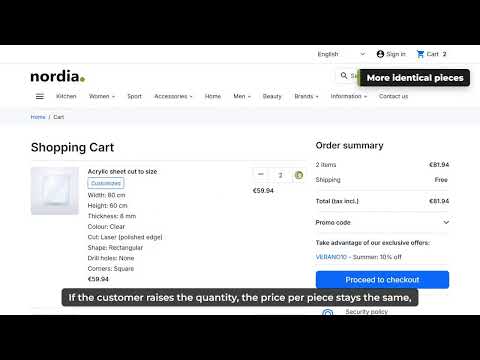
Each configuration is its own line, with its own price and weight per piece. The shopping cart line displays the measurements and options, and this information is stored on the order, invoice, and emails.
Panel in the order and workshop sheet
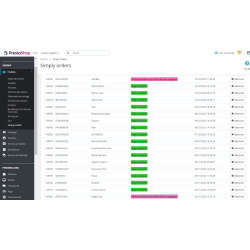
In the back-office order you see the configuration of each line, and you can print a workshop sheet with what needs to be manufactured.
No overrides
It uses PrestaShop's core customizations. It works like this. 1.7.8 to version 9.x, with the classic and Hummingbird themes.
/ An editor who shows where every euro comes from.
Simulator
In the product editor, the tab Prove It lets you set measurements and options and shows you where every euro of the price comes from. You can check a ruler before any customer sees it.
Copying, templates, and JSON
Copy the configuration to other products by ID or reference, define templates by category, and export or import the configuration in JSON.
/ Already selling with Mega Product by Alabaz? Switch over without starting from scratch.
If you have both modules installed, the configuration is imported automatically When this is installed, it reads from the Mega Product tables of Alabaz and nothing is changed: it continues selling as before.
Check before you go in
An import screen displays the products, what's been imported, and any messages indicating that the translation couldn't be completed. You can check each product in the simulator and compare the price. You can import again: products you've already edited here will be retained unless you specify otherwise.
You go through product by product, and you can go back
Pass It deactivates the product in Mega Product (only that row, and saves its previous state) and this module takes over. Return to Mega Product It undoes it, and when this module is uninstalled, everything returns to Mega Product.
What is not imported. It is noted in the import report, and you will have to redo it here or leave it in Mega Product: product groups or categories such as options, image layers, components, file upload, Megadesigner/3D, quantity pricing tables, sales by box, stock by measure and some types of ruler (pricebox, , stock, , minqty, , maxqty, , changedefm, , limits, , boxes, , referencePrestaShop discounts are applied to the entire configured price; Mega Product handled them differently, so compare prices before proceeding. Mega Product by Alabaz is a third-party module, unrelated to PrestaShop. Rekire.
/ What you should know
You can find it in Catalog → Custom Products and on the button Set up From the product details. The configured weight is sent to the carriers. It is translated into Spanish, English, French, Italian, German, and Portuguese. License AFL-3.0.
Compatible with PrestaShop 1.7.8 a 9.x
Developed and maintained by REQUIRE