






- New


RKR City and International Phone Selector: Clean addresses and valid phone numbers in PrestaShop images
RKR City and International Phone Selector: Clean addresses and valid phone numbers in PrestaShop
Price:
€96.68
This product can be bought as a subscription. Below you can see what each option includes and what it costs.
First year:
€96.68
tax incl.
From the second year:
€24.18/year
tax incl.
- One year of technical support and lifetime updates; from the second year, support is extended for €24.18/year and includes taking on your general improvement ideas for the module.
- Renews automatically; cancel whenever you want, with no minimum term.
One-time payment:
€96.68
tax incl.
- One year of technical support and lifetime updates; after that, support ends (with the subscription it is extended for €24.18/year).
- A single payment, with no automatic charges.
€79.90 Sin impuesto
€96.68 Con impuesto
Let your customers choose their city from a real list, with the postal code and province automatically filled in, and have the phone number validated with its international prefix and saved in E.164. It works in the checkout of any theme and in the address back office. Includes 8,024 municipalities in Spain, phone number validator for 178 countries, and 23 themes. Tested on PrestaShop versions 1.7.8 to 9.2. Rekire module, tested in real stores.
Compatible with PrestaShop 1.7.8 to 9.2.
City and phone selector
A misspelled city and a non-existent phone number are like a package that never arrives.
When customers manually enter addresses, they often get incorrect cities, postal codes that don't match the province, and phone numbers missing area codes or with one less digit. This can lead to shipping problems and unconfirmed orders. RKR Select City ensures the city is checked against a real-world list and the phone number is verified against the country before the order is finalized.
8,024 municipalities
Ready-to-use kits from Spain, including province and postal code, plus starter packs from Portugal, France, Italy, Germany, and the United Kingdom
178 countries
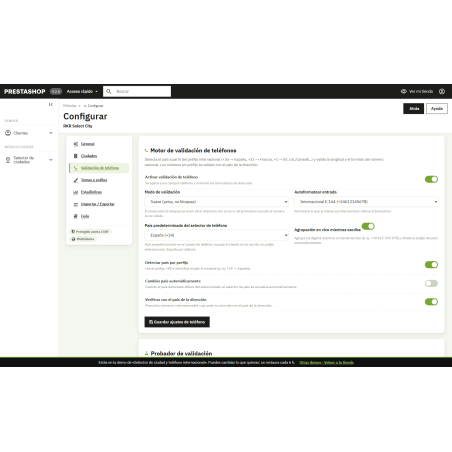
in the phone validator, each with its prefix, number length and format
PrestaShop 1.7.8 → 9.2
Tested on 1.7.8 , 8.2, 9.0 and 9.2, with PHP 7.2 or higher
/ Directions that the carrier understands
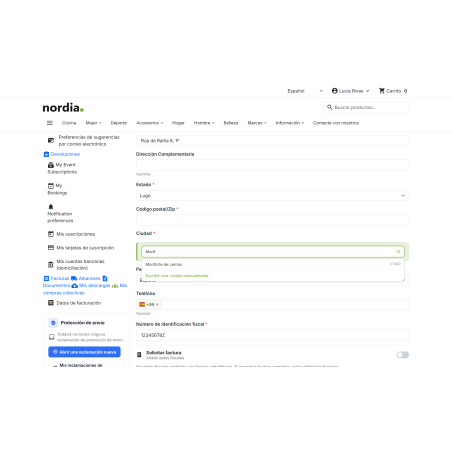
When the customer selects a province, they see its cities in a drop-down menu with a search function. Once a city is selected, the postal code is automatically filled in, ensuring consistency between the selected city and the province. Fewer address errors mean fewer returns and fewer delivery issues.
If your store's form doesn't ask for a province, or if the country has thousands of cities, the search engine will look throughout the country and find any city, not just the first ones on the list.
You decide how strict you want to be: with the city in strict mode, only cities from the list are accepted (where the list has cities), and if you prefer to leave some leeway, the client can write their own by hand.
Phones you can count on
International prefix detected
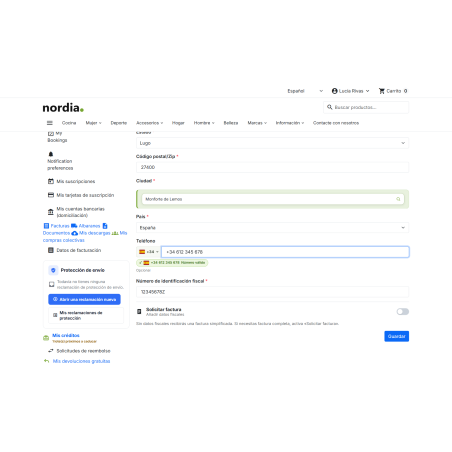
The customer enters +34, +33, or +351, and the module recognizes the country. A French number remains French, and one without a prefix uses the country code of the address.
Saved in E.164
The number is saved in international format (+34612345678) on the server, even if the client has JavaScript disabled. This is the format expected for SMS and WhatsApp messages. If you prefer, you can save it in national format or exactly as the client enters it.
Soft or strict mode
In soft mode, the module notifies the client; in strict mode, it blocks the transmission of the address if the number is invalid. A valid number from another country will trigger a warning, but will not block the transmission.
/ In your theme's checkout and in the back office
It connects to the PrestaShop address form, so it works with the classic theme, Hummingbird, and single-page checkouts. No overrides: it doesn't overlap with any of your store's classes or conflict with other modules. And the same city selector and phone number validator are in the back office address form, so addresses you enter manually will also be displayed correctly.
/ A complete panel, without leaving the back office
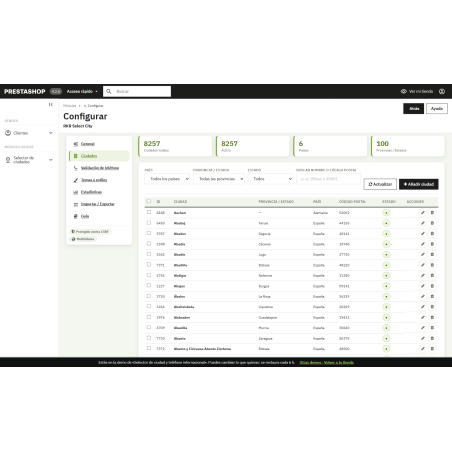
City manager
Add, edit, activate, or deactivate cities from a single screen, or import them from CSV or JSON with a preview before applying anything. Country packs load with one click.
23 tracks with live preview
To make the selector and phone field look like part of your store: colors, borders, shadows, and animation effects.
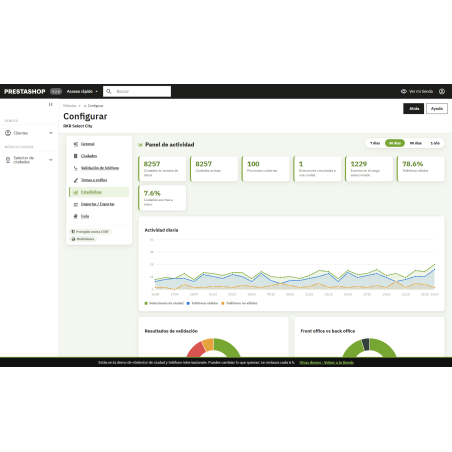
Statistics
7 indicators and 5 charts: daily activity, phone validation results, store vs. back office, provinces with the most cities, and most selected cities. With 7, 30, 90, and 365-day ranges, and configurable retention: old records are automatically purged.
What worries us
GDPR: In statistics, the phone number is never saved in full, only masked. Settings are saved per store in multi-store environments. The text displayed to the customer is available in Spanish, French, Italian, Portuguese, and German, and the dashboard is available in Spanish and English. Settings and data can be exported and imported to transfer them from one store to another.
If you're coming from easycityselector, your cities will be migrated upon installation. AFL-3.0.
Compatible with PrestaShop 1.7.8 to 9.2
Developed and maintained by REKIRE
-
Referencerkrselectcity
4 other products in the same category

- New

RKR Weight Pricing Pro: Weight-based sales for PrestaShop
 Blog
Blog
€96.68
€79.90 Sin impuesto
€96.68 Con impuesto
Product Videos

Cache Buster Module - updates users' browser cache
Blog
€18.15
€15.00 Sin impuesto
€18.15 Con impuesto

También podría interesarte


€60.44
€49.95 Sin impuesto
€60.44 Con impuesto

€12.09
€9.99 Sin impuesto
€12.09 Con impuesto
- On sale!


€96.79
€79.99 Sin impuesto
€96.79 Con impuesto


€96.79
€79.99 Sin impuesto
€96.79 Con impuesto


€84.69
€69.99 Sin impuesto
€84.69 Con impuesto

€120.99
€99.99 Sin impuesto
€120.99 Con impuesto


€60.50
€50.00 Sin impuesto
€60.50 Con impuesto


€96.79
€79.99 Sin impuesto
€96.79 Con impuesto


€302.50
€250.00 Sin impuesto
€302.50 Con impuesto


€181.50
€150.00 Sin impuesto
€181.50 Con impuesto
Questions and answers
-
¿Qué ciudades trae incluidas?
0-
Los 8.024 municipios de España, con su provincia y su código postal, listos para usar, más packs de inicio de Portugal, Francia, Italia, Alemania y Reino Unido que se cargan con un clic. Desde el gestor de ciudades puedes añadir, editar, activar o desactivar ciudades, o importarlas desde CSV o JSON con vista previa. Si vienes de easycityselector, tus ciudades se migran al instalar.
-
-
¿Cómo valida el teléfono?
0-
Reconoce el prefijo internacional que escribe el cliente (+34, +33, +351…) y comprueba el número contra su país, con prefijo, longitud y formato para 178 países; uno sin prefijo toma el del país de la dirección. Por defecto lo guarda en formato E.164 (+34612345678) en el servidor, incluso sin JavaScript, aunque puedes guardarlo en formato nacional o tal cual. En modo suave avisa y en modo estricto bloquea la dirección si el número no es válido.
-
-
¿Funciona con mi tema y con checkouts de una sola página?
0-
Sí. Se engancha al formulario de dirección de PrestaShop, así que funciona con Classic, con Hummingbird y con los checkouts de una sola página, sin overrides que pisen clases de tu tienda. El mismo selector de ciudad y el validador de teléfono están también en el formulario de direcciones del back-office.
-
-
¿Puede el cliente escribir una ciudad que no está en la lista?
0-
Depende de lo que elijas. En modo estricto solo se aceptan ciudades de la lista (en los países donde la lista tiene ciudades); si prefieres dejar margen, el cliente puede escribir la suya a mano. Si tu formulario no pide provincia o el país tiene miles de ciudades, el buscador consulta en todo el país.
-
-
¿En qué versiones funciona y en qué idiomas viene?
0-
Funciona de PrestaShop 1.7.8 a 9.2 con PHP 7.2 o superior, y se ha probado en 1.7.8, 8.2, 9.0 y 9.2. Los textos que ve el cliente vienen en español, francés, italiano, portugués y alemán, y el panel en español e inglés. Los ajustes van por tienda en multitienda, y en las estadísticas el teléfono nunca se guarda completo, solo enmascarado.
-
-
¿Puedo conseguirlo con la suscripción anual de Rekire?
0-
Sí. La Suscripción anual a todos los módulos de Rekire da acceso a este módulo y a todos los demás, igual que un bono de horas de soporte. La instalación y configuración también se pueden contratar con horas de soporte.
-

