




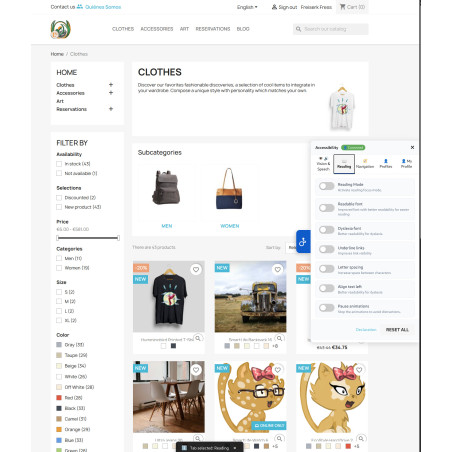


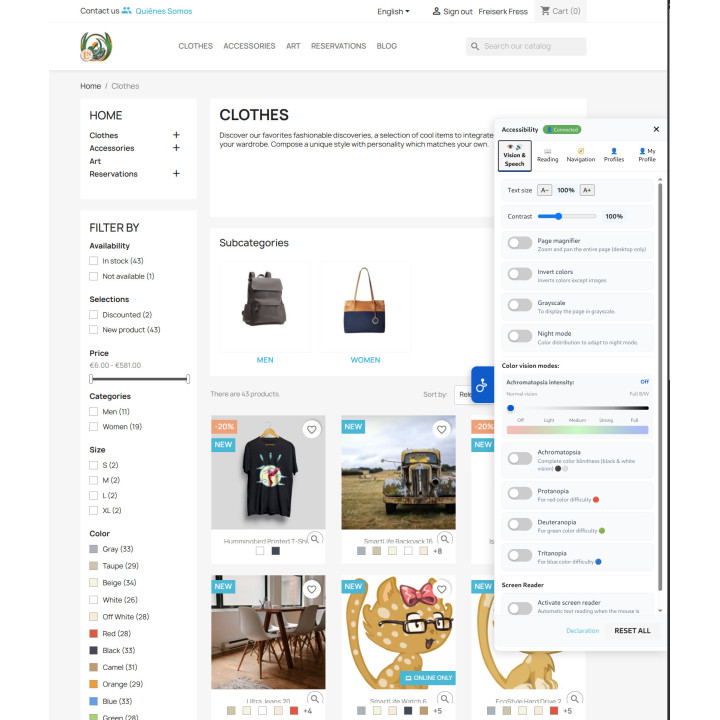
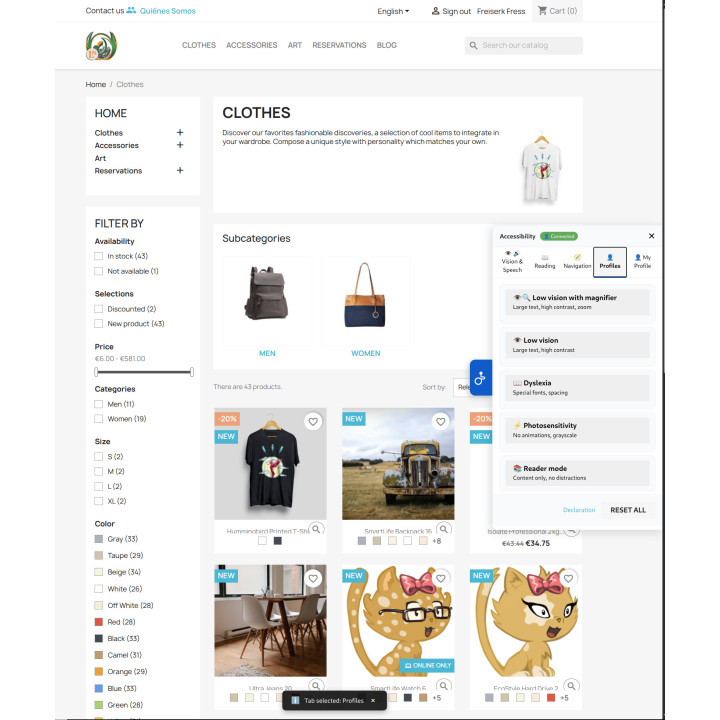

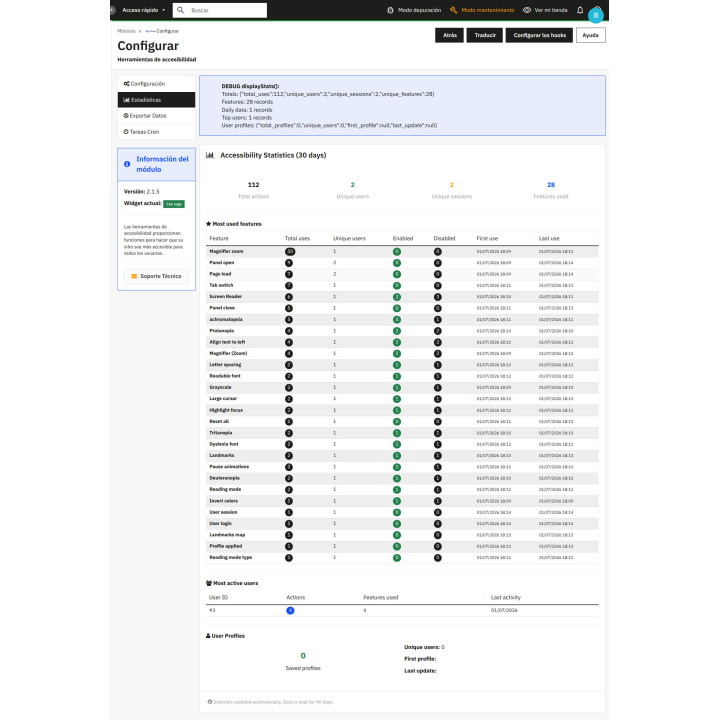

Easy Accessibility Module images
What it does for your store
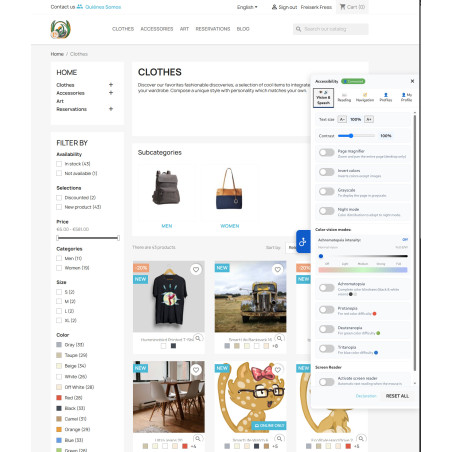
- Accessibility button on every page. Your customers can adapt any page to what they need to read and buy, without you changing the theme or touching the template.
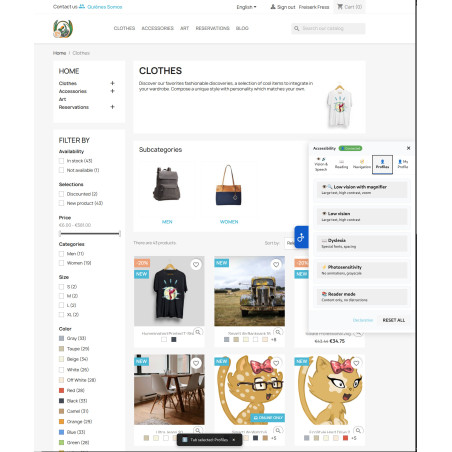
- One-touch profiles: Low vision, low vision with magnifying glass, dyslexia, photosensitivity and reader mode are activated at once, and one button leaves everything as it was.
- Contrast and color blindness filters: Text size, contrast, inverted colors, grayscale, and filters for different types of color blindness.
- Assisted reading and navigation: Screen reader with browser voice, font for dyslexia, large cursor and highlighted keyboard focus.
- Your settings, in your account. Once logged in, each customer finds the store as they left it, from any device.
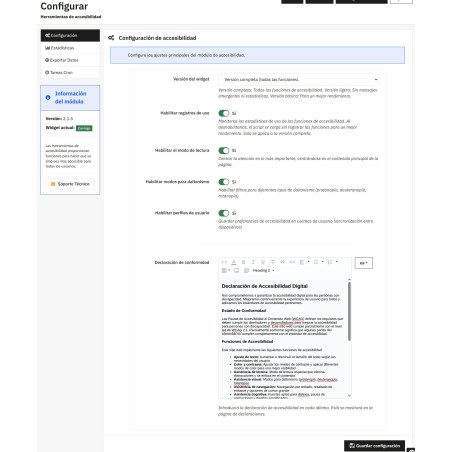
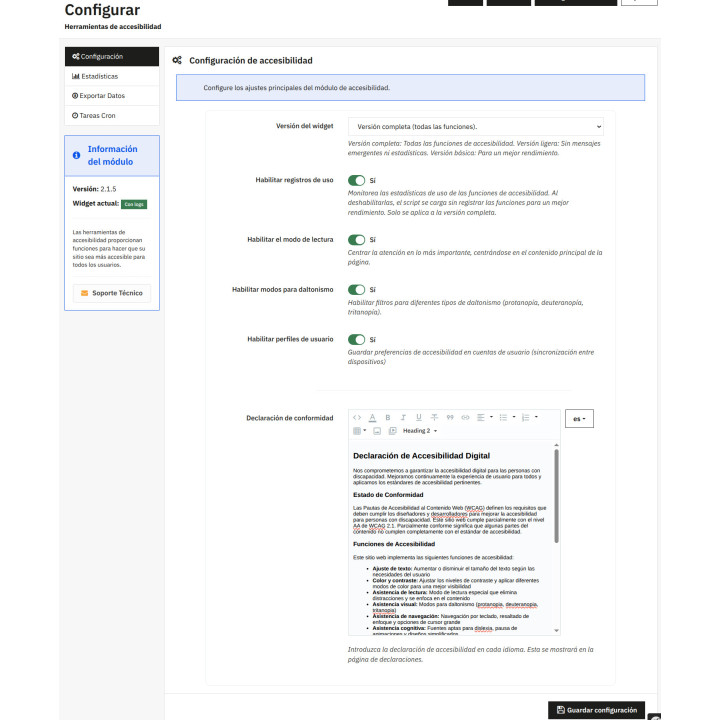
- Accessibility statement included. Brings the declaration page already written and you edit it in each language of your store.
Easy Accessibility Module
Add an accessibility button to every page of your store: five one-click profiles (low vision, dyslexia, photosensitivity, magnifying glass, and reader mode) and over twenty tools—contrast adjustment, color blindness filters, screen reader, dyslexia font, large cursor, keyboard navigation—that each client customizes to their needs. Save their preferences to their account, bring in a pre-written accessibility statement page, and tell you which tools your visitors actually use. No external services or fees required.
Installation, updates and support
Free installation
We'll do it for you! We'll install and configure the module in your store completely free of charge , guaranteeing a quick and hassle-free start.
Lifetime updates
Get permanent access to the latest version of your module. Your investment is protected and it will always be compatible with new versions of PrestaShop.
Certified quality
Our modules have passed the official PrestaShop validation, ensuring their security, performance and compatibility with the platform's standards.
Premium support (1 year)
You have a full year of dedicated support . Any questions or problems that arise regarding the module will be resolved by our expert team.
Why did we create this module?
Your store is visited by people with low vision, color blindness, those who navigate using only a keyboard, or those who need the product information read aloud. PrestaShop doesn't provide the necessary tools to adapt it for them out of the box, and those who can't read a price usually don't let you know: they just go to another store.
We wanted each customer to be able to adjust the store to their needs with a single button, without having to change themes or pay fees, and for you to have a page where you can declare what you do for accessibility.
A website alone doesn't make it accessible, because accessibility depends on the entire store: the theme, the text, and the images. What it does do is provide tools for those who need them.
Your store is read by people who don't see it the way you do.
A customer with low vision, one who can't distinguish red from green, one who navigates only with the keyboard, and one who needs the information sheet read aloud. None of the four write to tell you about it: they go to another store.
Accessibility tools place a floating button on every page of your store. From there, each visitor can adapt the page to their needs in order to read and shop.
Profiles: one tap, not fifteen settings
Nobody wants to learn a settings panel just to read a price. The five profiles solve that problem at once: low vision , low vision with magnifying glass , dyslexia , photosensitivity , and reader mode . And a button that resets everything to its previous settings.
And if you want to fine-tune things, they're all there.
Reading
Legible font, dyslexia-friendly font (OpenDyslexic), underlined links, letter spacing with slider, left-aligned text, paused animations, and distraction-free reading mode.
Vision
Text size, contrast up to double, invert colors leaving photos intact, grayscale, night mode and page magnifier.
Color vision
Filters for protanopia, deuteranopia, tritanopia, and achromatopsia with adjustable intensity. Around 8% of men have difficulty distinguishing red from green: in a store, that's like a button that's hard to see.
Screen reader
Read aloud what the customer points to, using the voice, speed, tone, and volume that the customer chooses, using the browser's own speech synthesis.
Navigation
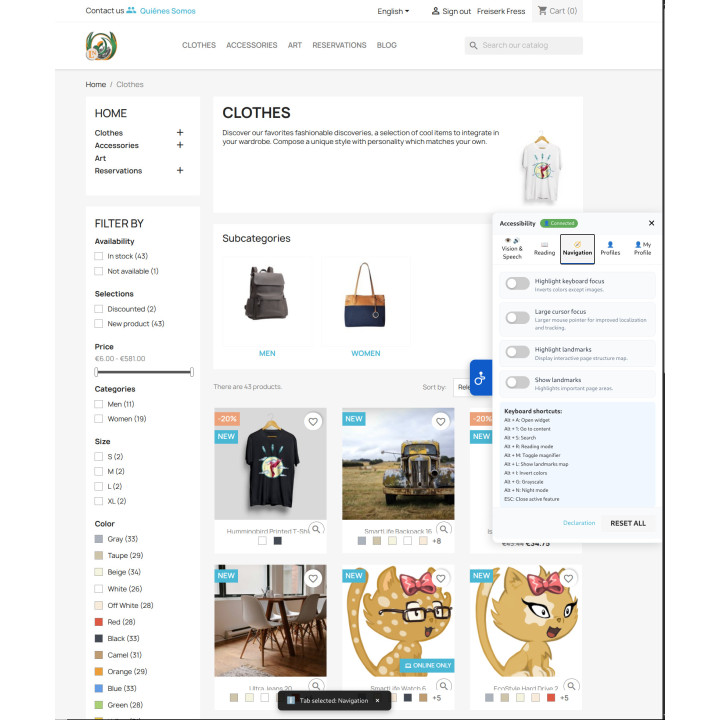
Keyboard focus highlighting, large cursor, interactive page structure map, and ARIA landmark highlighting. Accessible with keyboard shortcuts, starting with Alt + A.
On-screen notifications
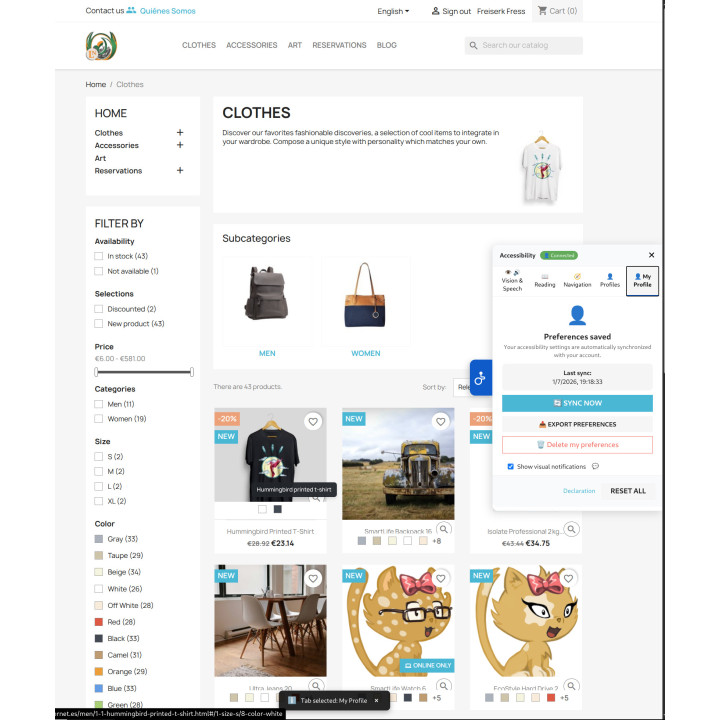
Each change is confirmed with a visible notification, which the customer can turn off if it bothers them.
Your settings are saved in your account.
Without a login, any adjustments the customer makes only last for the duration of their visit. With an account logged in, these adjustments are saved automatically and travel with the customer: they can log in from their mobile phone, laptop, or another computer and find the store exactly as they left it.
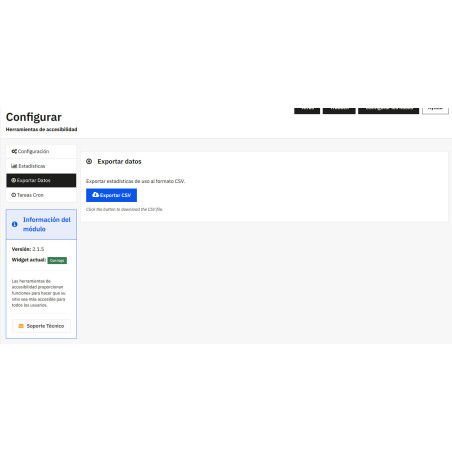
And it's your data: you can export or delete it from the same panel, without writing to anyone.
The declaration page, already written
The module includes a pre-written accessibility statement and provides it in each client's language: compliance status, available functions, and who to contact if something goes wrong. It's your text, and it's edited in the back office, language by language, using the PrestaShop editor.
What this module is NOT
It doesn't make you compliant on its own, and no module can. Compliance is a site-wide issue: your theme, your text, your images, and your forms. What this does is provide tools for those who need them and give you a platform to declare what you do and the data to back it up.
What do your customers really use?
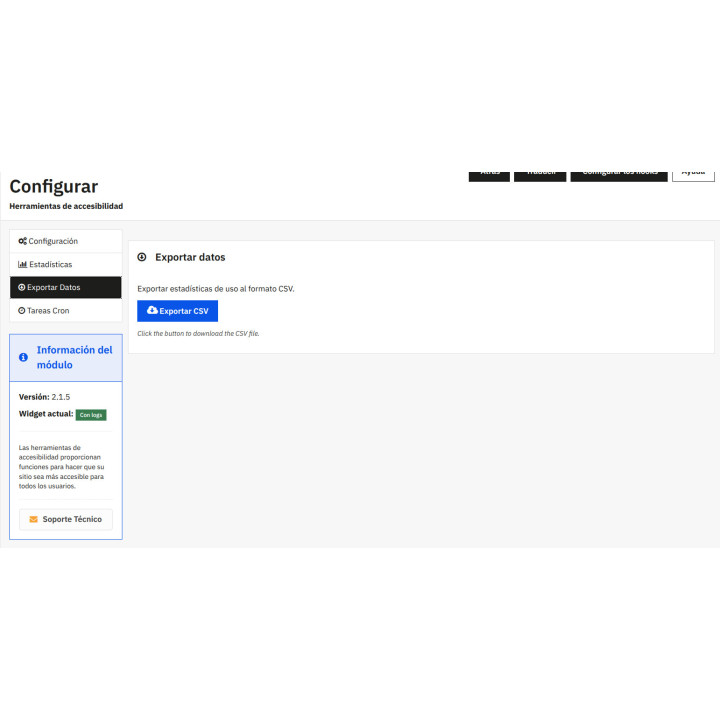
If you turn on usage logs, the module records which tools are used, how often, by how many people, and when. It's no longer guesswork: if your customers activate contrast and font settings for dyslexia, that's telling you something about your store.
The data stays in your database, can be exported, and there's a scheduled task that deletes the old data according to the number of days you specify.
What usually worries
Performance
Three versions of the widget: full, lightweight (without notifications or statistics), and basic. Any settings you disable will not be displayed on the front end.
Privacy
There's no external service, no account to create, and no fees. The speech synthesis is provided by the browser, and your preferences are saved in your own database.
Multistore and languages
The declaration is written in each language of the store, and the widget labels are translated using the PrestaShop catalog itself.
Facility
It installs and that's it: the button appears on the front without touching the template or changing the theme.
Compatible with PrestaShop 8.0 and 9.x. For version 1.7 there is a separate version of the same module: request it if you need it.
REKIRE ?? modules for PrestaShop.
-
Referencemod117
| Version | 2.1.7 for PrestaShop 8 and 9 · 2.1.4 for PrestaShop 1.7 |
|---|---|
| Compatibility | PrestaShop 1.7.5 – 9.1: the ZIP file contains one version for 1.7 and another for 8 and 9 |
| Languages included | Spanish and English |
| Modify the core | No: no overrides |
| Own tables | Yes: customer preferences and usage statistics |
| Requirements | None: the screen reader uses the browser's own voice. |
v2.1.10
Corrected
- The configuration screen displayed all four switches as "No" even though they were set to "Yes". With multi-store enabled,
Configuration::get()without a store context—which is how the screen opens from the "Configure" link in the module manager—resolves in the global context, and there was no row there:install()was writing toConfiguration::updateValue(), which saves to the store's row in the context. The front end did respect the values, so the widget appeared with its tabs while the screen indicated that everything was off. Adding&setShopContext=s-1to the same URL made all four switches "Yes": that was the only change. The danger wasn't the incorrect notification itself, but the following: the merchant sees everything off, clicks "to fix it", and that save does write zeros, and to the global row, which no longer matches the store's row. The screen wasn't just providing incorrect information; it was practically encouraging users to break it. The module has never offered per-store configuration, so it now always reads and writes the global row (Configuration::getGlobalValue()andConfiguration::updateGlobalValue()), which is the default value in any context and in any store. The 75 calls toeasyaccessibility.php,cron.php,controllers/front/cron.php, andcontrollers/front/declaration.phppass through this row. Already installed stores update their values to the global row withupgrade/ upgrade-2.1.10.php, which also deletes the per-store rows that are no longer being read. In a multi-store setup with different values for each store, this unifies them: the default store value is retained. - The version of the "Module Information" card was handwritten in the template.
views/templates/admin/tabbed_interface.tplliterally said2.1.6, so even with 2.1.9 installed, the screen still displayed 2.1.6. Now it comes from$this ->version, assigned inrenderTabbedInterface(), and it can't fall behind again. - The widget's two landmark labels were mixed up. In the full version, the
show-landmarkstoggle—which opens the page structure map—was called "Highlight Landmarks," and the `landmarks—which highlights important areas—was called "Show Landmarks." The help text for each was correct, and the basic version already had them. Now they say "Show Landmark Map" and "Highlight Landmarks." - "Photosensitivity" appeared in lowercase in the widget's profile list, among four others that began with a capital letter. It was the translation from the Spanish catalog, not the template.
v2.1.7
- New Accessibility Button with five profiles, color blindness filters, screen reader and declaration page, with a separate version for PrestaShop 1.7.
At Rekire we want to make things easy for you. That's why our PrestaShop modules come with a flexible usage license:
- Unlimited use in your projects. You can use the module in as many of your own installations as you want, even if you are an agency and manage several websites (without needing to be in multi-store mode).
- Distribution restrictions. It is not permitted to exchange, distribute, sell, or republish the module to third parties.
Professional ethics. This software is our livelihood. We ask for your professional ethics and that you make new purchases if the volume of projects requires it: it's the only way for us to make it worthwhile to continue developing such great modules and maintain our constant improvements.
Technical support
In order to provide you with the best service, module support is governed by these conditions:
- Support is provided exclusively on the website declared as the main site .
- If you have not declared a primary site, support is automatically applied to the first installation where the module is activated.
4 other products in the same category



También podría interesarte

Product Videos



Product Videos


Product Videos

Product Videos


Product Videos


Product Videos


Product Videos

Questions and answers
Nobody has asked anything about this product yet.
