- New








CSV image import module from local folder images
You have the folder with the supplier's photos. You have the catalog uploaded. And in between, the part nobody wants to do: upload them one by one, product by product, looking up the reference.
RKR Bulk Images reads that folder directly from your computer and uploads each photo to the correct product. No FTP, no giant ZIP file, and no leaving your browser open all night crossing your fingers.
The browser asks for permission once, and the screen reads the entire folder—including subfolders—in a couple of seconds. Nothing leaves your computer until you start the document , and what does leave are the images requested by the spreadsheet: nothing more.
Then it uploads them one by one, with a progress bar and a log. You can pause, close the tab, and return: the work continues right where it left off.
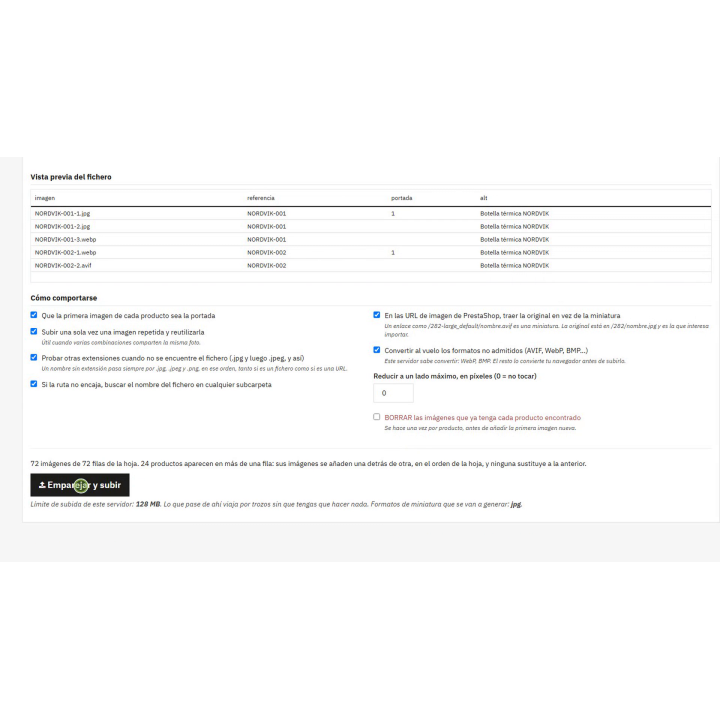
An Excel spreadsheet or CSV file specifies which photo goes with which product. If you don't have one, the "Download image list" button will generate a file containing everything in the folder, including the columns that this screen expects later .
Open it in Excel, fill in the reference column, and then load the same file again. No need to manually type a path or struggle with capital letters: the names appear exactly as they are on the disk.
PrestaShop saves product photos in JPG format. If the supplier sends you AVIF, WebP, BMP, GIF, or TIFF files, the module converts them on the fly.
.jpg that is actually an AVIF is detected by its bytes, not by its name, and is converted anyway. The screen reads your computer's folder using the File System Access API , which only exists in Chrome, Edge, Opera, or Brave, and on a computer . Firefox and Safari don't implement it, and on a mobile device, there's no folder to grant access to. If you're using one of those devices, the module will tell you this before letting you start, instead of failing mid-upload. The rest of the module—the store, the images, the thumbnails—works the same on any server.










Nobody has asked anything about this product yet.